• KultureGeek
  • Comparateur de prix
       
iPhoneAddict
 iAddictv5Notre Application iPhone/iPad
  • Accueil Apps
  • Actualité Apple
  • Keynote Apple
  • Firmwares & iTunes
  • Contactez-nous
Accueil » Liste des Apps » Apps Universelles » Utilitaires » Find My Headphones And Devices
2.5 iOS €Gratuit Paliverse Apps, LLC 5 1 Find My Headphones And Devices is the #1 app to locate lost Headphones, earbuds, and other Devices in seconds! Find one of your lost Earbuds or both lost Earbuds. Thousands of Apple, Sony, Bose, Beats, and other headphones found. • Avoid...
Find My Headphones And Devices

Find My Headphones And Devices

iOS Universel / Utilitaires

Gratuit
Obtenir sur l'App Store

Find My Headphones And Devices is the #1 app to locate lost Headphones, earbuds, and other Devices in seconds!

Find one of your lost Earbuds or both lost Earbuds.

Thousands of Apple, Sony, Bose, Beats, and other headphones found.

• Avoid spending hundreds of dollars replacing your lost Bluetooth headphones.

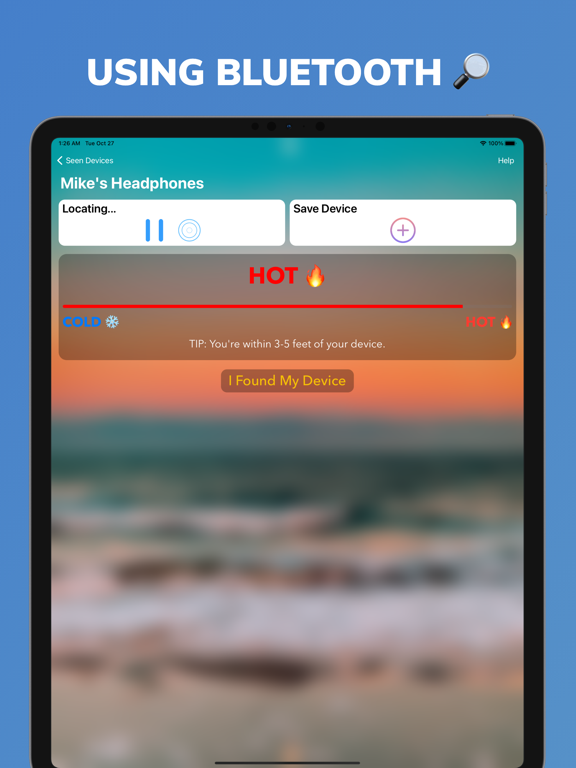
• Make finding your device fun, not stressful. Find My Headphones And Devices uses the Cold, Warmer, Hot game to find your devices.

• Save your Headphones and Devices for faster searching

• Works with hundreds of wireless headphones, headsets, and speakers from brands like Jabra, Jaybird, JBL etc..

• Can find any wireless headphones broadcasting a Bluetooth Signal

• Works indoors and outdoors

Walking slowly is the key to find your lost Bluetooth headphones or earbuds.

Device must be powered on and emitting Bluetooth to be found. The app can't find lost Earbuds in the case, or a case itself - it requires a Bluetooth signal.

DISCLAIMER: We are not affiliated with Apple, Beats, Bose, Jabra, Jaybird, JBL and others mentioned companies in any way. We only developed and tested our App with these devices.

*Find My Headphones And Devices is not intended to give you the exact location but will tell you the area where your headphones are hiding

*Devices must be powered on and emitting a Bluetooth signal to track. This app does not use GPS, device must be in Bluetooth range to be tracked

En voir plus...

Quoi de neuf dans la dernière version ?

We’re quickly making improvements to give you an even better experience.
This release includes the following:

• Added Button to Start/Pause searching
• Added vibration to help alert you when you're near your device
• Design changes
• Stability Improvements
• Bug Fixes

Follow us on social media in the settings tab

If you have any suggestions or experience any issues, please share with us at: contact.paliverseapps@gmail.com
We truly appreciate your feedback.

  • Screenshot #1 pour Find My Headphones And Devices
  • Screenshot #2 pour Find My Headphones And Devices
  • Screenshot #3 pour Find My Headphones And Devices
  • Screenshot #4 pour Find My Headphones And Devices
  • Screenshot #5 pour Find My Headphones And Devices
  • Screenshot #6 pour Find My Headphones And Devices

D'autres applications du développeur

KeyMaster Manager
KeyMaster Manager
/ iOS Universel
Day Counter & Countdown
/ iOS Universel
Stars Connect Puzzle Game
/ iPad

Note

(1 notes)

Détails sur l'application

Version
2.5
Taille
77.4 Mo
Version minimum d'iOS
12.0
Dernière mise à jour
02/11/2020
Publié par
Paliverse Apps, LLC

Newsletter App Store

Recevez chaque jour les meilleures promos

Actualité Apple

Image [#BonPlan] Les AirPods Pro 3 en promo pour seulement 198 €
[#BonPlan] Les AirPods Pro 3 en promo pour seulement 198 €
Image Nouvelle pub d’Apple pour les AirPods Pro 3 et la réduction de bruit avec Vinicius Jr
Nouvelle pub d’Apple pour les AirPods Pro 3 et la réduction de bruit avec Vinicius Jr
Image Le MacBook avec écran tactile est « 100% confirmé » selon un leaker
Le MacBook avec écran tactile est « 100% confirmé » selon un leaker
Image Siri AI : comment contourner la file d’attente sur macOS 27 Golden Gate
Siri AI : comment contourner la file d’attente sur macOS 27 Golden Gate
Partenaires : Actualité iPhone - Culture Geek
©2009-2026 i2CMedia | A propos |