HACCP LE
iOS Universel / Utilitaires
**RECORD AND MONITOR TEMPERATURES AS PART OF A HACCP COMPLIANCE OR QUALITY AUDIT
PROGRAM**
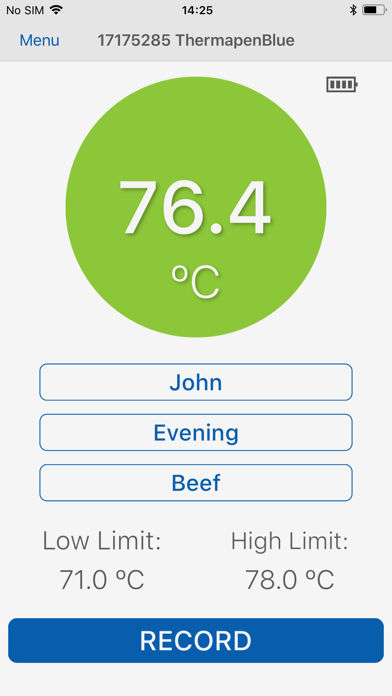
HACCP LE from ETI is designed to allow iPhones, iPod Touches, and iPads to be used in conjunction with Thermapen® Blue, BlueTherm®, and RayTemp® Blue One for an easy-to-use, complete HACCP system. Create custom lists for Users, Checklists, and Items within the app. Assign high and low temperature settings for each Item. Store temperature readings and Yes/No questions with the touch of a button and add User Notes and Corrective Actions where needed. Export your Reports PDF by email or save into your cloud connected apps.
FEATURES
• Create lists of Users
• Labels for Items
• High and low temperatures for each Item being measured
• Yes/No Questions
• Notes and Corrective Actions that users can attach to specific readings
• User Alerts let you know when an Item is outside of customized parameters
• Email/Export a Report PDF
HOW TO GET STARTED
Download the HACCP LE app. Once installed:
• Go to the Menu
• Add Users
• Create new Checklists
• Add Items inside of Checklists
• Setup Corrective Actions (optional)
HOW TO TAKE TEMPERATURES
From the Home screen, select a User, Checklist, and Item. Recording temperatures is easy.
• Insert the probe into the medium to be measured.
• When the reading stabilizes, tap Record or press the transfer button on the connected device.
• Once the temperature is stored, a confirmation window will confirm pass or fail.
• If the reading passed, the app will automatically move on to the next Item.
• If the reading fails and Corrective Actions are turned on, the app will prompt the user to select a Corrective Action. It will then return to the original Item, allowing the User to perform the selected Corrective Action and try again.
HOW TO VIEW SAVED READINGS
Saved readings can be viewed at any time by tapping on Reports via the Menu. They are displayed, in order, with the most recent item on top. Each reading displays:
• Item Name
• Pass or Fail
• Date
• Time
• Reading Value
• High and Low limits for that Item
Readings that are outside of the high and low temperature limits are indicated in red.
To see Corrective Actions and add Custom Notes, simply click on the reading.
HOW TO EXPORT REPORT
A Report can shared via email or any file apps installed (iCloud Drive, Google Drive, DropBox, etc).
• Select Reports from the via the Menu page
• Tap the Export button
• Select one of the options; Export and Delete Reports, Export Only, or Cancel.
• Select which app you would like to use for email or saving your Report.
Compatible with iOS 9.3+ for iPhone, iPod Touch, and iPad
Quoi de neuf dans la dernière version ?
Bug Fixes