iPhoneAddict Apps
  • Actualités
  • Accueil Apps
  • iPhone
  • iPad
  • Universelles
  • Mac
  • Apple TV
KG KultureGeek
App
iPhone / iPad Télécharger iAddict v5 Mac Télécharger iAddict Mac
  • Actualités
  • Accueil Apps
  • iPhone
  • iPad
  • Universelles
  • Mac
  • Apple TV
  • Archives keynotes
  • Firmwares & iTunes
  • Contactez-nous
  • Comparateur de prix
  • KultureGeek
Accueil » Liste des Apps » Apps Universelles » Utilitaires » Hear Back PRO
L'application n'est plus disponible sur l'App Store français
6.5.3 iOS €Gratuit Hear Technologies 0 0 Control Hear Back PRO Mixers, simply by connecting your PRO Hub to a wireless network! Here's some things to know: • Connect the HBUS IN port (located on the back of your PRO Hub) to a gigabit-speed LAN port of your wireless access point. Launch...
Hear Back PRO

Hear Back PRO

iOS Universel / Utilitaires

Gratuit
Obtenir sur l'App Store
Facebook X E-mail

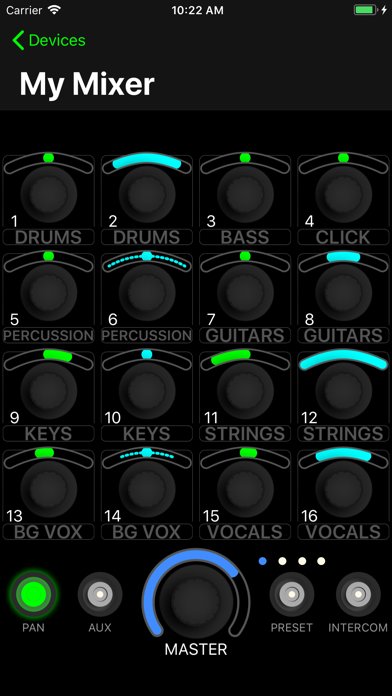
Control Hear Back PRO Mixers, simply by connecting your PRO Hub to a wireless network!

Here's some things to know:
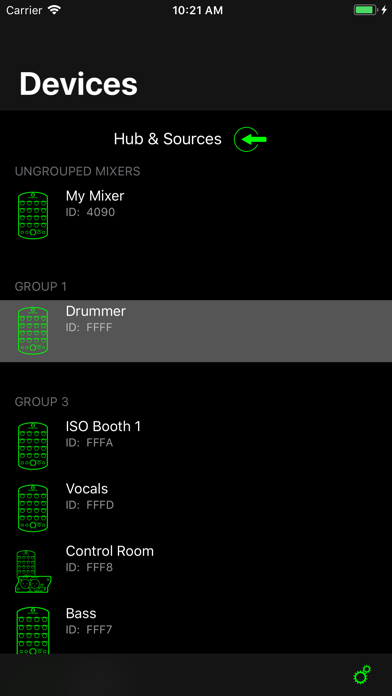
• Connect the HBUS IN port (located on the back of your PRO Hub) to a gigabit-speed LAN port of your wireless access point. Launch the app, and watch your mixers populate in the list.

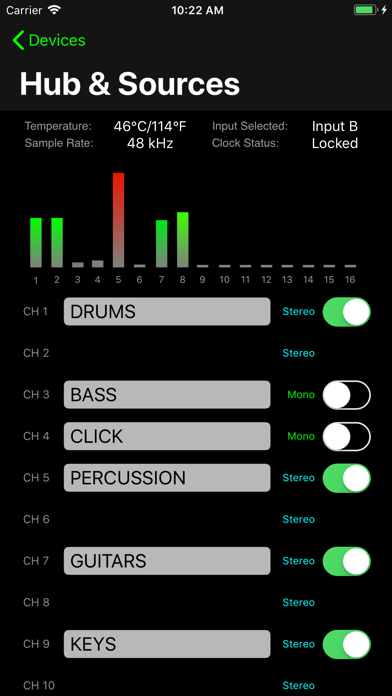
• Name your input sources, and toggle between mono/stereo pairs

• Swipe right on a Mixer in the list to give it a name

• Swipe left on a Mixer to reveal additional options, such as:
• Sending a Mix to another Mixer
• Reset the current Mix
• Adjust the brightness of the LEDs
• Disable certain knobs, buttons, and features of the Mixer

• Drag and drop Mixers in the list to place into groups (grouped Mixers will mirror each other)

• If running v5 firmware, choose what you want on a knob by tapping the knob's label and selecting from either input channels or submixes

• Create submixes by mixing up to 16 input channels, then assign your submix to a single knob!


NOTE:
Minimum firmware requirements:
• Hub: v2.3 (download from www.hearback.com/downloads)
• Mixer: v2.14 (https://youtu.be/V9uKnRFa4SE)

If your current Mixer firmware is below v2.14, call or email Hear Technologies to request a firmware update card.
• tel: +1 (256) 922-1200 ext 135
• email: Info@HearTechnologies.com

En voir plus...

Quoi de neuf dans la dernière version ?

- Implemented new protocol features, allowing for less network congestion
- Removed the Server/Client feature
  • Screenshot #1 pour Hear Back PRO
  • Screenshot #2 pour Hear Back PRO
  • Screenshot #3 pour Hear Back PRO
  • Screenshot #4 pour Hear Back PRO
  • Screenshot #5 pour Hear Back PRO
  • Screenshot #6 pour Hear Back PRO

Note

(0 note)

Détails sur l'application

Version
6.5.3
Taille
8.4 Mo
Version minimum d'iOS
14.3
Dernière mise à jour
03/06/2023
Publié par
Hear Technologies

Newsletter App Store

Recevez chaque jour les meilleures promos

Actualité Apple

Image iOS 27 : un nouveau firmware bêta pour les AirPods
iOS 27 : un nouveau firmware bêta pour les AirPods
Image ChatGPT sur Mac peut répondre et analyser vos iMessages
ChatGPT sur Mac peut répondre et analyser vos iMessages
Image iOS 27 : des albums photos partagés en meilleure qualité qui occupent votre stockage iCloud
iOS 27 : des albums photos partagés en meilleure qualité qui occupent votre stockage iCloud
Image Des coques pour l’iPhone 18 Pro Max montrent plusieurs coloris
Des coques pour l’iPhone 18 Pro Max montrent plusieurs coloris
iPhoneAddict Apps

Le catalogue iPhoneAddict pour suivre les nouveautés, mises à jour et baisses de prix de l’App Store.

Apps

Toutes les apps iOS iPhone iPad Universelles Mac Apple TV

iPhoneAddict

Actualité Apple Archives keynotes Contact À propos KultureGeek

Suivez-nous

©2009-2026 i2CMedia. Tous droits réservés.