• KultureGeek
  • Comparateur de prix
       
iPhoneAddict
 iAddictv5Notre Application iPhone/iPad
  • Accueil Apps
  • Actualité Apple
  • Keynote Apple
  • Firmwares & iTunes
  • Contactez-nous
Accueil » Liste des Apps » Apps iPhone » Utilitaires » JobTime Pro
L'application n'est plus disponible sur l'App Store français
2.3 iOS €0,99€ MJS 0 0 Thank you all for your support and suggestions. This release has been rebuilt from the ground up using new technology. Some new features that you will enjoy include the ability to keep a running total of all your overtime for your ENTIRE career,...
JobTime Pro

JobTime Pro

iPhone / Utilitaires

0,99€ au lieu de 1,19€
Acheter sur l'App Store

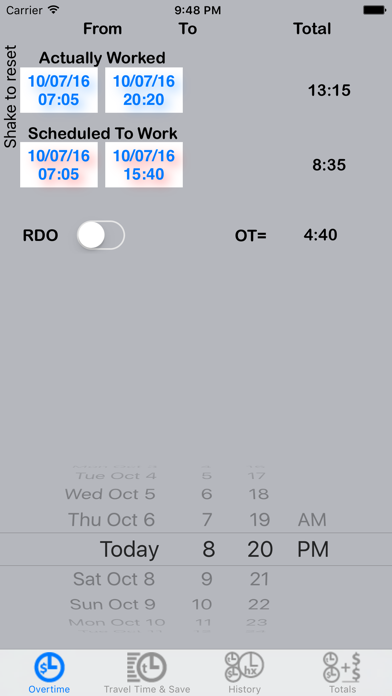
Thank you all for your support and suggestions.

This release has been rebuilt from the ground up using new technology.

Some new features that you will enjoy include the ability to keep a running total of all your overtime for your ENTIRE career, whether taken in time or cash.

You will be able to view the details of every overtime slip you recorded on your device.

For example, you will be able to review any notes that you may have included, such as "Arrest Overtime" or "United Nations General Assembly" or the overtime generating "Trump Protest" detail.

You now have the ability to record your overtime entry to your calendar, if you wish.

You are also provided with a monthly breakdown for the year you select. The breakdown reports how many hours you worked and, depending on the option, the summation of hours and cash.

It is highly recommended that you setup your specific details in the Settings App of the device you are using. These details include:
Your home patrol boro, your yearly income, and your reference number (important if you want to be sure you are paid on time).

You can change your desired time increment settings by going to the Settings App on your iPhone.
Tap: Settings > JobTime > 5 Minute Increments (ON or OFF).
OFF allows 1-minute increments if so desired.

It's recommended to change your time format to 24-Hour Time so that you can feel more comfortable with the iOS device overall.
Tap: Settings > Date & Time > 24-Hour Time (ON).

Your comments and suggestions are appreciated and are taken into consideration with each release.

En voir plus...

Quoi de neuf dans la dernière version ?

This app has been updated by Apple to display the Apple Watch app icon.

Fix for the switch swipe & tap issue.
Fix for iOS 10 and iPhone 7
  • Screenshot #1 pour JobTime Pro
  • Screenshot #2 pour JobTime Pro
  • Screenshot #3 pour JobTime Pro

Note

(0 note)

Détails sur l'application

Version
2.3
Taille
0.7 Mo
Version minimum d'iOS
10.0
Dernière mise à jour
05/12/2016
Publié par
MJS

Newsletter App Store

Recevez chaque jour les meilleures promos

Actualité Apple

Image Apple arrête la vente de l’étui de transport du Vision Pro dans plusieurs pays
Apple arrête la vente de l’étui de transport du Vision Pro dans plusieurs pays
Image macOS 27 Golden Gate est la dernière version avec Rosetta 2 pour faire tourner les apps Intel
macOS 27 Golden Gate est la dernière version avec Rosetta 2 pour faire tourner les apps Intel
Image iOS 27 : le chiffrement RCS bloqué en France, un choix qui relance le débat sur la confidentialité des messages
iOS 27 : le chiffrement RCS bloqué en France, un choix qui relance le débat sur la confidentialité des messages
Image iOS 27 : comment utiliser Siri AI en France dès maintenant
iOS 27 : comment utiliser Siri AI en France dès maintenant
Partenaires : Actualité iPhone - Culture Geek
©2009-2026 i2CMedia | A propos |