iPhoneAddict Apps
  • Accueil Apps
  • iPhone
  • iPad
  • Universelles
  • Mac
  • Apple TV
KG KultureGeek
App
iPhone / iPad Télécharger iAddict v5 Mac Télécharger iAddict Mac
  • Accueil Apps
  • iPhone
  • iPad
  • Universelles
  • Mac
  • Apple TV
  • Actualité Apple
  • Archives keynotes
  • Firmwares & iTunes
  • Contactez-nous
  • Comparateur de prix
  • KultureGeek
Accueil » Liste des Apps » Apps Universelles » Utilitaires » Mainframe: Symbolic Calculator
L'application n'est plus disponible sur l'App Store français
1.2 iOS €0,99€ The Gray Dot Company LLC 0 0 This calculator is a funny little app that is great at repeating the same calculation over and over with different numbers or variables. You have to get used to entering formulas are unintuitive to create using a graphical representation. But then...
Mainframe: Symbolic Calculator

Mainframe: Symbolic Calculator

iOS Universel / Utilitaires

0,99€ au lieu de 1,19€
Acheter sur l'App Store

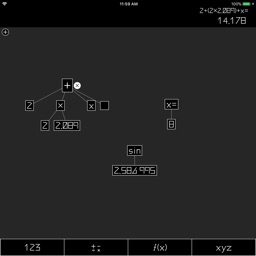
This calculator is a funny little app that is great at repeating the same calculation over and over with different numbers or variables. You have to get used to entering formulas are unintuitive to create using a graphical representation. But then every part of the formula is editable, like the numbers and operations, and you can get a lot of math done in a really short time!

There's no tutorial, but here are some tricks:

- Empty nodes will automatically appear when you assign an operation, so the easiest way to create formulas is to assign an operation (addition, subtraction, function, etc) and then assign a number, or a sub-operation.
- Tap "+" to add a new node, or you can drag from that button, to place the new node wherever you want it. You'll have to do this if you want to use variables (drag out an "x=" node).
- Drag from an "unattached" node to an operation to add that node to another operation's tree.
- You can use long presses on nodes to move sections of the tree around.
- You can have multiple formulas on-screen at the same time. Tap on any node on the tree to have it become the "current" operation.
- Shake the app to have your formulas arranged in a row, or press the "zoom" button to see all of your work, and tap in the place you want to edit.

Sorry that "multiplication" (×) and "x" look so similar. I'll try to address this in a future update. In the meantime, use "y" or "z" for more readable variables.

This app is open-source! Go to https://github.com/colinta/Mainframe to browse the code, open issues, or request features. I built this app on top of SpriteKit, using code from a game that I'm building.

En voir plus...

Quoi de neuf dans la dernière version ?

Finally supports iPhone X and other edge-to-edge devices.

Added fractional math support, for woodworking.

  • Screenshot #1 pour Mainframe: Symbolic Calculator
  • Screenshot #2 pour Mainframe: Symbolic Calculator
  • Screenshot #3 pour Mainframe: Symbolic Calculator
  • Screenshot #4 pour Mainframe: Symbolic Calculator
  • Screenshot #5 pour Mainframe: Symbolic Calculator
  • Screenshot #6 pour Mainframe: Symbolic Calculator

Note

(0 note)

Détails sur l'application

Version
1.2
Taille
7.3 Mo
Version minimum d'iOS
11.0
Dernière mise à jour
22/01/2020
Publié par
The Gray Dot Company LLC

Newsletter App Store

Recevez chaque jour les meilleures promos

Actualité Apple

Image Résultats Apple T3 2026 : l’iPhone progresse, record du chiffre d’affaires
Résultats Apple T3 2026 : l’iPhone progresse, record du chiffre d’affaires
Image Séisme au Japon : Apple va faire un don aux secours
Séisme au Japon : Apple va faire un don aux secours
Image Les résultats financiers d’Apple aujourd’hui seront les derniers pour Tim Cook
Les résultats financiers d’Apple aujourd’hui seront les derniers pour Tim Cook
Image Ventes d’iPhone : Apple réalise son deuxième trimestre historique
Ventes d’iPhone : Apple réalise son deuxième trimestre historique
iPhoneAddict Apps

Le catalogue iPhoneAddict pour suivre les nouveautés, mises à jour et baisses de prix de l’App Store.

Apps

Toutes les apps iOS iPhone iPad Universelles Mac Apple TV

iPhoneAddict

Actualité Apple Archives keynotes Contact À propos KultureGeek

Suivez-nous

©2009-2026 i2CMedia. Tous droits réservés.