Netstat
iOS Universel / Utilitaires
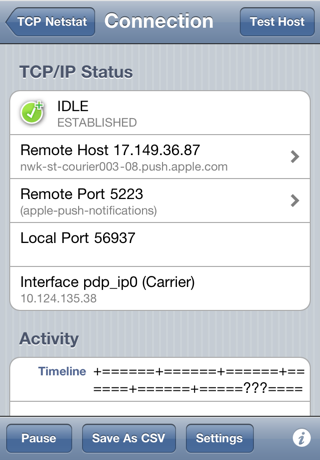
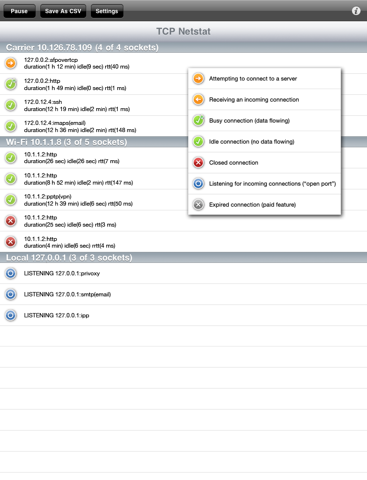
A network status app for Apple iOS — discover which servers and ports are being used on iPhone®, iPad® and iPod touch®. Monitor your device’s TCP connections for uploads and downloads (IPv4 only) and export the list as CSV. Very useful for programmers, developers and curious users! You can use Netstat’s in-app feedback if you have questions or ideas.
!!! IMPORTANT: Apple has blocked Netstat’s functionality as of iOS 10.0 !!!
Features available on iOS 9 and earlier include:
• View connections live.
• View host address and name, port description.
• View connection duration, idle time and round-trip time.
• View bytes received & sent per connection, host and port.
• View connection activity timeline (busy/idle history).
• Hear audio alerts for new and ongoing connections.
• “Delta Mode” shows new activity only.
• Sort connections by your preferred criteria.
• Export list as CSV to iTunes, apps and e-mail.
• Host connectivity test button.
• Export up to 48 hours of connection history.
• Look up IP address WHOIS and port info.
• Identify interfaces as ‘Cellular’, ‘Wi-Fi’, or ‘VPN’.
• Built-in Help.
Some features require in-app purchase.
Quoi de neuf dans la dernière version ?
►Important Notice: This version is compatible with iOS 9 and earlier only. Apple has blocked its functionality in iOS 10.0.◀
Here’s what you get for free:
• Updated for iOS 5.
• Revised display format: port labels now appear first.
• Bugfixes & internal compatibility changes.
• Minor cosmetic changes.
What’s New with In-App Purchase:
• If you already paid for “All Features”, these have been added for free:
• Audio mode: beeps on connection activity, can play in background.
• Delta mode: filters the list to show new activity only.
• Custom sort order (by most recent activity, duration of activity, number of bytes downloaded/uploaded, server IP address/port).
• IP address display mode.
NB for existing users: if you get a message that “Netstat could not save your data. Your device might be full” this is actually due to a schema change. Simply tap Erase.
NB. Some worldwide hardware variations may still see connections listed as being very long (a hundred hours). Please report this using in-app feedback so that I can find out which models are affected. Thank you!