Network Analyzer Scanner Netty
iOS Universel / Utilitaires
Netty is the all-in-one network toolkit for your iPhone and iPad. Whether you're a home user troubleshooting Wi-Fi issues, an IT professional auditing a corporate LAN, or a developer debugging connectivity — Netty gives you powerful, professional-grade tools in a beautiful, intuitive interface.
No ads. No tracking. No subscriptions. Just tools.
LAN SCANNER — Who's On Your Network?
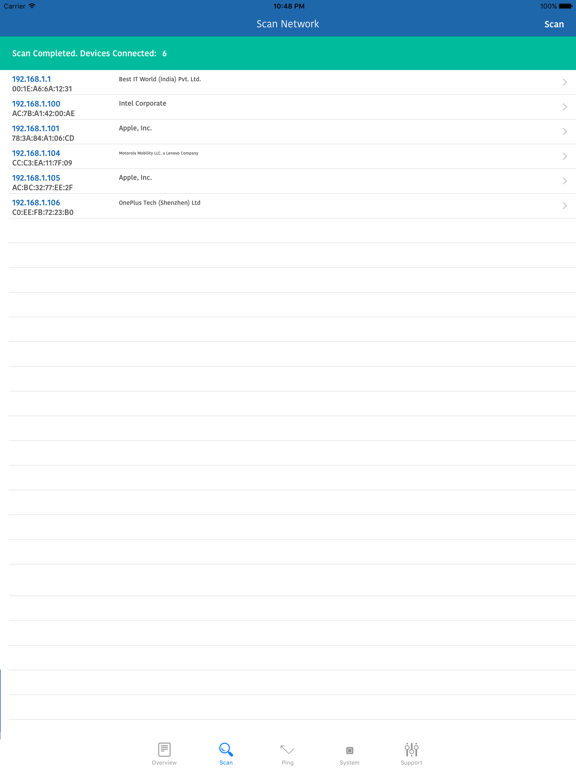
Scan your entire local network in seconds. Netty discovers every connected device — phones, laptops, smart TVs, printers, cameras, IoT devices, game consoles, and more. Each device is automatically identified by:
• MAC address vendor lookup (thousands of manufacturers)
• Bonjour/mDNS hostname resolution
• Intelligent device classification with custom icons
• "New device" alerts for unknown connections
Perfect for home network security monitoring or enterprise auditing.
NETWORK OVERVIEW — Everything At a Glance
See your complete network status instantly:
• Wi-Fi SSID, BSSID, channel, and signal quality
• Local IP address and subnet mask
• External (public) IP with geolocation
• DNS server configuration
• Cellular carrier details
• VPN connection status
PROFESSIONAL TOOLS SUITE
▸ Ping — Send ICMP echo requests to any host. See real-time round-trip latency, packet loss, min/avg/max stats. Works just like terminal ping.
▸ Traceroute — Map the complete path between you and any server. Identify exactly where slowdowns occur, hop by hop.
▸ Port Scanner — Probe any host for open TCP ports. Discover running services like HTTP, SSH, FTP, and SMTP. Essential for security audits.
▸ DNS Lookup — Query any record type: A, AAAA, MX, CNAME, TXT, NS, SOA. Debug DNS propagation issues and verify configurations.
▸ WHOIS — Look up domain registration details including owner, registrar, creation date, expiry, and nameservers.
▸ Speed Test — Measure real download and upload bandwidth along with network latency. Verify your ISP is delivering promised speeds.
WI-FI AR — Augmented Reality Speed Mapping
Walk through your home or office and drop speed-test markers in AR. Visualize download speeds, upload speeds, and latency as floating 3D gauges anchored to real-world locations. Identify dead zones and find the perfect spot for your router.
Save snapshots of your AR heatmap directly to your Photos.
BUILT FOR PRIVACY
• No accounts required
• No analytics or tracking
• No advertisements
• All data stays on your device
• No server-side processing
DESIGNED FOR iOS
• Beautiful native SwiftUI interface
• Dark mode support
• Smooth animations and haptic feedback
• Universal app — optimized for iPhone and iPad
Whether you need to find who's stealing your Wi-Fi, diagnose a slow connection, check if a server port is open, or create a visual Wi-Fi heatmap of your home — Netty has you covered.
Download Netty today and take control of your network.
P.S : The app doesn't detect WiFi strength as Apple has not exposed that info to developers.
Quoi de neuf dans la dernière version ?
• AR Wi-Fi Heatmaps — Visualize speed test results in augmented reality
• Improved LAN Scanner — Bonjour/mDNS device name discovery
• Better camera and IoT device detection
• Enhanced traceroute with ICMP-based hop detection
• Wi-Fi permission guidance with helpful banners
• Performance and stability improvements