passcoder
iOS Universel / Utilitaires
You don't trust your Password-Manager?
The Password-Manager knows site, name and password. To make it safer you need to split your password into "myLovelyPassword" and a Salt. This app will automate it for you.
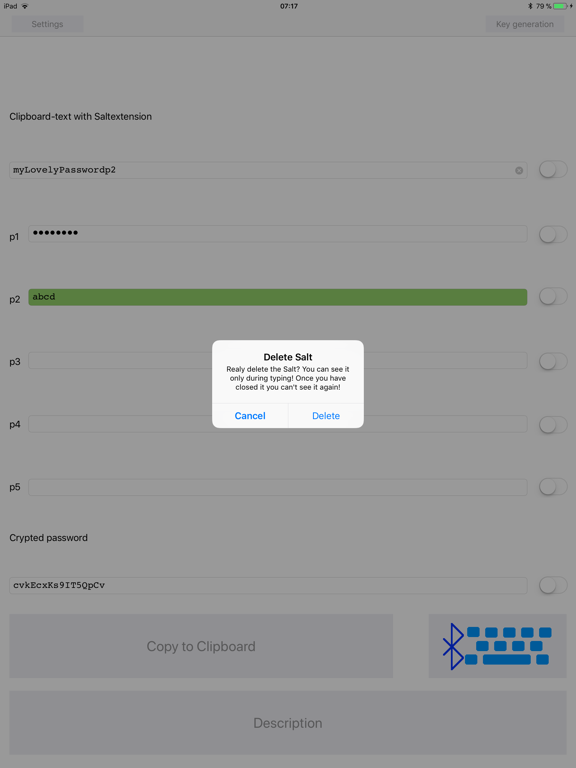
Add to every password in your Password-Manger a Salt-extension ("p1", "p2", "p3", "p4" or "p5") e.g. "myLovelyPasswordp1" or "1234p1". Normaly your Password-Manager copy the password to the clipboard. The app read the clipboard and replace "p1", "p2", "p3", "p4" or "p5" with your selfdefined Salt e.g. "p1" = "abcd". In the example it will result to "myLovelyPasswordabcd" or "1234abcd".
After the replacement the resulting password will be crypted e.g. "cvkEcxKs9IT5QpCv" or "GrNwW6P2FvkDWhHm", that nobody could see your Salt even when he has hacked your account.
The Passcoder expect the password with extension in the clipboard. After starting the passcoder you could copy the crypted password to the clipboard or show it in the textfield and use it for registration and login. The 5 different Salt-fields could be used for different versions of salts or different security levels of salts. You could share the salt with people according your security level and give them the corresponding part from the password manager.
This app automatically take the clipboardstring, check the last two letters p1 to p5 and replace it with a Salt. The resulting password is a crypted code from the password - px + salt, that the salt is not visible in the resulting password.
After you have typed the Salt into a Textfield and locked it (switch is green) you are not able to see the Salt again. Don't store the Salts into your Password-Manger. Store it where you like but safe.
By adding _1, _2, ... _8 or _9 you are able to select the length of the crypted code.
By adding one or more of !#$%&()*+-.@[]{} you will force this chars at the end of the crypted code. Some accounts like to have at least one special char.
By replacing px with qx you will get only numbers for creating pins.
All could be combined as you like but the order is MyLovelyPassword + pn + specialchar(s) + _# where # is from 1 to 9 and n from 1 to 5.
Why trust this app?
You don't need to trust this app. This app generate anything and don't know where it goes. But for sure this app don't connect anybody over the network. Don't store anything than the salts.
What is when this app disapear?
You can download the code from my homepage. Just follow the support link and open the passcoder simulator. On the bottom you are able to download a c# project or a code snippet for PHP.
Now with InputStick (from http://www.inputstick.com) connection! Activate it in settings!
Quoi de neuf dans la dernière version ?
new lib from input stick used
crypted connection now possible