Quick Quake
iOS Universel / Utilitaires
Rapid earthquake location and magnitude verification has never been easier. Quick Quake is also a great educational tool – simply use the demo data to see how P (primary) and S (secondary) waves are used to determine the location of an earthquake.
Quick Quake is an earthquake data analysis tool that allows users to quickly determine the epicentre and magnitude of an earthquake by simply picking a P wave and S wave arrival from a single seismograph, then moving the epicentre around a map until the seismograms from the other stations line up in time.
The Seismology Research Centre has developed Quick Quake so that users of the Quake Server seismic observatory data management system can quickly verify the automatic event notifications that Quake Server sends out by email. The traditional method of locating earthquakes can take anywhere from 10-20 minutes, but with Quick Quake you can verify or refine the automatic eqServer location and magnitude in less than a minute.
How to use Quick Quake with the demo data:
• Select which station you wish to use to pick a P and S wave (the “key site”) and hit the target icon
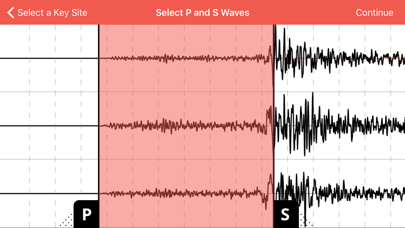
• Drag the P (primary wave) marker to the right until it aligns with the first signal that you can see above the background noise
• Drag the S (secondary wave) marker to the left until it aligns with the significant increase in signal level (see the screenshots as a guide)
• Pinch to zoom the time and amplitude scale if you need better resolution
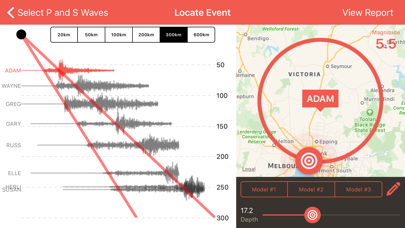
• Continue to the locating screen, where you can drag the target around the circle until the waveforms on the left of the screen roughly align with the P and S travel time guide lines
It’s that simple. The solution should work no matter which station you choose, but the closer the station the easier the P and S wave arrival times will be to pick.
If you have an Quake Server, just log in using your credentials and the server's IP address or domain name, then you can browse through recent (and past) automatic events and proceed as above.
On the “Select a Key Site” screen, you can defer stations from your calculations using a left-swipe, or restore them with a right-swipe. You can also sort your stations in order of distance from the selected “key site”.
On the “Locate Event” screen there is are options to adjust the P-wave and S-wave travel velocities to suit your local conditions, as well as the depth of the earthquake. The iPad version shows quick-adjustment buttons, and iPhone and iPad versions include three presets for P and S velocity “models” - now with a customisable magnitude formula.
Contact the Seismology Research Centre to learn more about seismographs, Quake Server, and earthquake monitoring networks. Remember to follow the SRC on Facebook and Twitter.
Quoi de neuf dans la dernière version ?
Bug fix with past event month display