RS-MS1I
iOS Universel / Utilitaires
Functional overview of the application
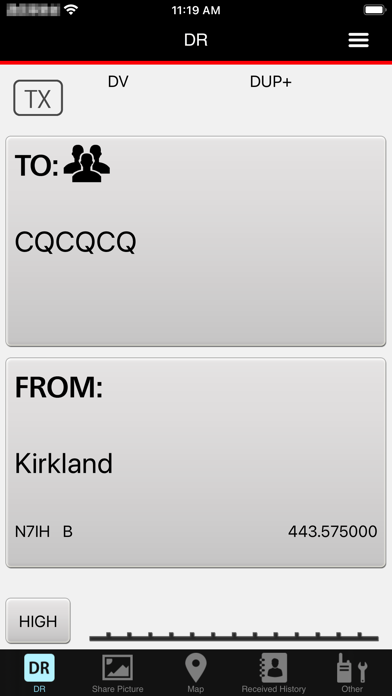
DR functions
You can use some transceiver’s DR functions.
Share pictures
Send and receive voice and pictures.
Map
See the location of repeater sites or other stations on a map using received position data, or your transceiver’s repeater list.
Automatically set the transceiver’s “FROM” and “TO” fields by tapping a repeater site or a station on the map.
Receive History
In the DV mode, read and edit the received station’s information.
Download additional information from an Internet database, such as QRZ.com or APRS.fi.
Text messaging
Send and receive text messages.
Call Sign list
Edit call signs and names used in the DR function. Also, you can add a call sign and a name in the Call Sign list.
Repeater list
See the detailed data entered in the Repeater list.
Transceiver settings
Change some of the transceiver’s function settings.
Application settings
Select application software settings.
Import
Import a Repeater list or a Call Sign list.
Export
Export a Repeater list, a Call Sign list, or Receive History.
See the transceiver’s instruction manual for details. The instruction manual can be downloaded from the ICOM web site.
Device requirements
The RS-MS1I operating requirements are as follows:
iOS16 or later
Usable transceivers (As of May 2026)
- ID-4100A/E + Bluetooth unit (UT-137)
- ID-52A or ID-52E *1
- ID-52A PLUS or ID-52E PLUS *2
- ID-5200A or ID-5200E *3
- IC-705 *4
*1 Supported in RS-MS1I Ver.1.1.0 or later.
*2 Supported in RS-MS1I Ver.1.3.0 or later.
*3 Supported in RS-MS1I Ver.1.4.0 or later.
*4 Supported in RS-MS1I Ver.1.2.0 or later.
Preparation
To use the RS-MS1I with a supported transceiver, you need an optional Bluetooth unit. See your transceiver’s instruction manual for details.
Transceiver’s settings
Set the following functions as shown below to use the RS-MS1I.
[Function] > [CI-V] > [CI-V Transceive]: ON
[Bluetooth Set] > [Data Device Set] > [Serial Port Function]: CI-V (Echo back OFF)
Note:
- The RS-MS1I may not work with all iPhones or iPads, even if they are one of the tested devices. This is because an application program on your device may conflict with the RS-MS1I.
- The RS-MS1I may not be used, depending on the OS version, installed application, and so on.
- Bluetooth LE is used for the connection with the transceiver, so there may be a time delay between the transceiver’s operation and the display on the iPhone or iPad.
- When sending or receiving pictures using “FAST mode,” the headset audio will be temporarily interrupted because of the transceiver’s Bluetooth unit limitations.
- You may need to connect to the Internet through a Wireless LAN, an LTE network or a 5G network for some functions.
- The RS-MS1I supports only portrait orientation with the iPhone. It does not support Auto Rotate. However, landscape orientation and Auto Rotate are supported with the iPad.
Quoi de neuf dans la dernière version ?
- Supported with ID-5200A/E.
- Supported the display of 10 GHz band repeaters.
- Fixed a bug where the app would crash when displaying the map screen on devices running iOS 26 or iPadOS 26.