Sensor Logger
iOS Universel / Utilitaires
Sensor Logger collects, records and displays data from a range of sensors on iPhone, Apple Watch, iPad and AirPods — including accelerometer, gyroscope, GPS, audio, camera and Bluetooth devices. You can log device properties such as screen brightness, battery and network state. Select and preview desired sensors in a few taps. A single tap initiates the recording function, which works even when the app is in the background. View and manage recordings within the app via interactive plots. The app supports many export formats, including Zipped CSV, JSON, Excel, KML and more. For advanced use cases, stream data via HTTP or MQTT, resample measurements from multiple sensors, create Studies to collect data from other users systematically and write custom automation rules based on sensor, time and location. Once you have collected your data, you can create Stories — data-driven dashboard with your recordings, hosted online for effortless sharing.
Sensor Logger is designed for researchers, educators, and anyone interested in collecting or monitoring sensors on their smartphone. It serves as the ultimate toolbox for exploring various fields, including physics, science, technology, engineering, and mathematics (STEM).
- One-tap logging
- Background recording
- Recordings on interactive plots
- Stream data via HTTP & MQTT
- Intelligent, custom rule engine
- Zipped CSV, JSON, Excel, KML & SQLite exports
- Resample and aggregate measurements
- Enable & disable specific sensors
- Scan and log nearby Bluetooth devices
- Add timestamp-synchronised annotations during recording
- Adjust sampling frequency for sensor groups
- Custom recording workflow
- Raw and calibrated measurements available
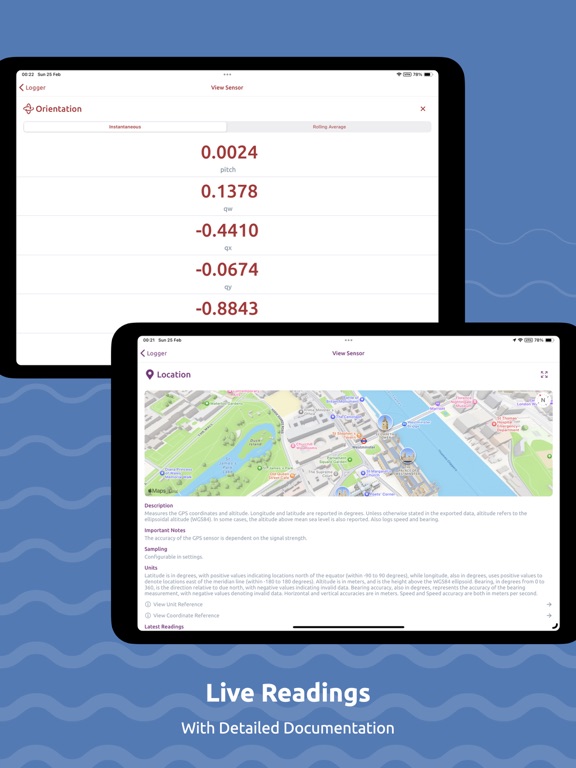
- Live plots and readings for sensors
- Organise, sort and filter recordings
- Control & track recording session from Watch
- Bulk export & delete recordings
- Resources to help you analyse your data
- Data stays on-device and private
- Create and share dashboard-style, data-driven Stories using your recordings, hosted online.
Studies & Sensor Logger Cloud
Create Studies to collect data from other Sensor Logger users efficiently. When activated, Studies use the investigator's specified sensor configuration for consistent data collection. Participants can upload their recordings to a secure cloud and join, pause, or switch Studies anytime. Studies include clear data usage descriptions, privacy statements, and contact details to ensure privacy compliance. Customize Study size, duration, sensor configuration, and export formats.
Optional Paid Features (Plus, Pro & Ultimate)
- No limitations on the number of stored recordings
- Additional export formats
- Combined CSV export
- Customise recording workflow
- Advanced sensor configurations
- Custom naming templates
- Theme and icon customizations
- Unlimited Bluetooth beacons and no limit on the minimum RSSI
- Create larger Studies with more participants
- More allocated storage on Sensor Logger Cloud
- Email support
- Advanced study customization
Supported Measurements
- Device Acceleration (Accelerometer; Raw & Calibrated)
- Gravity Vector (Accelerometer)
- Device Rotation Rate (Gyro)
- Device Orientation (Gyro Raw & Calibrated)
- Magnetic Field (Magnetometer Raw & Calibrated)
- Compass
- Barometric Altitude (Barometer)
- GPS Coordinate, Altitude, Speed & Heading
- Audio (Microphone)
- Loudness (Microphone)
- Images (Front/Back)
- Video (Front/Back)
- Depth
- Pedometer
- Activity
- Heart Rate (Watch)
- Wrist Motion (Watch)
- Location & Barometer (Watch)
- Annotations (Timestamp and text)
- Device battery level and state
- Device screen brightness level
- Nearby Bluetooth beacons (advertised data)
- Headphone Motion (AirPods)
- Network
Heart rate logging requires integration with the Health app on the watch. Permission to access the heart rate from HealthKit on the watch is needed for the app to log the measurements.
Terms of Service: https://www.apple.com/legal/internet-services/itunes/dev/stdeula/
Quoi de neuf dans la dernière version ?
- Introducing Health Check, a one-stop-shop to diagnose any recording and permission issues. It verifies background location permissions, disk space, low power mode, battery level, battery optimisations, and "keep screen awake" state.
- Expanded Bluetooth decoder support, including heart rate monitors, cycling power meters, running speed & cadence foot pods, WitMotion motion sensors, and select temperature/humidity thermometers.
- Fixed an issue where the tilt compensation compass algorithm in Sensor Zoo fails if the phone is held landscape.
- See the status of toggled BLE sensors based on how recently Sensor Logger has received advertisements. You can view this in the Inline Preview during a recording session.
- Preview BLE beacons as they get detected during the scanning process.
- Added an option to enable & disable GATT connections for fetching bluetooth device metadata. This is now disabled by default.