Sharin - Access Transfer View Cloud & WiFi Files
iPad / Utilitaires
Sharin - Access Transfer View Cloud & WiFi Files
Do you wish to explore, connect and transfer files in your WiFi network to and from your Cloud Storage?
Do you wish to share your iPad files wirelessly with another iPad?
Do you want to connect, access, browse, upload and download multiple files in Computers in your network?
Do you want to transfer files from your Cloud drives (Box, Dropbox, Google Drive, Google Nearline, OneDrive, iCloud) to your iPad and other computers in your WiFi network?
Do you want to transfer files from one Cloud account to another Cloud account?
Do you want to copy and transfer files smoothly between your iPad and your NAS?
Do you want to transfer your photos, videos and documents from your iPad to your cloud accounts or another iPad or iPhone or Mac in your network neighborhood?
Do you want to search and sort and compare files in multiple Cloud accounts?
Do you want to share your files in your multiple cloud accounts through email or post these links in Facebook, Twitter or Google+?
Do you wish to have a common place to store all your Cloud accounts and view the documents, photos, and videos in one application?
Sharin lets you do all this and more. It has inbuilt document readers and media viewers for your videos and images. You can replace iBooks and other document readers and media players with Sharin's inbuilt readers and viewers.
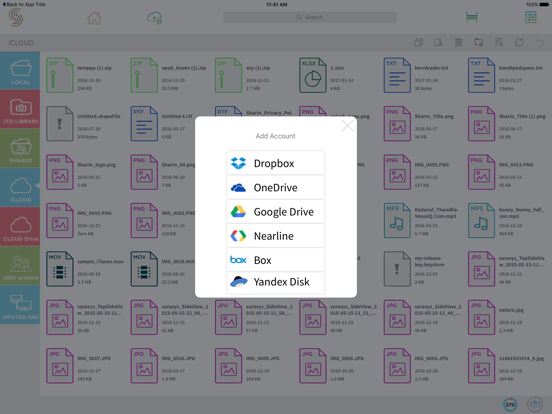
Get the free version of Sharin. We provide you with all the above features and let you transfer 150 files for the first month and thirty files free for every month. If you wish to share and transfer more than 480 files a year subscribe to the unlimited version. We have monthly, quarterly, biannual and yearly subscriptions for heavy users. We allow multiple cloud accounts for cloud storages such as Box, DropBox, Google Drive, and OneDrive. Sharin allows you to transfer files to your Google Nearline project.
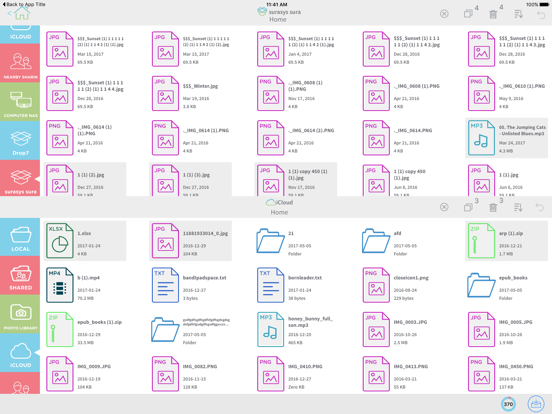
With Sharin you can transfer, copy, move and delete files in different Cloud Accounts and computer/NAS or iPad.
Supported Cloud Accounts : Dropbox, Box, OneDrive, GoogleDrive, Google Nearline, and iCloud
Sharing photos, videos, documents and files:
We provide a unique split screen not available in any other file browsing application for simultaneous view of two different accounts. You can sort by name, date, size and file type. Easy to find duplicate files in your accounts and shared devices. Transfer files and photos and videos in your Camera folder in your iPad to any other connected device or cloud account or vice versa using our intuitive split screen. We provide file Management commands such as transfer and delete.
You can share your files and media using the shared folder with your friends. Share your photos with your friends easily after putting them in your shared folder in the Sharin app. Copy and move files from your iPad to your friend's using Sharin app. Share your files and media stored across multiple cloud accounts via links through email using the Sharin app. Share your file links via Facebook, Twitter, Google+.
With Sharin, you can access Computer / NAS : We automatically detect other iPad, iPhone, Windows, Mac, Linux, NAS devices in the network neighbourhood with Sharin app. Copy, move, delete your remote files on iPad the files from other machines (Windows, MAC and Linux) in your network neighborhood. Copy, move, transfer files in computer / NAS and iPad or Cloud Accounts.
Supported OS and Device: Windows, Mac OS X, Linux
Inbuilt Player, Viewer & Reader
Play or View your media files (Photos, Videos, Music, Documents) in the Sharin app.
Built-in readers:
Photos : png, jpeg, jpg, gif, tiff, bmp.
Videos : mp4, m4v, mov.
Audio : mp3, wav.
Documents : pdf, txt, rtf, doc, docx, xls, xlsx, ppt, pptx, ePuB.
Quoi de neuf dans la dernière version ?
This update from Apple will improve the functionality of this app. No new features are included.
1) Google Drive and Google Nearline authentication have been updated.
2) Yandex Cloud drive has been added.
3) Folder operations such as cut, copy, paste and delete within the account are now available.
4) Split window user interface has been updated.
5) Tutorial has been added.
6) Minor bugs fixed.
7) User can subscribe for either 6 months or 1 Year.