iPhoneAddict Apps
  • Actualités
  • Accueil Apps
  • iPhone
  • iPad
  • Universelles
  • Mac
  • Apple TV
KG KultureGeek
App
iPhone / iPad Télécharger iAddict v5 Mac Télécharger iAddict Mac
  • Actualités
  • Accueil Apps
  • iPhone
  • iPad
  • Universelles
  • Mac
  • Apple TV
  • Archives keynotes
  • Firmwares & iTunes
  • Contactez-nous
  • Comparateur de prix
  • KultureGeek
Accueil » Liste des Apps » Apps Universelles » Utilitaires » Strap Angles
1.1 iOS €Gratuit Blair DuBois 0 0 Measure the floor and centerline angles of a cargo strap by following a 2 step process: STEP 1 - CALIBRATE The first step is to calibrate the initial position and orientation of your iPhone or iPad. Calibrate by placing your iPhone or iPad flat...
Strap Angles

Strap Angles

iOS Universel / Utilitaires

Gratuit
Obtenir sur l'App Store
Facebook X E-mail

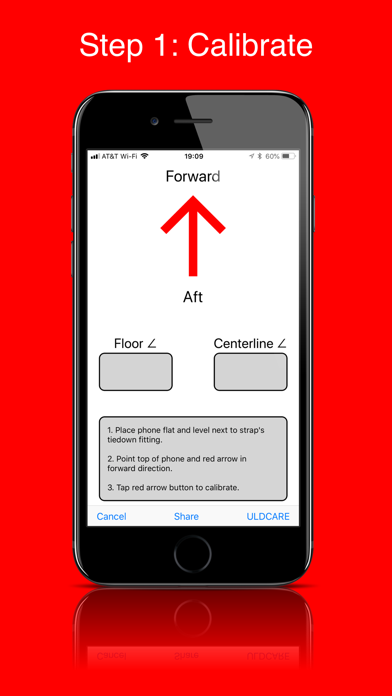
Measure the floor and centerline angles of a cargo strap by following a 2 step process:

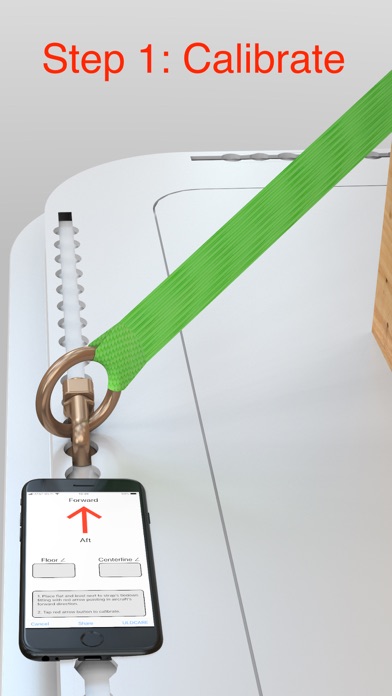
STEP 1 - CALIBRATE

The first step is to calibrate the initial position and orientation of your iPhone or iPad. Calibrate by placing your iPhone or iPad flat and level next to the strap's tie-down fitting (double stud fitting or ring), pointing the top of the phone in the aircraft's forward direction, and tapping the red arrow button.

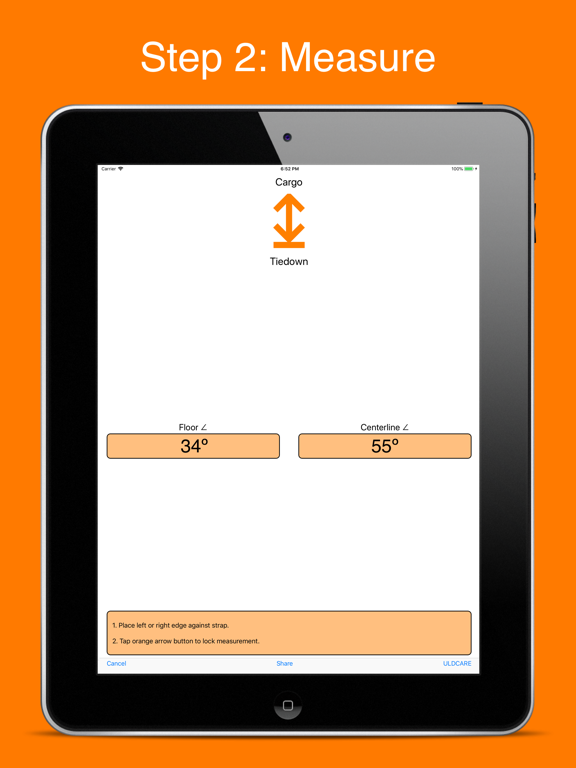
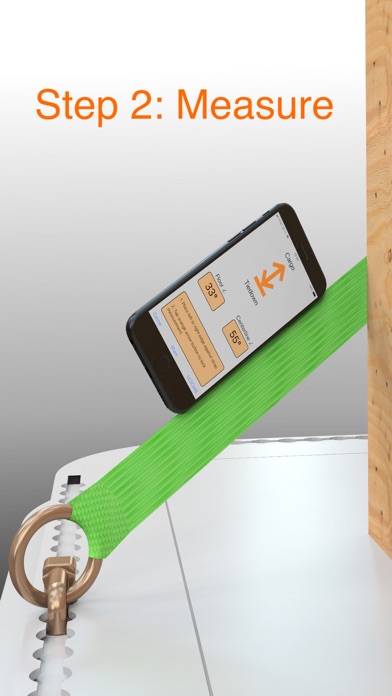
STEP 2 - MEASURE

The second step is to measure the strap's floor and centerline angle by moving the iPhone or iPad to the strap Place the edge of your iPhone or iPad against the strap while pointing the top of the iPhone or iPad towards the strap's first contact point with the cargo and pointing the bottom of the phone towards the strap's tie-down fitting. Tap the orange arrow button to lock the measurement.

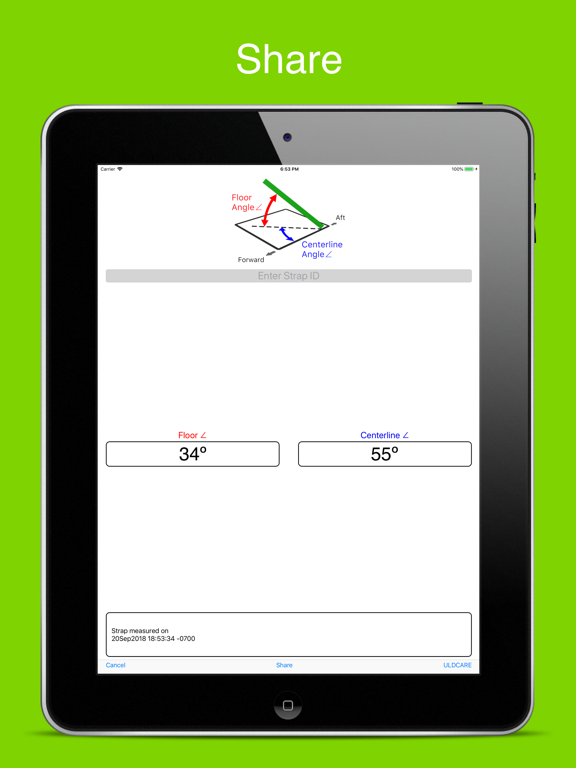
SHARE

Tap the Share button on the app's bottom toolbar to copy, save, text, email, AirDrop, post, or send the angle measurements. Enter the strap's identification number if you need to keep track of different straps.

REASONABILITY CHECK

Before using your measured floor and centerline angles to determine strap restraint capability, you must do a reasonability check which verifies that the measurements represent reasonable angles of the strap. For example, if a strap is installed so that it looks close to straight up and down, a reasonable value for the floor angle measurement would be 80 to 90 degrees. If a strap is installed so that it looks like it extends in the forward direction along the floor, a reasonable value for the centerline angle would be from 0 to 10 degrees, and a reasonable value for the floor angle would be from 0 to 10 degrees. If either your floor angle or centerline angle measurement does not appear reasonable, then do not use the measurements and determine why there is an error.

ULDCARE

ULDCARE is the sponsor of this app. Tap the ULDCARE button on the app's bottom toolbar for more information on strapping cargo.

En voir plus...

Quoi de neuf dans la dernière version ?

Updates the app's ULDCARE button to link to a page with more information on cargo straps and strapping.
  • Screenshot #1 pour Strap Angles
  • Screenshot #2 pour Strap Angles
  • Screenshot #3 pour Strap Angles
  • Screenshot #4 pour Strap Angles
  • Screenshot #5 pour Strap Angles
  • Screenshot #6 pour Strap Angles

Note

(0 note)

Détails sur l'application

Version
1.1
Taille
14.6 Mo
Version minimum d'iOS
10.3
Dernière mise à jour
03/10/2018
Publié par
Blair DuBois

Newsletter App Store

Recevez chaque jour les meilleures promos

Actualité Apple

Image AppleCare One Family : Apple lance une assurance familiale pour tous les appareils du foyer… aux États-Unis
AppleCare One Family : Apple lance une assurance familiale pour tous les appareils du foyer… aux États-Unis
Image iPhone Duo : l’Apple Watch pourra remplacer Touch ID pour déverrouiller le pliable
iPhone Duo : l’Apple Watch pourra remplacer Touch ID pour déverrouiller le pliable
Image Prix des iPhone en hausse chez Apple : les revendeurs proposent encore les anciens tarifs (mais pas pour longtemps)
Prix des iPhone en hausse chez Apple : les revendeurs proposent encore les anciens tarifs (mais pas pour longtemps)
Image Apple prolonge l’accès gratuit aux fonctions satellite pour les iPhone 14, 15 et 16
Apple prolonge l’accès gratuit aux fonctions satellite pour les iPhone 14, 15 et 16
iPhoneAddict Apps

Le catalogue iPhoneAddict pour suivre les nouveautés, mises à jour et baisses de prix de l’App Store.

Apps

Toutes les apps iOS iPhone iPad Universelles Mac Apple TV

iPhoneAddict

Actualité Apple Archives keynotes Contact À propos KultureGeek

Suivez-nous

©2009-2026 i2CMedia. Tous droits réservés.