iPhoneAddict Apps
  • Actualités
  • Accueil Apps
  • iPhone
  • iPad
  • Universelles
  • Mac
  • Apple TV
KG KultureGeek
App
iPhone / iPad Télécharger iAddict v5 Mac Télécharger iAddict Mac
  • Actualités
  • Accueil Apps
  • iPhone
  • iPad
  • Universelles
  • Mac
  • Apple TV
  • Archives keynotes
  • Firmwares & iTunes
  • Contactez-nous
  • Comparateur de prix
  • KultureGeek
Accueil » Liste des Apps » Apps iPhone » Utilitaires » Swellpro Spry
1.1 iOS €Gratuit Shenzhen SwellPro Technology Co.,LTD 0 0 Its fully waterproof fuselage and built-in camera helps you capture photos and 4K/30fps video in all weather conditions. The competitive power system allows you to experience high speed flight over water - enjoying true freedom. The Spry remote...
Swellpro Spry

Swellpro Spry

iPhone / Utilitaires

Gratuit
Obtenir sur l'App Store
Facebook X E-mail

Its fully waterproof fuselage and built-in camera helps you capture photos and 4K/30fps video in all weather conditions. The competitive power system allows you to experience high speed flight over water - enjoying true freedom.
The Spry remote controller has a built-in WI-FI module that can be used to connect your mobile device and control the aircraft to perform various intelligent automatic flight modes with the Spry APP.
To connect the app to the Spry’s remote controller, power on the remote controller and drone, then connect your mobile device to the WiFi hotspot called SP_FF1.....
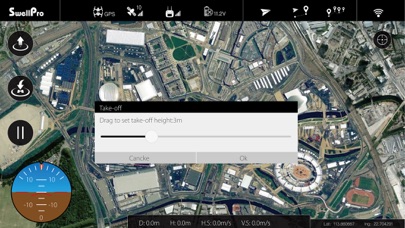
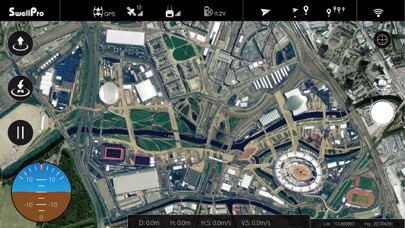
After successfully connecting, open the APP to display realtime data from the drone such as voltage, coordinates, altitude, distance, GPS signal and other flight parameters.
The APP allows you to perform an auto-take-off, hover, return home, flight paths, follow me, tap to fly, etc.
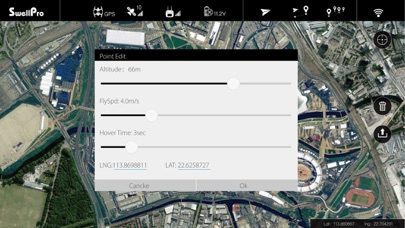
Tap-to-Fly: Click the “Tap-to-Fly” button, and then click the target points on the map and click the Upload button. The drone will start flying to the point and hover there. If you need to set the parameters manually, you can tap on the flight point.
Route/Mission Planning: Tap the “Flight Path Setting” at the top of the screen and tap the map to set the flight path (double tap the flight point to delete it, tap the “Delete” button to delete all flight paths). Tap the flight point again to edit.
En voir plus...

  • Screenshot #1 pour Swellpro Spry
  • Screenshot #2 pour Swellpro Spry
  • Screenshot #3 pour Swellpro Spry

D'autres applications du développeur

SPLASH DRONESPLASH DRONEiPhoneSwellpro FlySwellpro FlyiPhoneSwellCamSwellCamiPhoneSwellCam2SwellCam2iPhoneSDFlySDFlyiOS Universel

Note

(0 note)

Détails sur l'application

Version
1.1
Taille
27.2 Mo
Version minimum d'iOS
10.0
Dernière mise à jour
07/12/2018
Publié par
Shenzhen SwellPro Technology Co.,LTD

Newsletter App Store

Recevez chaque jour les meilleures promos

Actualité Apple

Image Le récap Apple de la semaine : iPhone, IA, résultats records et AirPods au menu
Le récap Apple de la semaine : iPhone, IA, résultats records et AirPods au menu
Image Les AirPods avec caméras sont attendus dès septembre
Les AirPods avec caméras sont attendus dès septembre
Image Le MacBook Air a des stocks limités à cause de la pénurie de RAM
Le MacBook Air a des stocks limités à cause de la pénurie de RAM
Image Les lunettes connectées d’Apple miseront sur la santé et le sport
Les lunettes connectées d’Apple miseront sur la santé et le sport
iPhoneAddict Apps

Le catalogue iPhoneAddict pour suivre les nouveautés, mises à jour et baisses de prix de l’App Store.

Apps

Toutes les apps iOS iPhone iPad Universelles Mac Apple TV

iPhoneAddict

Actualité Apple Archives keynotes Contact À propos KultureGeek

Suivez-nous

©2009-2026 i2CMedia. Tous droits réservés.