iPhoneAddict Apps
  • Actualités
  • Accueil Apps
  • iPhone
  • iPad
  • Universelles
  • Mac
  • Apple TV
KG KultureGeek
App
iPhone / iPad Télécharger iAddict v5 Mac Télécharger iAddict Mac
  • Actualités
  • Accueil Apps
  • iPhone
  • iPad
  • Universelles
  • Mac
  • Apple TV
  • Archives keynotes
  • Firmwares & iTunes
  • Contactez-nous
  • Comparateur de prix
  • KultureGeek
Accueil » Liste des Apps » Apps Universelles » Utilitaires » Text Comp
L'application n'est plus disponible sur l'App Store français
1.0.3 iOS €Gratuit Yoichi Nozaki 1 1 With Text Comp, you can easily compare the two text files or directories. It's simple to use: 1. Import and select files to compare First, Let's import files that you want to compare from iCloud or other applications. You can also import archive...
Text Comp

Text Comp

iOS Universel / Utilitaires

Gratuit
Obtenir sur l'App Store
Facebook X E-mail

With Text Comp, you can easily compare the two text files or directories.

It's simple to use:


1. Import and select files to compare

First, Let's import files that you want to compare from iCloud or other applications.
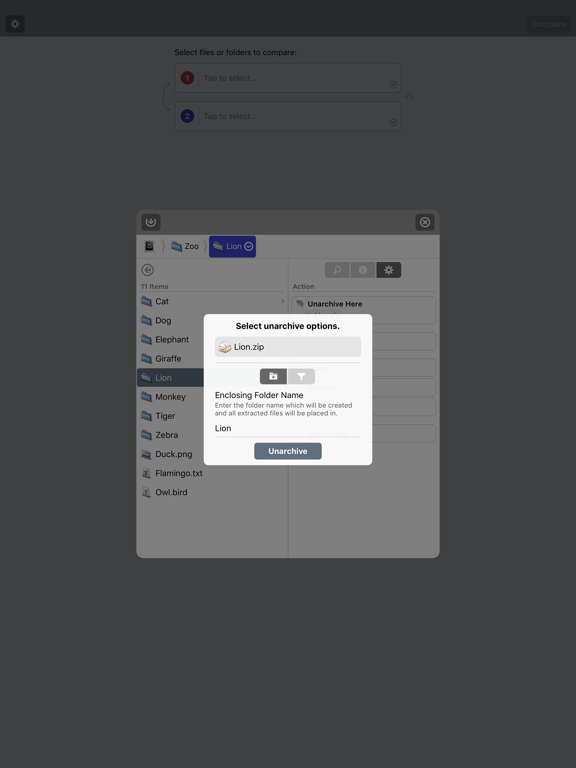
You can also import archive files (zip, tar, gz, bz2, lzh, etc) and can unarchive it in Text Comp.

Useful file finder interface makes you select files faster.
You can quickly move directory hierarchy by Path bar.

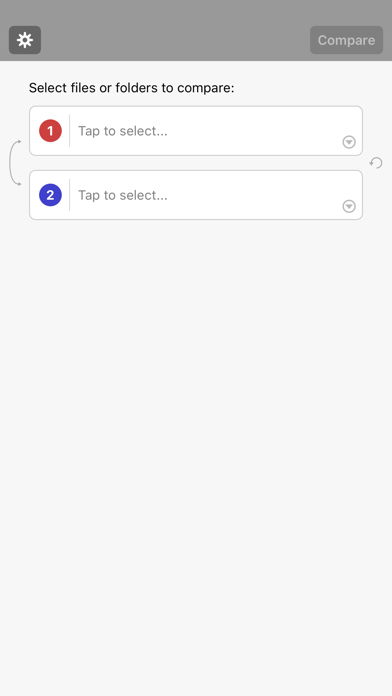
To select a file or a directory to compare, tap the red or blue highlighted button in Path bar.
The red means source "1" and the blue means source "2" for comparison in Text Comp.


2. Compare and analyze results

Comparison results are displayed in 2-pane interface to make you easily undarstand what and where differences are.
In addition, you can filter the results partially to make differences more clear (by 4 buttons at the top center of the screen or "Filter" options page).
Also, theare are useful features like search and line marker (Text Comparison only) that will help your analysis of the results.

There are some options to control behaviors and appearances of the comparison.
Please give it a try to change it to fit your needs.

Text Comp can also compare the image files, that is lower functonality than Pixel Comp though.
Please use Pixel Comp if you need more detailed image comparison.


That's it.

Let's compare!


--

NOTICE


Internally, Text Comp handles text in Unicode.
So your text will be firstly coverted to Unicode if it's other than Unicode.

Because of the lossy conversion, it's possible that the Text Comp's comparison result is different from the result that compared in the raw encoding of the original text.


--

About full version


Once upgrade to full version, following features will be available:

- No ad-banners displayed.
- "Export" available.

En voir plus...

Quoi de neuf dans la dernière version ?

This app has been updated by Apple to display the Apple Watch app icon.

Added following features to make it more easier to import files.

- App Extensions support (* Import/Export files from other applications).
- Document Interaction support (* Copy files from other applications).
- Import from Clipboard.
- Import from URL.

and Minor bug fixes.
  • Screenshot #1 pour Text Comp
  • Screenshot #2 pour Text Comp
  • Screenshot #3 pour Text Comp
  • Screenshot #4 pour Text Comp
  • Screenshot #5 pour Text Comp
  • Screenshot #6 pour Text Comp

Note

(1 notes)

Détails sur l'application

Version
1.0.3
Taille
13.6 Mo
Version minimum d'iOS
9.0
Dernière mise à jour
03/09/2016
Publié par
Yoichi Nozaki

Newsletter App Store

Recevez chaque jour les meilleures promos

Actualité Apple

Image iPhone 18 Pro : l’invitation d’Apple pour sa keynote tease deux nouveautés
iPhone 18 Pro : l’invitation d’Apple pour sa keynote tease deux nouveautés
Image watchOS 27 : Apple met automatiquement à jour certaines applications Apple Watch
watchOS 27 : Apple met automatiquement à jour certaines applications Apple Watch
Image iPhone Ultra pliable : un concept vidéo imagine la présentation du futur smartphone d’Apple
iPhone Ultra pliable : un concept vidéo imagine la présentation du futur smartphone d’Apple
Image Rock Paper Pencil 4.0 imite le crayon graphite avec l’Apple Pencil
Rock Paper Pencil 4.0 imite le crayon graphite avec l’Apple Pencil
iPhoneAddict Apps

Le catalogue iPhoneAddict pour suivre les nouveautés, mises à jour et baisses de prix de l’App Store.

Apps

Toutes les apps iOS iPhone iPad Universelles Mac Apple TV

iPhoneAddict

Actualité Apple Archives keynotes Contact À propos KultureGeek

Suivez-nous

©2009-2026 i2CMedia. Tous droits réservés.