ToDo2.0 - for your ToDo list
iOS Universel / Utilitaires
This is easy and useful memo app.
Please check and compare with other apps.
■ Features of ToDo2.0
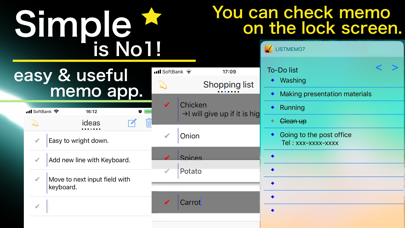
□ List style memos are possible at the highest standard speed.
• The first screen is input screen.
• You can directly enter each item. (Do not bother to move to other screen.)
• You can move to the next entry field on the keyboard.
• Of course you can also do line breaks on the keyboard.
□ Each memo can be used.
• You can copy each memo.
• You can post to SNS.
• You can broadcast to individual lines while watching the transmission contents.
□ Memos can be added to the widget.
• You can check memos without opening the application.
• You can draw a strikethrough on the widget.
□ You can move to another page by side scrolling.
• In many memo apps, when you move to another page, you need to (1) return to the page list and (2) select a certain page, but in ProMemo you can move only by side scrolling so it is speedy.
■ Usage of ToDo2.0
□ Memo function & widget.
• To-Do list
• Shopping list
• Personal name, address, immediate appointment memos
• Sudden idea memo
• Reflection and assignment list of sport
• List of conscious things before practice and games
• Cheat list at presentation
□ Memo function & SNS posting function.
• Drafts before posting to SNS such as e-mail
• Continuous postings list to Twitter etc.
• Comparative list of texts on Twitter etc.
□ Memo function & individual line simultaneous transmission function.
• Notifying everyone the place to meet.
• Asking a questionnaire.
■ Functions of ToDo2.0 Conclusion
• Move to the next item on keyboard
• Add new line on keyboard
• Page movement function by side scrolling
• Sort function
• Partial deletion function (Delete memos with gray background)
• Batch delete function (keyboard is open at the same time)
• Confirmation function before deletion
• Automatic saving function of memo contents
• Copy memo function
• SNS contribution function
• Send by e-mail function
• Broadcast function to individual line
• Add widget function
• Check function on widget
• Alarm function
■ Q & A
Q1: How do I sort?
Please press the button on the upper left of the screen.
Icons are displayed on the right side of each entry field.
You can sort by swiping the icon up or down.
Q2: How can I add an entry field?
There are two methods below.
Method 1: Next button on the keyboard.
Method 2: The second button from the top right of the screen. (*)
※ Please use it immediately after opening the application.
Q3: How can I move to another page?
Scroll the screen sideways.
You can move to another page.
Q4: How do I post to SNS?
Please press and hold the check button on the left end.
Q5: How do I copy a memo?
Press and hold the check button at the left end.
A copy icon appears.
Press the icon to copy the memo.
Q6: How do I add ToDo2.0 to widget?
The procedure is as follows.
① Scroll the home screen sideways and move to the widjet screen.
② Press "Edit" to move to "Add widget" screen.
③ Press "+" at the left end of the ProMemo to add it to the widget.
Q7: What if my memo does not fit in my widget?
There is a limit on the vertical width of the widget that one application can use.
If it does not fit, please make a memo on another page.
Q8: What is the advantage of using ToDo2.0 instead of twitter's draft function?
I think there are 3 merits.
· A point where you can compare sentences before submission.
· When posting continuously, you can edit while reviewing the overall flow.
· You can use sentences you posted elsewhere. (Copy possible and easy to modify)
Quoi de neuf dans la dernière version ?
Bug fix.