• KultureGeek
  • Comparateur de prix
       
iPhoneAddict
 iAddictv5Notre Application iPhone/iPad
  • Accueil Apps
  • Actualité Apple
  • Keynote Apple
  • Firmwares & iTunes
  • Contactez-nous
Accueil » Liste des Apps » Apps iPhone » Utilitaires » Treasury
1.4 iOS €Gratuit Toby Coulstock 5 2 Manage your hard won loot! Treasury is an app to make tracking, spending and hoarding money in tabletop role playing games as easy as possible. Need to pay someone two copper pieces and you only have gold? Change coins with a tap or two or just...
Treasury

Treasury

iPhone / Utilitaires

Gratuit
Obtenir sur l'App Store

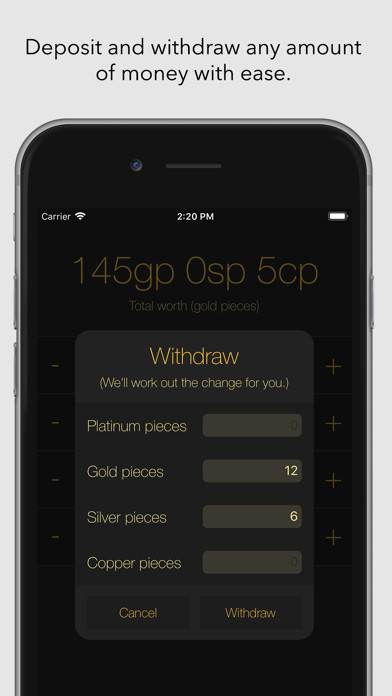
Manage your hard won loot! Treasury is an app to make tracking, spending and hoarding money in tabletop role playing games as easy as possible. Need to pay someone two copper pieces and you only have gold? Change coins with a tap or two or just withdraw two copper and let Treasury work out the change. Treasury is built to keep the accounting out of your hair so you can get on with pillaging and shopping.

En voir plus...

Quoi de neuf dans la dernière version ?

- Minor tweaks to support the new iPhones

  • Screenshot #1 pour Treasury
  • Screenshot #2 pour Treasury
  • Screenshot #3 pour Treasury

D'autres applications du développeur

Dice Ex Machina
Dice Ex Machina
/ iOS Universel
To Do Today
To Do Today
/ iPhone

Note

(2 notes)

Détails sur l'application

Version
1.4
Taille
8.7 Mo
Version minimum d'iOS
11.0
Dernière mise à jour
21/09/2018
Publié par
Toby Coulstock

Newsletter App Store

Recevez chaque jour les meilleures promos

Actualité Apple

Image L’iPhone 17 Pro Max écrase la concurrence sur l’autonomie malgré une batterie standard
L’iPhone 17 Pro Max écrase la concurrence sur l’autonomie malgré une batterie standard
Image Les puces M5 Max et M5 Ultra d’Apple se dévoilent avec iOS 16.3
Les puces M5 Max et M5 Ultra d’Apple se dévoilent avec iOS 16.3
Image Release candidate pour iOS 26.3, macOS 26.3, watchOS 26.3, tvOS 26.3 et visionOS 26.3
Release candidate pour iOS 26.3, macOS 26.3, watchOS 26.3, tvOS 26.3 et visionOS 26.3
Image Studio Display 2 : 90 Hz et non 120 Hz pour l’écran d’Apple ?
Studio Display 2 : 90 Hz et non 120 Hz pour l’écran d’Apple ?
Partenaires : Actualité iPhone - Culture Geek
©2009-2026 i2CMedia | A propos |