Voice Input Assist
iOS Universel / Utilitaires
User of this editing app for Voice Input can edit sentences by using various function buttons such as moving cursor, selecting characters, deleting characters, copying and pasting characters, sending mails and other functions.
Initially, this app was developed for aged persons who are not good at editing characters using the standard keyboard due to dry fingertips. However, it has been noticed that even young people can enjoy this app with the merit of “How to enunciate well”
Aged persons will show strong interest in the “Voice Input” function and they may feel they can operate a smart phone, when they view an actual scene in which sentences can be entered by “Voice Input” on a smart phone. However, “Voice Input” in the Japanese language is still not 100% perfect, thus users must adjust (edit) their sentences by using a keyboard. And they will face difficulties editing on the small screen of the device. They must put their dry fingertips on the characters correctly in order to select and adjust them. These are difficult tasks for aged persons. Therefore, this app provides easier operation by using user-friendly buttons.
【Button Functions】
6 types of buttons for moving the cursor forward in six directions.
3 types of buttons for selecting character(s) forward in two directions and “select all”.
2 types of buttons for deleting character(s) forward in two directions.
3 types of buttons for “cut,” “copy” and “paste”
4 types of buttons for moving to other apps: Mail, Notes, Line and Google.
“Finish/New” button is a function to stop an editing operation and begin editing a new draft.
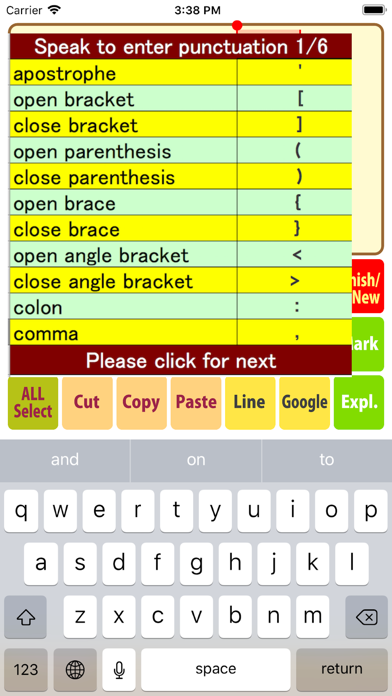
“Mark” button provides a table of “words to enter punctuation or other characters.” Users may not be able to remember all words to be pronounced into the microphone for punctuation. This button will provide six dictionary tables for these punctuation and characters to be pronounced.
“Expl.” button will show tables for using the Voice Input and Editing function of this app.
A button to withdraw a keyboard is installed at version 3.1.0
【Game using “Voice Input”】
A game using “Voice Input” is included in this app.
Users can practice “Voice Input” with this game. The game provides 15 sentences as “questions” to be spoken into a microphone. If users speak into a microphone by reading questions appearing in the corner of “Question”, the iPhone will translate the voice and write a sentence in the “Answer” column.
When users tap a “Judge” button, a circle mark will appear on the screen if the written sentences are equal to the same question. A cross mark will appear if the answer is not equal to the same question.
The “Redo” button can be used when users wish to delete their answers and try it again.
The “Next Q” button will lead to a new question on the screen.
The “Try again” button will return to the screen of the first question.
The questions are arranged from simple sentences to complicated sentences so that users can understand the essence of this app. Further, users can test how to input punctuation via voice by referring to the table of punctuation.
A “Mark” button for six tables of punctuation are also installed in the screen of this game.
Quoi de neuf dans la dernière version ?
This editing app for "Voice Input" was reproduced by using the newest Xcoce 10.2.1 in order that users can operate it on the newest iPhone version 12.3.1. The contents of this app is not changed as same as version 3.1.0.