WiFi Helper
iPhone / Utilitaires
With this app you can manage multiple WiFi access data.
You can use a generated QR code to pass on the access data. Show it on your iPhone, or a second screen (even with direct AirPlay) or by sending it as a photo. Importing such a QR code ( "WIFI:" format - also from other apps) is also possible and thus directly integrate the access data into your collection. This is done by live camera or static photo.
Additionally the scanning from your router NFC tags is supported.
The App includes two Siri Extensions:
- "Tell Current WiFi" can be activated from the main view and then Siri can directly answer you, what is the name of the current connected WiFi.
- "WiFi Credentials" can be activated on the detail view of a wifi setting. Siri will bring you to this view, so that you can share the settings.
An iMessage Extension is included, which send the WiFi Data as a message and automatically receives those data from such a message.
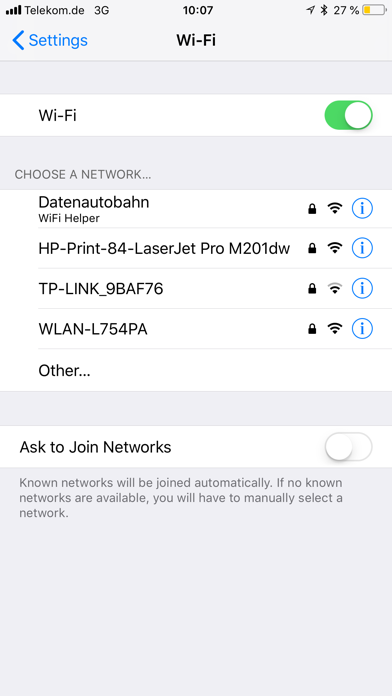
The app helps you to set up WiFi access by passing the access data to iOS. To set up a new WiFi from your collection, simply click on the WiFi in the iOS settings or connect it from inside the app - the app will passes the password directly to iOS (to be recognized by the app name under the WiFi SSID).
The Apple Watch companion app lists all WiFi access data from the iPhone app. If the WiFi used by the iPhone is in the list, it will be highlighted in green. After selecting a WiFi SSID, the Apple Watch app displays the QR code with the WiFi settings data, to import them somewhere else.
We also support a companion Alexa Skill. To quickly find and activate the skill, we linked it directly in the App. You can connect the App to the Skill via a connection QR Code shown by an Echo Show or a six digit code read out by Alexa. After connecting the app with the skill, you can transfer WiFi credentials by swiping a switch on the detail view and the skill will present those credentials for you.
For customers of Deutsche Telekom, they offer for theier router models:
- Speedport w724v Type C
- Speedport w922v
- Speedport w925v
- Speedport Entry 2
- Speedport NEO
- Speedport Hybrid
- Speedport Smart
- Speedport Smart 2
- Speedport Smart 3
- Speedport Pro
a router passwort, which shows the standard Wi-FI accessdata also in a special QR code. This can be read by the app.
For feedback, questions or problems, please contact wlan@anrufliste.com
Quoi de neuf dans la dernière version ?
We added two Siri Extensions:
- "Tell Current WiFi" can be activated from the main view and then Siri can directly answer you, what is the name of the current connected WiFi.
- "WiFi Credentials" can be activated on the detail view of a wifi setting. Siri will bring you to this view, so that you can share the settings.