Winmail.dat Viewer - For iOS 10
iOS Universel / Utilitaires
The most trusted and oldest winmail viewer on Appstore.
Supports iOS 10, iOS 9, iPhone 7, iPhone 7 Plus, 6S and 6S Plus
+++CELEBRATING OVER 50000 USERS.+++
= Featured in the App Store's "What's Hot" list =
= Featured in the App Store's "New & Noteworthy" list =
Supports iOS8 iOS7, iOS6 and iPhone 6, iPhone 6 Plus, iPhone 5 , iPad mini, iPad Air!!
Please note that, there is no need to open the application directly by tapping on application icon on device. ON installation, It get registered as an addon for mail application, you just need to tap on winmaildat attachment in your email which will the open the application with the content of your attachment.
Here are the Help Instructions:
1) Open up the email and touch on the icon of the winmail.dat file.
2) You will see the "Open in Winmail.dat Viewer" screen using a short tap; if not then keep touching the icon till the whole box darkens.
3) Once you keep touching the icon (on left side) itself, after a couple of seconds, a 2-choice menu pops up from the bottom.
4) Click on - "Open in Winmail.dat Viewer" app. The winmail.dat file will then open, showing the attachments inside.
You can perform following on contents on winmail.dat attachment
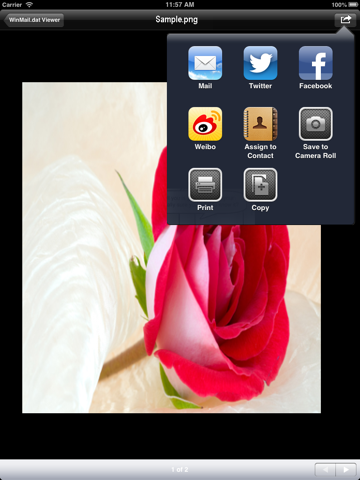
- Saving image file in Camera role folder, in photo album
- Share image using twitter, Facebook, weibo
- Assign image to contact
- forwarding opened files/documents using mail
- Printing documents
- opening single files in external applications
- Copy files on clipboard
Kindly give good ratings and reviews if you like this application. Thank You!!
The robust Winmail file reader for the NEW iPhone 5, iPhone 4s, iPhone 4, iPhone 3s, iPod, iPad 3 and 2.
Supports wide variety of document formats including doc, docx, xls, xlsx, ppt, pptx and PDF, txt, csv, as well as most image formats such as JPEG and TIFF.
PLEASE NOTE:
1) ON SOME DEVICES APPLICATION MAY REQUIRE REBOOT AFTER INSTALLATION.
2) IF ATTACHMENT SIZE IS LARGE THEN IT MAY TAKE SOME TIME TO OPEN IT IN VIEWER.
Do you have winmail.dat files in email attachments and you are iPhone user ? viewing their contents is painful task of downloading them to Mac then open them?
This application allows you to view and extract contents of those winmail.dat messages (which are TNEF-encoded messages) in flawless way.
That means if you receive winmail.dat on your e-mail, then with 'Winmail.dat Viewer' you can view the rich text message contents and attachments embedded into this file using the appropriate software/app.
You may receive winmail.dat files from the senders who are using Microsoft Outlook (1997, 2000, 2003, 2007, 2010). Winmail.dat contains all attachments and rich text message, and not all e-mail clients can recognize its format. Winmail.dat Viewer is the solution .
PLEASE NOTE: The "Winmail.dat Viewer" app will open ONLY a "winmail.dat" attachment.
Here are the Help Instructions:
1) Open up the email and touch on the icon of the winmail.dat file.
2) You will see the "Open in Winmail.dat Viewer" screen using a short tap; if not then keep touching the icon till the whole box darkens.
3) Once you keep touching the icon (on left side) itself, after a couple of seconds, a 2-choice menu pops up from the bottom.
4) Click on - "Open in Winmail.dat Viewer" app. The winmail.dat file will then open, showing the attachments inside.
###Now save images from winmail.dat attachments directly in to Photos folder on iPhone and iPad. So you can happily see the pics even after deleting the email from your inbox###
Option to disable this feature is also provided in settings of the application.
You can save following images formats on your iPhone/iPad,
- .tiff, .tif
- .jpg, .jpeg
- .gif
- .png
- .bmp, .BMPf
- .ico
- .cur
- .xbm
Quoi de neuf dans la dernière version ?
Apple a mis à jour cette app afin d’afficher l’icône de l’app Apple Watch.
- Support for iOS 10
- Improvements for iOS 9.x