Desktop Astro Clock
iOS Universel / Utilitaires
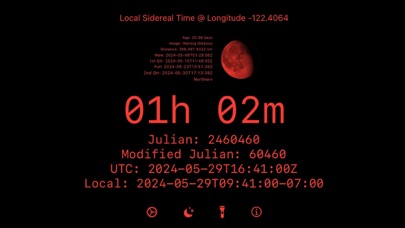
Desktop Astro Clock (formally known as: yabc - Yet Another Bedside Clock). This is a clock app that is designed to be run at the desktop, bedside or near a star map. It will display the time without turning off until the battery percentage drops below a user specified value. There are ten predefined, and one user defined display configurations. A single tap of the moon and star icon will bring up a red tinted clock showing the local sidereal time. In settings, you can add a moon display, meteor showers display, change colors, and configure the user defined clock display. Widgets are now supported and can be configured via Widget editing. A watchOS app is now included that displays a red tinted Modified Julian date, GMT Sidereal time, Moon, Moon name, and moon age in days. No ads, ever. Lock screen widgets include rectangular (two clock values look good here) and circular (for the current moon)
Features:
- Time display in various fixed formats
- Time display in a user defined format + color
- Always on display until a user specified battery level is reached (iOS)
- Moon display with moon transit details and full moon names *(4)*
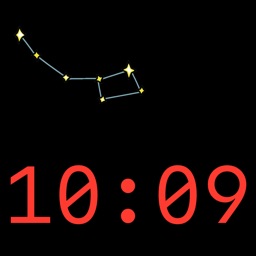
- Meteor Shower information (when visible) with star chart locator
- Blue moons are known by the tag [blue moon] added to the full moon name and a blue tint to the full moon image
- Super moons are known by the tag [super] added to the full moon name
Clock Times:
- GMT - Greenwich Mean Time
- GMST - Greenwich Mean Sidereal Time
- Julian Date - Seconds since noon 1st January 4713 B.C.
- LMST - Local Mean Sidereal Time *(3)*
- Modified Julian Date - Julian Date - 2400000.5
Predefined displays:
- Desk Clock - Day, Time, Date
- ISO 8901 - yyyy-mm-ssThh:mm:ss+tz
- ISO 8901 GMT - yyyy-mm-ssThh:mm:ssZ
- Greenwich Mean Sidereal Time - 'HH'h 'mm's 'ss'
- Julian - day.time in seconds since noon 1st January 4713 B.C.
- Local Mean Sidereal Time - 'HH'h 'mm'h *(3)*
- System Default - based on your iOS settings
- Time HH:MM:SS, Month, Day
- Time HH:MM
- Time HH:MM:SS, Day, Month, Year
- User Defined - you pick the format!
Widgets (One or more):
- Meteor Showers *(1)*
- Moon
- Moon with details
- Moon Names *(4)*
- Julian Date *(2)*
- Sidereal Date *(2)*
- User Defined Clock *(2)*
WatchOS App:
- Black background, Red tint, brightness adjustable with crown, shows Mofidied Julian Date, GMT Sideral Time, Moon face, Moon name, and Moon age *(3)* *(4)*
- Corner complication shows Moon, Modified Julian and Local Sidereal time
Lock screen Widgets:
- Rectangular for clock values (i.e.: Julian date and Sidereal time)
- Circular for the current moon
*(1) If no Meteor shower is in progress, just an image is shown*
*(2) Widgets do not support real time non-system clocks well. Updates will typically be between 15-60 minutes*
*(3) If you select Local Sidereal Mean Time display, you'll also need to enable the setting to allow access to your location information (only needs your longitude for the calculations). Default will be Greenwich England*
*(4) If you select Moon names, you'll also need to enable the settings to allow access to your location information (only need to check latitude > 0 for Northeren/Southeren hemishpere). Default will be at the equator*
Quoi de neuf dans la dernière version ?
Added Date Override in settings to change the date
Added Sky star maps for Meteor showers
Added Supermoons
Clean up light/dark mode views in Settings and Info
Fixed some locations where YABC was still displayed
Fixed some spelling errors
Update for iOS 17 widgets (.containerBackground)
Update meteor display to a scrollable list and full screen star chart with pan and zoom
Updated meteor shower table through 2025-05-01