• KultureGeek
  • Comparateur de prix
       
iPhoneAddict
 iAddictv5Notre Application iPhone/iPad
  • Accueil Apps
  • Actualité Apple
  • Keynote Apple
  • Firmwares & iTunes
  • Contactez-nous
Accueil » Liste des Apps » Apps Universelles » Autocollants » Olivia Sunny Mood For iMessage
L'application n'est plus disponible sur l'App Store français
1.0 iOS €Gratuit Hira Akram 0 0 Olivia has come all the way from the land down under to bring you warmth and a sunny mood! How to use iMessage Stickers: • You can peel and place them on anything in your conversation – bubbles, images, or even other stickers. • CUSTOMISE your...
Olivia Sunny Mood For iMessage

Olivia Sunny Mood For iMessage

iOS Universel / Autocollants

Gratuit
Obtenir sur l'App Store

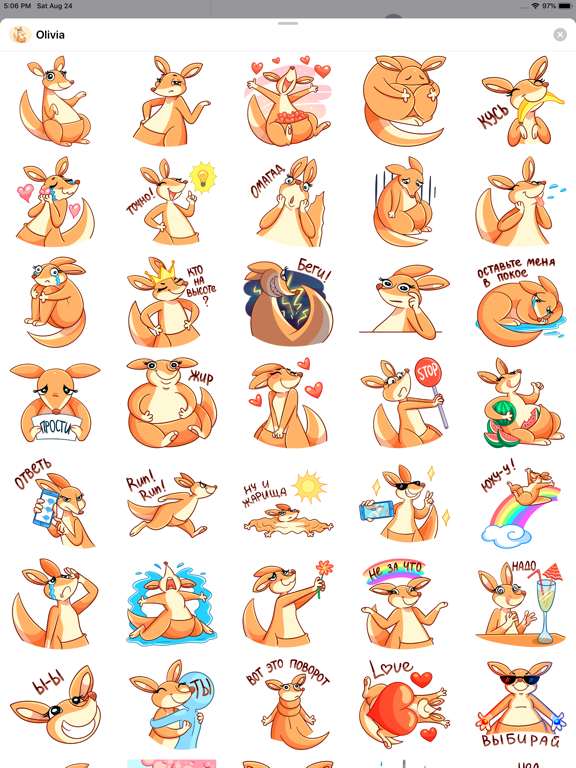
Olivia has come all the way from the land down under to bring you warmth and a sunny mood!

How to use iMessage Stickers:
• You can peel and place them on anything in your conversation – bubbles, images, or even other stickers.
• CUSTOMISE your photos with stickers in chat
• LAYER stickers over each other, in chat, and on photos
• To make stickers bigger or smaller, as you drag them up to the messages field to place them somewhere, add another finger to the screen and use pinch gesture to expand or contract them.
• Rotating stickers is done in the same way. As you hold a sticker above the screen before placing it, use two fingers to twist it around, changing its orientation.

Make you iMessages conversation even more cutter.

HOW TO FIND YOUR STICKERS:
• Access iMessage apps— Enter a contact to message, then tap the App Store icon beside the chat field to see your most recently used iMessage app.
• Find new stickers—First tap the App Store icon, then tap the 4-ovals icon in the lower left to bring up the app drawer. Then, tap the + icon to access the Store.
• If you are not seeing Stickers that you have purchased, you may need to change your settings. Tap the App Store icon, then tap the 4-ovals icon in the lower left to bring up the app drawer. Then click the + symbol to open the store, and select the Manage button top right. Make sure the app you are looking for is turned on.
• Use stickers in chat—Tap to send, or touch and hold to put stickers on top of a bubble, other stickers, photos, and videos.
-More Stickers Coming Soon-

CONTACTS: emaanhafsa@yahoo.com
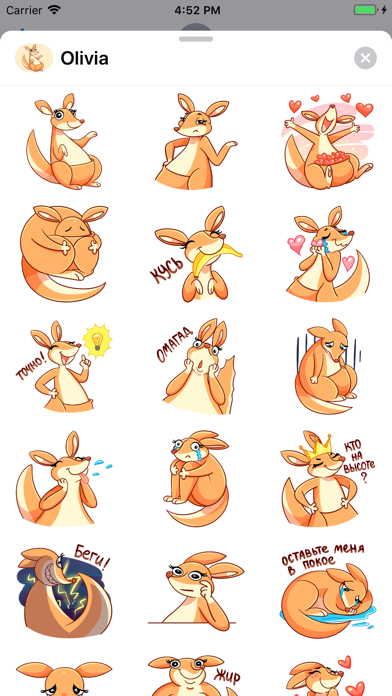
En voir plus...

  • Screenshot #1 pour Olivia Sunny Mood For iMessage
  • Screenshot #2 pour Olivia Sunny Mood For iMessage
  • Screenshot #3 pour Olivia Sunny Mood For iMessage
  • Screenshot #4 pour Olivia Sunny Mood For iMessage
  • Screenshot #5 pour Olivia Sunny Mood For iMessage
  • Screenshot #6 pour Olivia Sunny Mood For iMessage

D'autres applications du développeur

Six Kalima de l'Islam ستة كلمة
/ iOS Universel
Calculateur d'âge
Calculateur d'âge
/ iOS Universel
Qibla Finder, Boussole
/ iOS Universel
Calculateur de pourcentag Pro
/ iOS Universel
% Calculateur de pourcentage
/ iOS Universel
calendrier ramadhan
calendrier ramadhan
/ iOS Universel
Voir toutes les apps

Note

(0 note)

Détails sur l'application

Version
1.0
Taille
9.4 Mo
Version minimum d'iOS
10.0
Dernière mise à jour
26/08/2019
Publié par
Hira Akram

Newsletter App Store

Recevez chaque jour les meilleures promos

Actualité Apple

Image La MLS va utiliser des iPhone 17 Pro pour filmer un match de foot
La MLS va utiliser des iPhone 17 Pro pour filmer un match de foot
Image [#BonPlan] Les promos High-Tech du 3 décembre (livraison avant Noël)
[#BonPlan] Les promos High-Tech du 3 décembre (livraison avant Noël)
Image Release candidate pour iOS 26.2, macOS 26.2, watchOS 26.2, tvOS 26.2 et visionOS 26.2
Release candidate pour iOS 26.2, macOS 26.2, watchOS 26.2, tvOS 26.2 et visionOS 26.2
Image L’iPhone 17 Pro a perdu le mode Nuit pour les photos en portrait
L’iPhone 17 Pro a perdu le mode Nuit pour les photos en portrait
Partenaires : Actualité iPhone - Culture Geek
©2009-2025 i2CMedia | A propos |