San Fransymbols: SF Symbols
iOS Universel / developpeurs
Looking for an easy way to browse and find the perfect symbol for your iOS and Mac app? Look no further than San Fransymbols - the ultimate tool for exploring Apple's massive collection of over 6,000 SF Symbols.
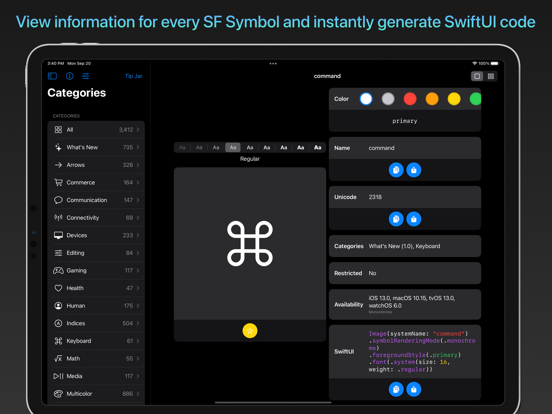
Designed to help developers and designers easily discover and use the perfect icon for any situation, San Fransymbols includes a range of powerful features. These include automatic SwiftUI and UIKit code generation for each symbol and weight, semantic search, and the ability to preview symbols in different colors.
With San Fransymbols, you can also easily compare different weights of each symbol, favorite symbols for quick access later, and create custom groups of symbols that sync seamlessly via iCloud.
But that's not all - San Fransymbols also provides full support for keyboard shortcuts and pointer interactions on iPadOS, making it easier than ever to navigate the app and find the perfect symbol, with drag and drop support for generated code snippets.
Whether you're a seasoned developer or just starting out, San Fransymbols is the perfect tool for discovering and using the power of SF Symbols in your iOS and Mac apps. Try it out today and see the difference for yourself!
San Fransymbols is created to make it easier than ever for you to search for, compare and choose the right symbol from SF Symbols for every situation, with features such as:
+++ SWIFTUI & UIKIT CODE +++
Automatically generate SwiftUI and UIKit code for every symbol and weight. Drag and drop support means you can drop the code right into other apps (such as Swift Playgrounds) on iPad.
+++ PREVIEW ALL ANIMATION TYPES +++
Easily see what each symbol animation looks like, and copy the auto-generated Swift code in a single tap.
+++ SEMANTIC SEARCH +++
San Fransymbols is smart. If you search for 'fly', it returns symbols such as 'airplane' - making it easier than ever to find the perfect SF Symbol for your app.
+++ PREVIEW SYMBOLS IN DIFFERENT COLORS +++
Choose from a set of system colors or define your own in the color picker. Any change is reflected in the auto-generated code for seamless UI prototyping!
+++ SEE WHICH SYMBOLS ARE RESTRICTED +++
Some symbols may only be used to refer to certain Apple services. San Fransymbols shows a red banner for these, so you can be certain you are using each symbol correctly.
+++ COMPARE WEIGHTS ON THE FLY +++
Compare every weight of each symbol by simply tapping on the desired weight. Will it look better in semibold or heavy? San Fransymbols makes it easier than ever to decide.
+++ FAVORITE SYMBOLS +++
Tap the yellow star icon under any symbol to add it to your favorites. Perfect for keeping track of a list of symbols you want to incorporate into a project.
+++ CUSTOM GROUPS +++
Create your own groups of symbols - perfect for keeping track of symbols you wish to use across different projects. These groups sync automatically via iCloud, so you can pickup where you left off on whatever device is on hand.
+++ SUPPORT FOR KEYBOARD SHORTCUTS AND CURSOR ON iPADOS +++
Full support for keyboard shortcuts and pointer interactions on iPadOS. Change symbol weight with the keyboard, right-click to set favorite symbols, easily navigate buttons with pointer interactions, and more.
Quoi de neuf dans la dernière version ?
+ Minor bug fixes to the UI in dark mode