• KultureGeek
  • Comparateur de prix
       
iPhoneAddict
 iAddictv5Notre Application iPhone/iPad
  • Accueil Apps
  • Actualité Apple
  • Keynote Apple
  • Firmwares & iTunes
  • Contactez-nous
Accueil » Liste des Apps » Apps Universelles » Economie et entreprise » SignPDF Pro- Quickly Annotate PDF
L'application n'est plus disponible sur l'App Store français
2.2.0 iOS €1,99€ Tektrify, Inc 3 2 Sign documents anywhere with your iPhone/iPod/iPad! No account required! Need to sign or fill out a document? SignPDF makes it quick and easy to do both and forget about printing, scanning, or faxing. Simply: 1) Open any PDF from your iPhone, iPod...
SignPDF Pro- Quickly Annotate PDF

SignPDF Pro- Quickly Annotate PDF

iOS Universel / Economie et entreprise

1,99€ au lieu de 2,49€
Acheter sur l'App Store

Sign documents anywhere with your iPhone/iPod/iPad! No account required!

Need to sign or fill out a document? SignPDF makes it quick and easy to do both and forget about printing, scanning, or faxing. Simply:

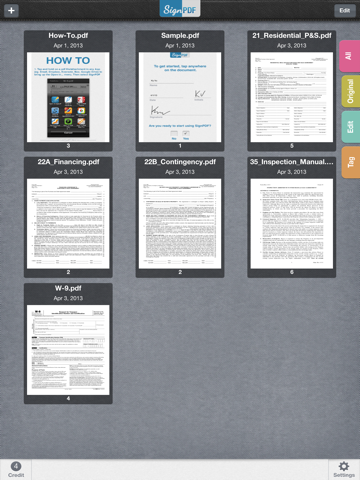
1) Open any PDF from your iPhone, iPod or iPad’s Email, Dropbox, Google Drive, Box.Net, etc...
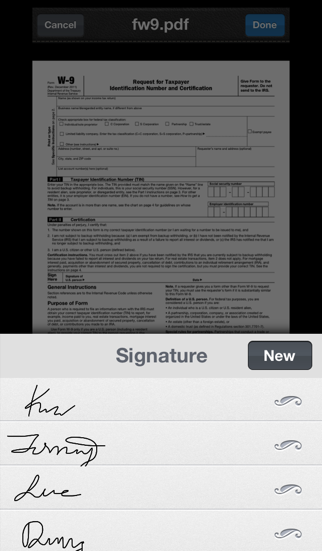
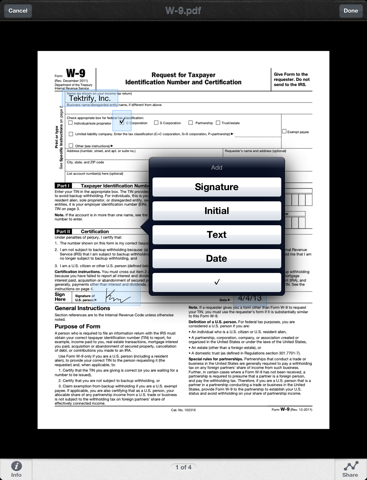
2) Fill out form with your name, initial, date, check boxes and sign realistically with your finger
3) Email the signed document to anyone, print it or upload to Dropbox, Google Drive, Box.Net, etc...

SignPDF is typically use to sign and fill documents including NDA’s, sales agreements, celebrity endorsements, real estate contracts, financing agreements, permission slips, marriage documents, and more...

*** Key Features:
- Sign documents with just a finger
- No need to print, sign, or fax documents again
- Easily add name, initial, date, check boxes and signature to PDF
- Your important docs stays with you on your device. We don't upload it our server!
- No sign up process or account is needed. Simply sign docs!
- Open documents from your email inbox, Dropbox, and more
- Export documents to use in other apps
- Printing - Print any document with AirPrint enabled printers

Pro Version:
- Will have 9 credits
- No Advertisement

How credits work:
- Sign and share one document will consume 1 credit, no matter how many pages long the document is.

En voir plus...

Quoi de neuf dans la dernière version ?

This app has been updated by Apple to display the Apple Watch app icon.

- Fix crash and black screen when opening a doc
- Fix freeze when first load up
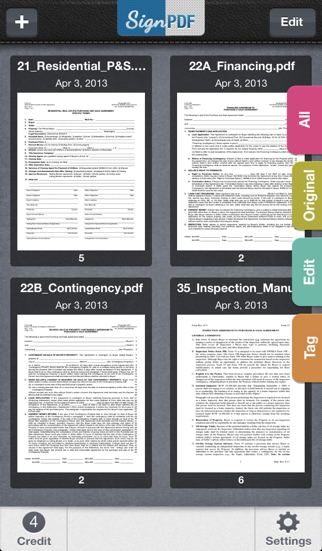
  • Screenshot #1 pour SignPDF Pro- Quickly Annotate PDF
  • Screenshot #2 pour SignPDF Pro- Quickly Annotate PDF
  • Screenshot #3 pour SignPDF Pro- Quickly Annotate PDF
  • Screenshot #4 pour SignPDF Pro- Quickly Annotate PDF
  • Screenshot #5 pour SignPDF Pro- Quickly Annotate PDF
  • Screenshot #6 pour SignPDF Pro- Quickly Annotate PDF

Note

(2 notes)

Détails sur l'application

Version
2.2.0
Taille
12.5 Mo
Version minimum d'iOS
6.0
Dernière mise à jour
25/09/2015
Publié par
Tektrify, Inc

Newsletter App Store

Recevez chaque jour les meilleures promos

Actualité Apple

Image WhatsApp pour iPhone prépare la traduction automatique des discussions
WhatsApp pour iPhone prépare la traduction automatique des discussions
Image Apple met en vente les Powerbeats Pro 2 en édition spéciale Nike
Apple met en vente les Powerbeats Pro 2 en édition spéciale Nike
Image Apple s’explique pour les trois types de cœurs dans les puces M5
Apple s’explique pour les trois types de cœurs dans les puces M5
Image What Happens at Night (Apple TV)  : Martin Scorsese réunit Leonardo DiCaprio et Jennifer Lawrence pour un long-métrage
What Happens at Night (Apple TV) : Martin Scorsese réunit Leonardo DiCaprio et Jennifer Lawrence pour un long-métrage
Partenaires : Actualité iPhone - Culture Geek
©2009-2026 i2CMedia | A propos |