Nihongo 123
iPhone / Education
App for learning Japanese grammar
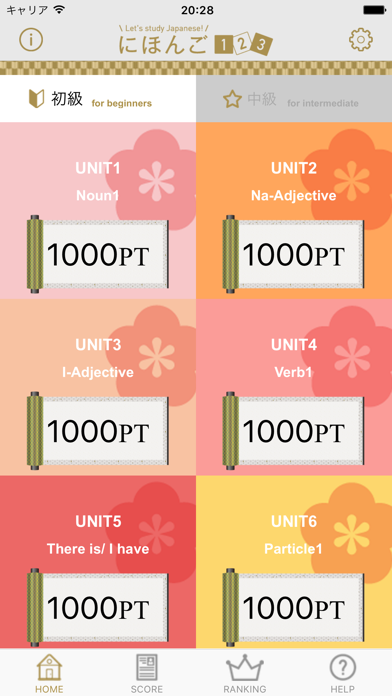
Grammar-classified Units Allow Users to Start Where They Want According to Their Learning Level
The Learning menu is divided into Beginner’s and Intermediate grades according to the level of difficulty, with each grade divided into grammar-classified units. So users can begin learning from any desired unit according to their learning level.
Lesson Procedure
Touch each unit to display the corresponding Lesson menu.
Each lesson is composed of [Video], [Grammar Note], [Flash Cards], [Listening] きく, and [Speaking]はなす sections.
Lessons can also be downloaded for use offline. To download a lesson, touch the corresponding icon. Note that the [Video] sections and [Speaking]はなす voice recognition function are not available for use offline.
Easy-to-Understand Learning with [Script-attached Dialogue Videos]
* Online Only
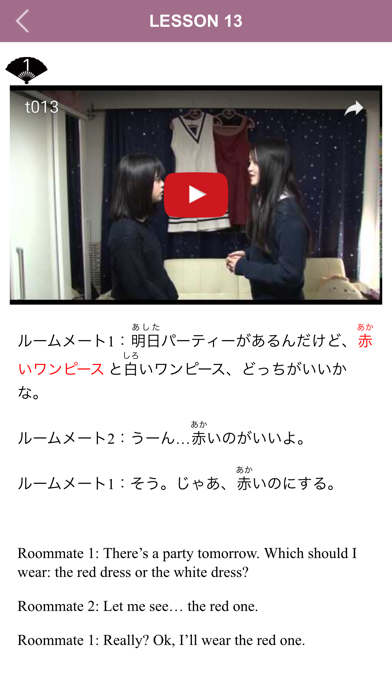
To begin a lesson, view the dialogue video first. English grammar notes appear below the play button. Touch the play button to start the video and display the script below it.
The script display area can be expanded and scrolled. Use the script to check any parts of the dialogue that were unclear, and then view the video again.
Because the lesson videos are made available through YouTube, it requires an environment with a high-speed Internet connection.
Build Vocabulary with [Flash Card]
* Available Offline
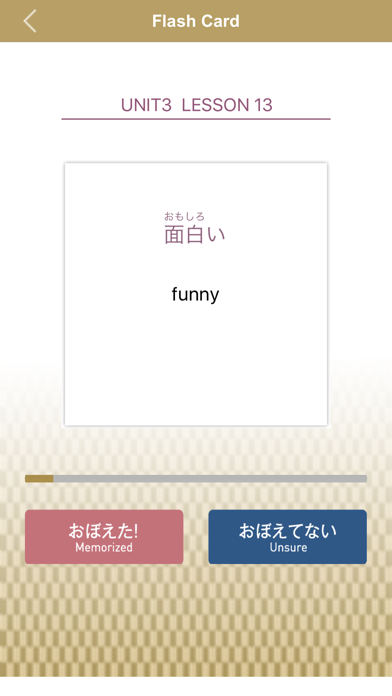
Use [Flash Card] to learn words related to a lesson by listening to them repeatedly. Some Beginners’ level words are accompanied by easy-to-understand illustrations.
Touch “List” to display a word list. Words, Romanized spellings, English translation, and verb groups are attached to the words on the list."V1", "V2", and "V3" denote Verb Groups 1, 2, and 3, respectively; "i" and "t" denote intransitive and transitive verbs, respectively.
Example: 書く kaku write "V1t"
In the Auto mode, cards are automatically played. Choose “Show All” to play all of the cards or “Hide Memorized Cards” to play only cards not yet memorized.
In the Manual mode, the cards are sorted into two piles: “Memorized” by swiping to the left, and “Unsure” by swiping to the right. The same operation can also be performed using the “Memorized” and “Unsure” buttons.
Improve Listening Ability in Quiz Format with [Listening] きく
* Available Offline
Use the quiz-style [Listening] きくfunction to listen to sample sounds related to a lesson, and choose the correct answer to place in the parentheses ( ). The sounds can be played repeatedly.
Check Pronunciation with [Speaking] はなす
* Online Only
Use the [Speaking] はなす function to form sentences in accord with the displayed contents by using grammar learned in a lesson. Touch the Microphone icon to begin voice recognition, and then say the sentence out loud toward the screen. The voice recognition software will check whether the sounds spoken are correct or not.
Listen to the correct sounds by pressing play on the Answer screen. Practice by listening to the sounds repeatedly.
Touch the Next button to display the next question.
A high-speed Internet connection is required to use the [Speaking] はなすfunction.
----------------------------------------
Contact mail address
jp-kyoten@un.tsukuba.ac.jp
University of Tsukuba
Quoi de neuf dans la dernière version ?
Apple のアップデートにより、この App の機能が向上します。 新しく追加される機能はありません。
Minor bug fixes