Our Minds AR
iOS Universel / Education
DEVICE REQUIREMENTS:
• iPhone se, 6s and up
• iPad 2017 and up
• iPad pro 1, 2 and up
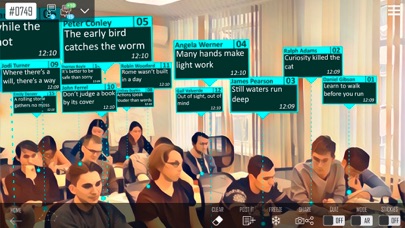
Our Minds AR is the first BYOD app for group learning and team work in Augmented Reality. In App Our Minds AR student’s utterances or questions pop up in a way similar to speech bubbles, as in comics. This new collaborative format is sure to make a class or a meeting more effective and engaging.
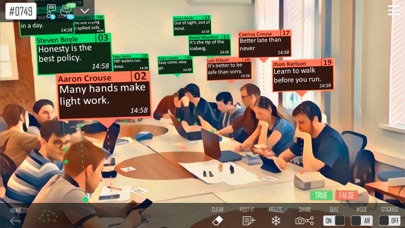
During a class, a teacher will immediately see the response of every student and will be able to grade him/her. During meetings or group work sessions every participant will get a chance to ask questions and share ideas without waiting for his/her turn.
This is a simple matter of typing in your smartphone the text message you wish other people to see. It will immediately appear in the speech bubble, thus, will be visible for anyone present in Augmented Reality. You can see students and their utterances at the same time. This is how the benefits of collaboration increase rapidly.
BYOD:
• App Our Minds AR works with any device compatible with ARKit.
• Students can use any device with installed Our Minds Chat, Discord or Telegram messengers
Features:
• Sending text messages and images to the speech bubbles.
• Sending screenshots to all class members.
• Answers may be graded by highlighting the correct answers in green and wrong answers in red.
• All the messages send by the students will be saved in the log.
• Saving room configuration.
• Three available messengers: Our Minds Chat, Discord and Telegram.
• A teacher can broadcast all the messages to the common screen via АirPlay.
How does it work?
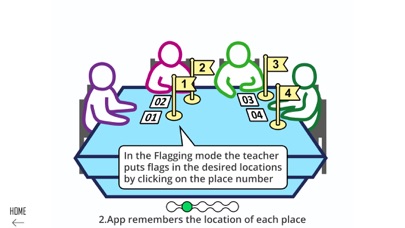
Before the class a teacher assigns a number to each seat in the classroom. This can be done by marking the desks with the printed numbers. Then, a teacher goes to the mapping mode in the Our Minds AR app and marks the location of each student’s seat using the camera. Now the group can start working in Augmented Reality. All the texts typed in a messenger will appear in speech bubbles.
vKontakte
---------
At the beginning of work, the teacher must inform all students of the name of the group 'Our Minds AR' on vkontakte. After entering the group, students can write to the bot located on the server. To get to the right lesson, students need to write a bot key of the lesson in the format # 'occupation number', for example: # 1234, # 1100. After that, students need to report the number of the place they occupy in the format # 'number of place', for example: # 1, # 10.
Discord
---------
At the beginning of work, the teacher must inform all students the invitation code to the Discord server 'Our Minds AR'. After logging into the Discord server, students will be able to write to the Our Minds Bot bot located on the server. To get to the right lesson, students need to write a bot key of the lesson in the format # 'occupation number', for example: # 1234, # 1100. After that, students need to report the number of the place they occupy in the format # 'number of place', for example: # 1, # 10.
Telegram
-------------
To start the work, the Teacher should tell to students the name of the Telegram Bot which is going to be used for the lesson. Before starting the work, students should send their place numbers to the Bot. After that they will be able to send their messages. All messages will be shown in augmented reality.
Quoi de neuf dans la dernière version ?
Some bugs were fixed.