Wordbook - Grab Words Anywhere
iOS Universel / Education
The best way to use Wordbook:
1. While reading from web pages or books on your iOS devices, select the word that you're not familiar with or want to memorize.
2. After selecting the word(s) by touch and hold or double-tap, a few system options will appear, including Copy, Paste, and Share.
3. Click "Share...", there will be a list of Apps that you may share the word to, pick Wordbook among those.
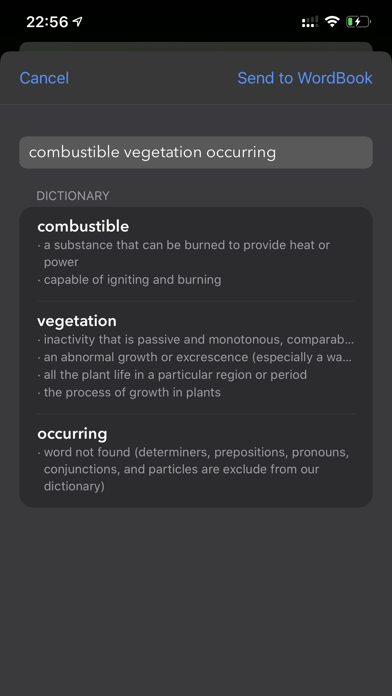
4. Now, our Wordbook extension will show the definition of the word(s).
5. Click the "Send to Workbook" button located at the top right corner, which will send those words to your own Wordbook for a future reminder to help you memorize them.
5. The next time you open your Wordbook, the word you want to memorize will be there for you to review.
Special Tips:
- Word Finder for Wordle, Scrabble, or Word Puzzles. Search words using wildcards such as '?' and '*':
'?' - as any single character.
'*' - as any length of characters.
The best way to use Wordbook:
1. While reading from web pages or Apps on your iOS devices, select the word that you're not familiar with or want to memorize.
2. After selecting the word(s) by touch and hold or double-tap, a few system options will appear, including Copy, Paste, and Share.
3. Click the "Share..."; there will be a list of Apps that you may share the word to. Pick Wordbook among those.
4. Now, our Wordbook extension will show the definition of the word(s). And you may send those words to your own Wordbook for a future reminder to help you memorize them by clicking the "Send to Workbook" button located at the top right corner.
5. The next time you open your Wordbook, the word you want to memorize will be there for you to review.
6. We recommend you check out the real-world usage of the word by clicking the "news" and "web" button under the definition; find out the visual representation of the word by clicking the "images" button beside it; hit the "translation" button if you want to the translation to your native language.
- Grab words anytime
I used to write down all the words I did not fully understand in my notebook. Not only copying each word is breaking my reading experience, and also it's easy to lose after a while. In WordBook, you can quickly grab any words I'm reading and "share" them with my Wordbook, like sharing a text with a close friend. Wordbook will put it into a list and remind you to review them until you can fully master those words.
- Sync across devices via iCloud
With the lovely feature and service of iCloud, your personal list of words in Wordbook will be able to sync across all iOS, macOS, and watchOS devices. It means when you add words from the iPad and work them on iPhone or vice versa.
- Quick Revise with Apple Watch App
An Apple Watch App also comes alone with Wordbook. If you allow Wordbook to send you reminder notifications, you can keep working on your words on your watch, anywhere, anytime at your convenience.
- Spacing memorize
The most effective way that technology can bring to you on memorizing things is spacing memorization. It means to show you the words repeatedly in the first few hours, then the next day, subsequently after several days to enforce the memory. Wordbook will do that automatically. Not only that, when you give feedback each time you see a word in the App: fully, kind of, or not remembering, Wordbook will adjust how and when the word will show to you later next time. A perfect pace designed just for you until you can get a full grip.
- Master the language in English, not lost in translation
A strong vocabulary is a crucial for mastering language and understanding valued information. Wordbook believes learning the meaning of the word in English will push the understanding of the word to a deeper level.
Terms of use: https://www.wordbook.cool/terms-and-conditions
Privacy policy: https://www.wordbook.cool/privacy-policy
Quoi de neuf dans la dernière version ?
Improved Word Explanations: We've updated our app with better word explanations, making it easier than ever to understand the meaning of any word you come across.
Enhanced User Experience: We've also made some enhancements to the user interface, including improved navigation and a cleaner, more modern look.
Bug Fixes and Performance Improvements: We've fixed several bugs and made some performance improvements to ensure that the app runs smoothly on all devices.
More Words and Phrases: We've added even more words and phrases to our database, so you'll always be able to find the definition you're looking for.