Accountant Lite Calc iPad
iPad / Finance
Accountant for iPad is the perfect calculator for general everyday use. Use it for adding columns of numbers, invoicing, point-of-sale receipt generation, income taxes, VAT and percentages, and much more.
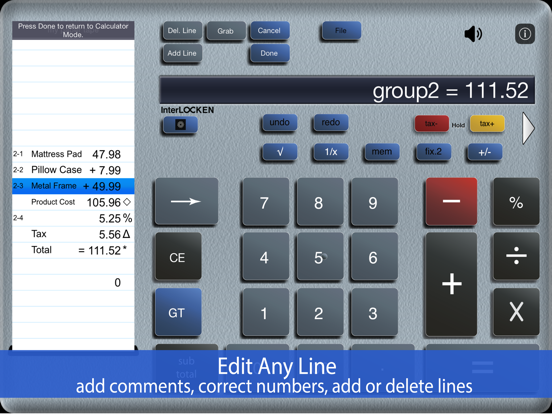
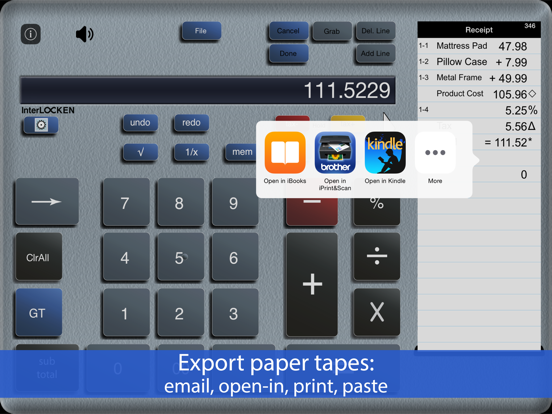
Save & retrieve important paper tape files for later use. Review & edit numbers, add or delete lines. You can also export paper tape files to iBooks©, DropBox©, Email or your favorite printing utility (see the FAQs).
Accountant for iPad features a full sized (1:1) keypad with TypeTone, a unique audio aid to help guide your finger back to the center of a key.
Free Version Description
==========
Upgrade in the App Store after evaluating this version of Accountant Lite Calc iPad.
==========
CPA's and Accountants: Please find 'Adding Machine: 10 Key Calc' in the App Store which is a true '10-key' compliant adding machine to add streams of numbers using reverse numeric/operator entry (see the 1st FAQ).
==========
Recent Press:
==========
● Over 400 consecutive days in the top 200 ranking of the Apple Finance Category.
● Ranked in "Top 10 - Finance" in the App Store.
● Strategic Finance (Tools of the Trade): "If you're looking for a professional desk calculator…..check out Interlocken's Accountant for iPad."
● AppsWild.com: "Whether you're tracking your monthly budget, coming up with an estimate of costs for a project you're working on....this App should be your first choice."
==========
About
==========
● Review your paper tape history and fix errors as needed.
● Freely chain + - x / % 1/x √
● TypeTone - a major innovation to aid accurate key entry using audio feedback.
● Full size (1:1) realistic keyboard.
● Export a PDF file to iBooks, Dropbox, Email, or your favorite printing utility.
● Add comments using voice dictation.
● Add, delete and modify lines and recompute results automatically.
● UNDO/REDO.
● Save paper tapes to disk for later use.
● TAX+/ TAX- keys for VAT calculation
● 3 display formats: fixed, fix+, float
● Comprehensive set of help screens.
● 4 Orientations: Landscape Left/Right + Portrait
● International number formatting (Settings -> General -> International).
==========
FAQ's
Q1. What is the difference between this App, 'Accountant for iPad', and '10 Key Calc HD' in the iPad App. Store.?
A1. Both calculators are single-column adding devices with full-size (1:1) keyboards and are optimized for the iPad user interface. ‘Accountant for iPad’ supports the free chaining of +, -, x, /, %, √, 1/x and is easier to use. '10 Key Calc HD' uses reverse number/operator the same as a 10 Key Adding Machine, commonly used by CPA's and Accountants.
Q2. Can I touch-type?
A2. 'Accountant for iPad' has several aids for touch-typing: TypeTone variable audio feedback, 1:1 scale keyboard, or, scale and reposition the keyboard to fit your hand best. There is also support for right and left-handers.
Q3. How do I edit an incorrect number or add & delete lines from the paper tape?
A3. Touch any line of the paper tape to go into edit mode. Touch the side controls: Add Line, Delete Line. You can also edit numbers, and split groups. Press Done to return to Calculator mode.
Q5. Tell me about Email, Printing, and Exporting a Paper Tape.
A5. From the Export dialog, select from: Email, Print, Copy or Open-In. Email includes a pdf attachment. Print requires an AirPrint capable printer. Open-In will cause a menu of 3rd party Apps to appear that can receive a hardcopy of your paper tape; for example, iBooks, DropBox, and 3rd party printer Apps for Brother, HP, Epson, Canon and more.
Quoi de neuf dans la dernière version ?
1. The 'Edit' file name button AND file sort buttons, in the file manager, was hidden on some iPad models
2. A link to the Interlocken privacy policy was added in the App