Whalefy: Manual Budget Tracker
iPhone / Finance
Whalefy — an easy-to-use assistant for managing your budget
Whalefy helps you manage your personal budget with a simple and clean interface. Everything you need for tracking your money is in one place — without unnecessary complexity.
No Ads
From our point of view, a financial app is not a good place for advertising. That is why Whalefy does not disturb you with banners, pop-ups, or short video ads.
Transactions
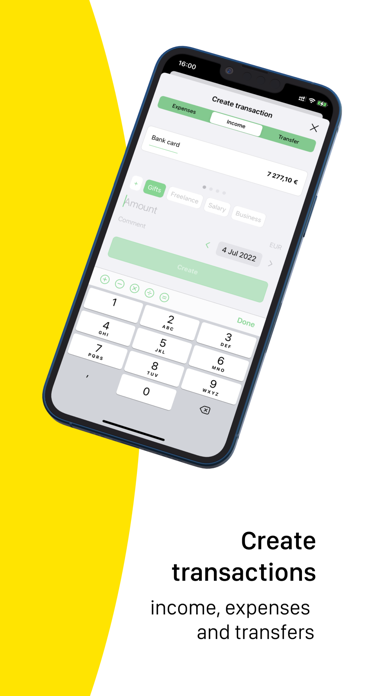
Whalefy supports three types of transactions to help you record your financial activity: income, expenses, and transfers.
Each transaction can include a short comment, so you can keep important details and remember what the transaction was for.
Wallets
Create as many wallets as you need: cash, cards, savings, investments, credit cards, loans, and more.
You can create wallets with positive or negative balances, making it easier to track both your money and your debts.
Categories
Income and expense categories help you understand where your money comes from and where it goes.
They give you a clearer picture of your cash flow and make budget tracking easier.
Advanced Analytics
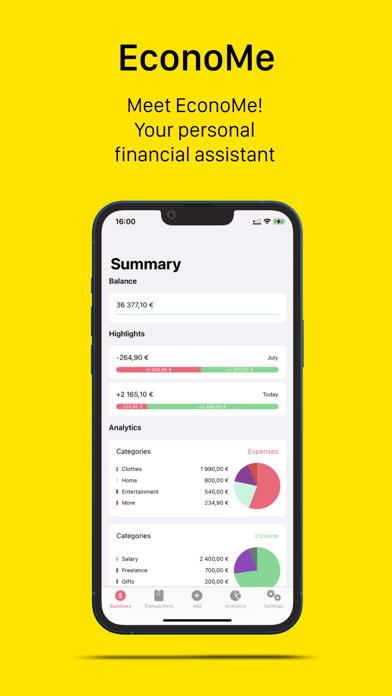
Ratings, charts, and diagrams for different time periods help you analyze your budget in detail.
Whalefy gives you a clear overview of your income, expenses, and balance, so you can better understand your financial habits.
Data Security
Your data is stored securely and protected using modern security practices.
Whalefy does not connect to your bank accounts and does not access your banking credentials. All transactions and wallets are created manually by you.
Simple and Reliable
Whalefy is designed to be easy to understand from the first minute.
It is a simple personal finance tool that helps you track your budget, organize your money, and stay in control of your finances.
Terms of Use: https://www.apple.com/legal/internet-services/itunes/dev/stdeula/
Quoi de neuf dans la dernière version ?
Analytics
Analytics can now be viewed not only for completed months. By default, Analytics now shows data for the current month.
Analytics Periods
We added the ability to view analytics not only for a single month, but also for a selected period.
The first tap selects the starting month, and the second tap selects the ending month. To view analytics for just one month, simply tap the same month twice.
UI Improvements
In dark mode, we improved the display of transfer transactions so that the colors no longer blend together and are easier to distinguish.