Body Vitals:Health Widgets
iPhone / Forme et santé
LE TERMINAL BLOOMBERG POUR VOTRE CORPS
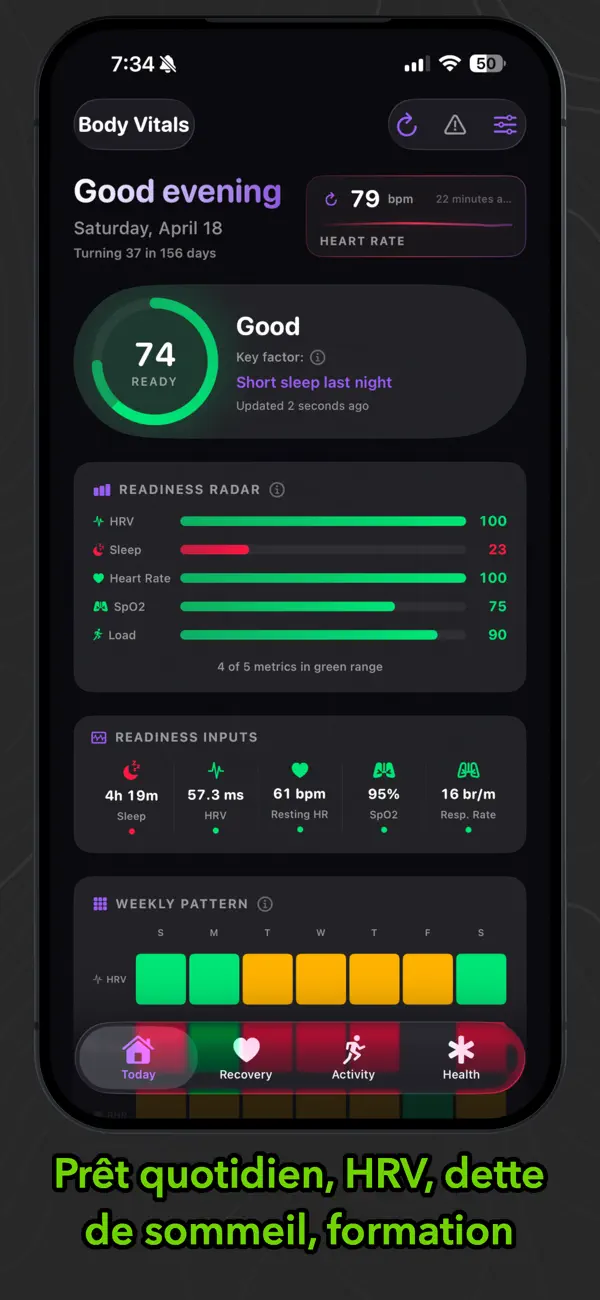
Body Vitals est un tableau de bord de santé basé sur des widgets pour iPhone. Votre score de préparation, votre HRV, vos phases de sommeil, votre fréquence cardiaque au repos, votre SpO2, votre VO2 Max, vos pas, vos entraînements et plus encore s'affichent en direct sur votre écran d'accueil, votre écran de verrouillage et votre écran StandBy, et non cachés dans les menus.
Apple Watch (Pro)
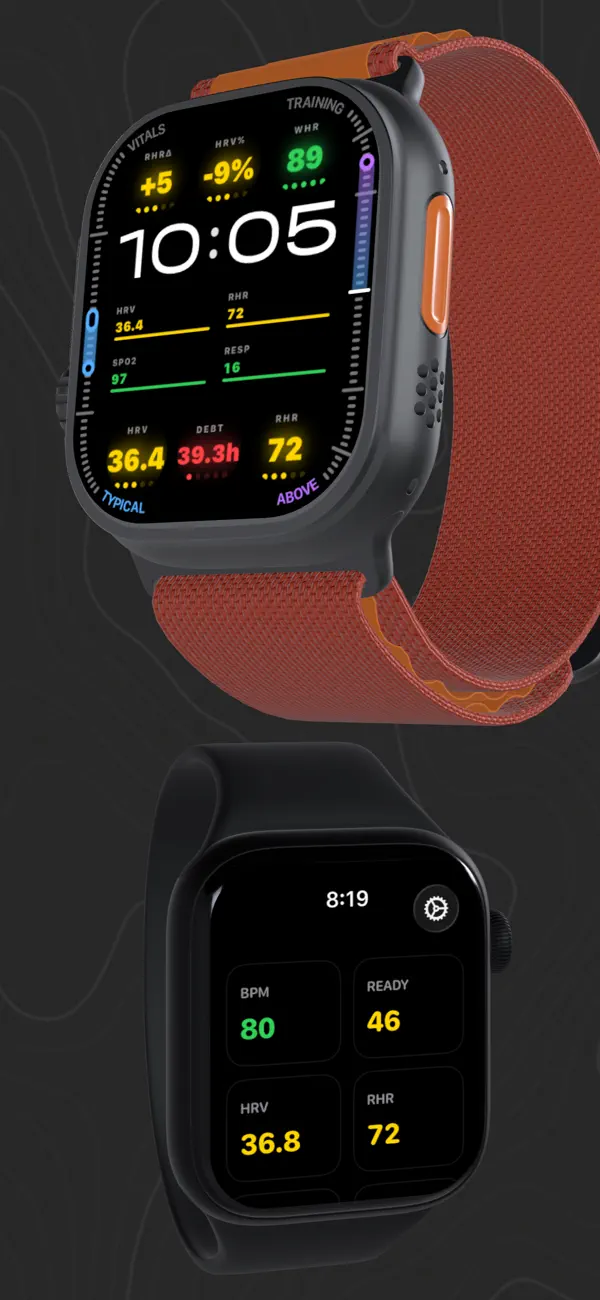
Apportez vos principales mesures de performance sur votre poignet avec des complications et une application de montre dédiée. Choisissez exactement quelles mesures vous souhaitez afficher, choisissez la fréquence cardiaque en direct comme mesure de complication, et appuyez sur "Synchroniser maintenant" pour demander une capture d'écran fraîche de votre iPhone.
Deux styles de complications (grille unique et 4-métriques) facilitent la construction d'une lunette qui correspond à vos objectifs, et l'application de la montre comprend un mode Texte grand optionnel pour des aperçus rapides.
Un score. Pas de devinettes.
Un seul score de préparation de 0 à 100 vous indique si aujourd'hui est une journée de poussée ou une journée de récupération. Il est construit à partir de la HRV par rapport à la ligne de base, de la qualité du sommeil, de la fréquence cardiaque au repos, de l'oxygène sanguin et de la charge d'entraînement. Après 90 jours, il s'ajuste à votre corps, et non aux moyennes de la population.
Voir ce que aucune application ne peut faire.
Body Vitals lit à partir d'Apple Health - où convergent vos applications - et relie les points pour obtenir une vue d'ensemble complète.
Exemples des informations que vous pouvez mettre en évidence :
- "L'HRV est en baisse et la caféine est élevée. Arrêtez plus tôt aujourd'hui."
- "La charge d'entraînement augmente tandis que la récupération glisse. Réduisez l'intensité."
- "Un sommeil profond plus une HRV élevée indiquent une journée en bonne santé."
Fonctions gratuites
- Tableau de bord à partir de widgets sur l'écran d'accueil, l'écran de verrouillage et l'écran d'attente.
- Score de préparation quotidienne
- Plus de 20 mesures de santé Apple avec des vues détaillées dédiées.
- Carte thermique du schéma hebdomadaire (7 jours x 5 signaux)
- Tendances à plusieurs périodes (1W, 1M, 6M, 1Y) avec des résumés de tendances clairs.
- Séquences de objectifs, contexte hebdomadaire/mensuel, exportation et partage (CSV et texte de résumé)
- Aucun compte requis
Déverrouillages Pro
- Application Apple Watch + complications + tableau de bord sur le poignet
- Coaching quotidien d'IA et coach de santé d'IA neuronale (sur l'appareil)
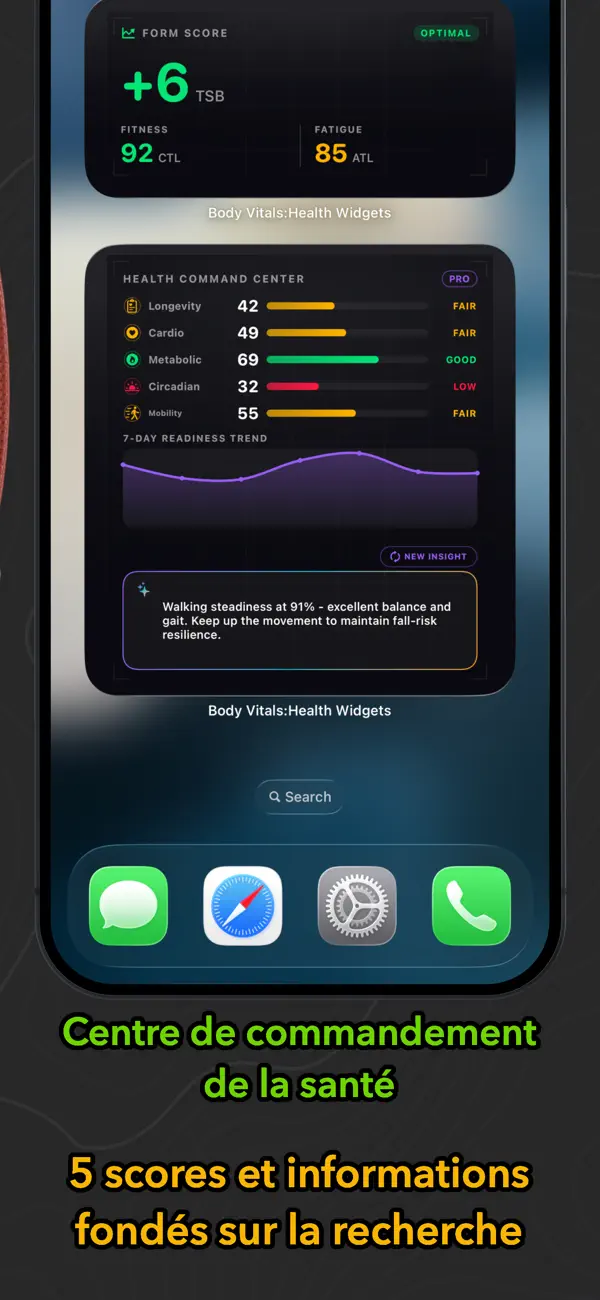
- 6 scores de santé composés : Longévité, cardiovasculaire, métabolique, circadien, mobilité, charge allostatique.
- Les scores composés décomposent les entrées afin que vous puissiez voir ce qui motive chaque score - avec des explications en langage clair et des informations d'IA.
- Intelligence de formation : Zone 2, Ratio A:C, CTL/ATL/TSB
- Intelligence de récupération : dette de sommeil, capacité quotidienne, préparation au travail, prévision de récupération, radar de préparation.
- Chronotype et schéma circadien : détection du chronotype, gravité du décalage horaire social, score d'alignement (0-100), fenêtres optimales et un graphique de tendance du milieu du sommeil sur 14 nuits.
- Entraîneur de respiration : séances de respiration guidées pour le biofeedback HRV, avec historique des séances et résultats.
- Tendances et corrélations : graphiques croisés de 30 jours et points clés simples (sommeil vs HRV, pleine conscience vs fréquence cardiaque au repos, et plus encore)
- Bilan de l'entraînement : coaching narratif post-entraînement avec un écran de détail interactif.
- Widgets Pro : grand centre de commande de santé, motif hebdomadaire sur l'écran d'accueil, cadran de préparation StandBy et plus encore.
Coaching IA qui reste privé
Body Vitals utilise les modèles de base d'Apple pour l'entraînement sur l'appareil lorsque vous passez à Pro. Pas
Quoi de neuf dans la dernière version ?
Vitals du corps 3.9 (Veuillez signaler tout bug ou commentaire provenant des paramètres de l'application -> Assistance ou écrivez-nous à escapethematrix.app@outlook.com)
Notes de sortie complètes : la version détaillée et longue de ces notes est livrée dans l'application - Paramètres -> À propos -> Nouveautés.
Marquez votre journée. Réveillez-vous en sachant ce que cela vous a fait.
Echo (Pro) - taggez votre journée en dix secondes et découvrez le lendemain matin à quoi ces choix sont liés, et si votre corps a réellement suivi le schéma. Environ 30 tags - sauna, plongée froide, alcool, repas tardifs, entraînement intense, stress, voyage, respiration - chacun soutenu par une étude citée et vérifié contre votre propre HRV, fréquence cardiaque au repos, sommeil et préparation.
Rien n'a été inventé - chaque ligne Echo est écrite et référencée, jamais générée par l'IA. Associations, pas de promesses.
Vos aliments apparaissent immédiatement - Nutrition x Récupération ne semble plus vide avant le quatorzième jour. Voyez immédiatement tous les nutriments enregistrés, avec des moyennes, une tendance sur 14 jours et le moment exact où vous les avez enregistrés.
Alcool x Récupération - jours de consommation d'alcool, moyenne, pic et total de 30 jours visible à partir de la première boisson que vous enregistrez.
Vos unités, à partir de l'application Santé - poids, taille, distance, température et eau suivent désormais tout ce que vous définissez dans Santé, chacune de manière indépendante. Pensez en livres mais courez en kilomètres ? Les deux, sans rien à configurer. La pierre fonctionne aussi, et une nouvelle section Unités dans les Paramètres indique où modifier chacune d'entre elles.
Nouveau icône d'application - œuvre d'art sombre à pleine couverture qui appartient à un écran d'accueil sombre, plus une version teintée pour les écrans d'accueil teints. Même icône sur Apple Watch et à l'intérieur de l'application.
Corrections - des conversions d'unités plus précises sur les appareils américains, un graphique corrigé de la température du poignet, un texte d'informations sur l'IA plus clair et un crash de fond rare résolu.
Tout fonctionne sur l'appareil. Vos données de santé ne quittent jamais votre iPhone.