AnyToDMG
macOS / developpeurs
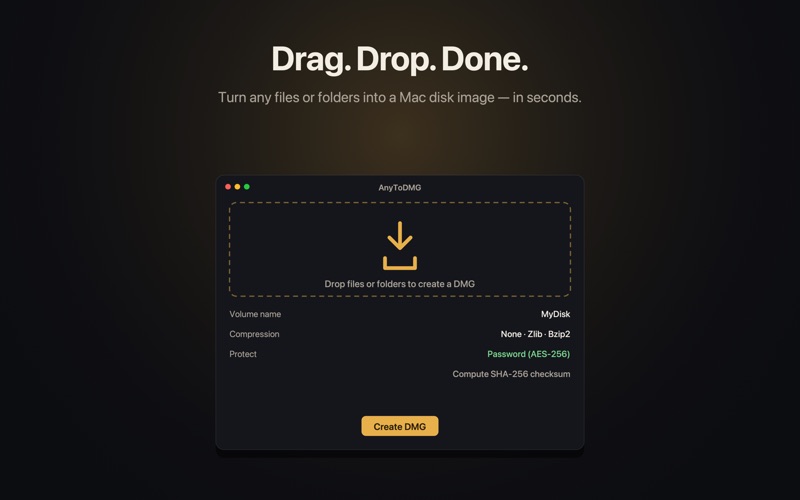
AnyToDMG does one thing beautifully: turn any files or folders into a Mac disk image. Drag, drop, done.
It started as the simplest DMG creator on the Mac — and it still is. Open it, drop what you want, and you get a clean, ready-to-share .dmg. No wizards, no clutter, no nonsense.
THE BASICS (free, forever)
• Drag and drop any files or folders — they land in the DMG exactly as you arrange them.
• Compression: keep it uncompressed, or shrink it with zlib or bzip2.
• Password protection: lock the image with real AES-256 encryption — only someone with the password can open it.
• Integrity: generate a SHA-256 checksum of the result, ready to copy and share.
• Shortcuts support — build a DMG from any Shortcut or automation.
• A single, focused window. Set your options, watch real progress, reveal the result in Finder.
ANYTODMG PRO (one-time upgrade)
For people who send sensitive things to other people. Pro adds true public-key cryptography and serious automation:
• OpenPGP encryption — encrypt a DMG to a recipient's public key, so only THEY can open it. AnyToDMG tells you exactly who can decrypt, every time.
• Digital signatures — sign your disk images so recipients can verify they came from you and weren't tampered with.
• Key management — generate your own keypair, import recipients' public keys, export yours to share. Your private keys stay protected in the macOS Keychain.
• Batch queue — line up many jobs and run them all, with per-item progress and results.
PRIVATE BY DESIGN
Everything happens on your Mac. AnyToDMG has no account, no servers, and no network access. Your files never leave your machine, and we never see them. OpenPGP is done entirely in-process — no external tools to install.
Pro is a single one-time purchase. Buy once, yours forever on all your Macs. Restore Purchases is one tap away.
A faithful rebuild of a Mac classic — same instant simplicity, now with modern encryption for the people who need it.
Quoi de neuf dans la dernière version ?
Full passphrase support for your private keys.
• New: Protect a new key with a passphrase. When you generate a key, you can optionally set a passphrase (with confirmation) so your private key is encrypted at rest.
• New: Open encrypted .xgpg files whose key is passphrase-protected. AnyToDMG prompts for the passphrase, unlocks the key, and decrypts — and remembers it for the rest of your session so a batch only asks once. Decrypting is always free.
• New: Sign with a passphrase-protected key. When you sign an encrypted DMG, AnyToDMG asks for the key's passphrase up front (so a wrong entry never wastes a build) and reuses the same session unlock as decrypting.
• Improved: Clearer prompts and errors throughout key generation, signing, and decryption.