FireSQLView 2
macOS / developpeurs
- View the Table Content of an SQLite Database File -
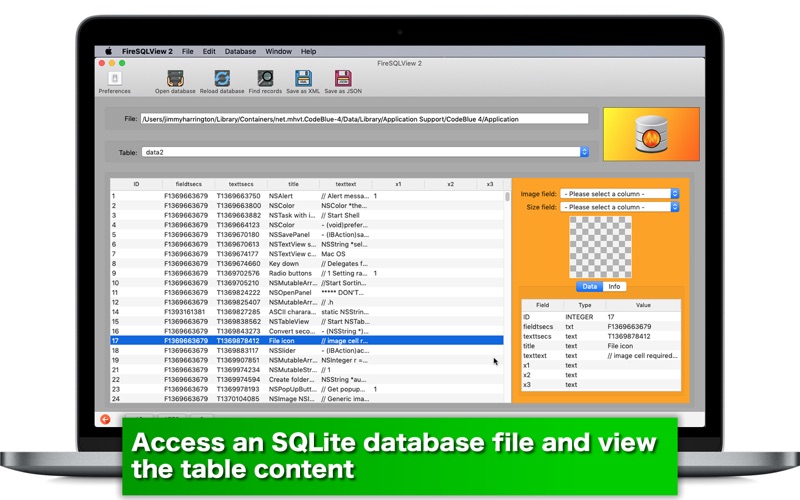
macOS gives software developers a great tool in storing and retrieving data. The SQLite library allows them to programmatically create a database. The question is how do they read the database that their app has created. FireSQLView 2 is an essential tool in reading the content of an SQLite database table. If you have a record with a field containing blob data and another with its data size, FireSQLView 2 even lets you see the data content as a picture.
- What's new? -
1.Run a search with up to three keywords to find a record.
2.Save the entire dataset for the selected table as a JSON file.
3.Right-click on a record in the data list to copy data into the clipboard.
4.The application is now available as freeware with an in-app purchase that gives you full functionality. You can use the application with free of charge for one week. After a week of fully-functional use, it will verify your purchase receipt. Therefore, continuous use of this application will require an in-app purchase.
- Features -
1. Read the content of an SQLite database table you select.
2. View blob data as a picture.
3. Save the selected record as a text file to your disk. A resulting text file has tab-separated strings containing field names and text values for the selected record.
4. Right-click on a record in the data list to copy data into the clipboard.
5. Save blob data as an image file to your disk.
6. See which field has the primary key.
7. See the data type of each field.
8. See the default value of each field.
9. Run a search with up to three keywords to find a record.
10.Save the entire dataset for the selected table as an XML file or a JSON file.
11.The fullScreen mode is supported.
12.Languages: English only.
13.Application file size: 25.6 MB.
14.The application comes with a built-in 12-page user guide. Click on the button that says ‘User's guide for for FireSQLView 2’ in the Home screen.
- System requirements -
1. 10.13 (tested with 10.13.6), 10.14 (tested with 10.14.4), 10.15 (tested with 10.15.2 Beta)
2. 64-bit system
- Limitations -
1. In order for you to read its tables, an SQLite database must contain an SQLITE_MASTER table.
2. You can use the application with free of charge for one week. After a week of fully-functional use, it will verify your purchase receipt. Therefore, continuous use of this application will require an in-app purchase.
3. In order to let the application select a specific record in the main content list by selecting one of the search matches, the database table must have a primary key.
Quoi de neuf dans la dernière version ?
1. Fix: The application interface can go wrong after the user resizes its window.
2. The application replaces generic field names (0, 1, ...) with correct ones when the user export data as XML or JSON.