• KultureGeek
  • Comparateur de prix
       
iPhoneAddict
 iAddictv5Notre Application iPhone/iPad
  • Accueil Apps
  • Actualité Apple
  • Keynote Apple
  • Firmwares & iTunes
  • Contactez-nous
Accueil » Liste des Apps » Apps Mac » developpeurs » Text Icons
L'application n'est plus disponible sur l'App Store français
2.0 macOS €3,99€ Clovis Michel Pedroso Picanco 0 0 Do you want to create great icons in seconds? Text Icons is a great solution to create squared text (or Emoji & Symbols) icons. Select the border color (and size), the background color and text. Your text can be: • A Rich Text, where you can...
Text Icons

Text Icons

macOS / developpeurs

3,99€ au lieu de 4,99€
Acheter sur l'App Store

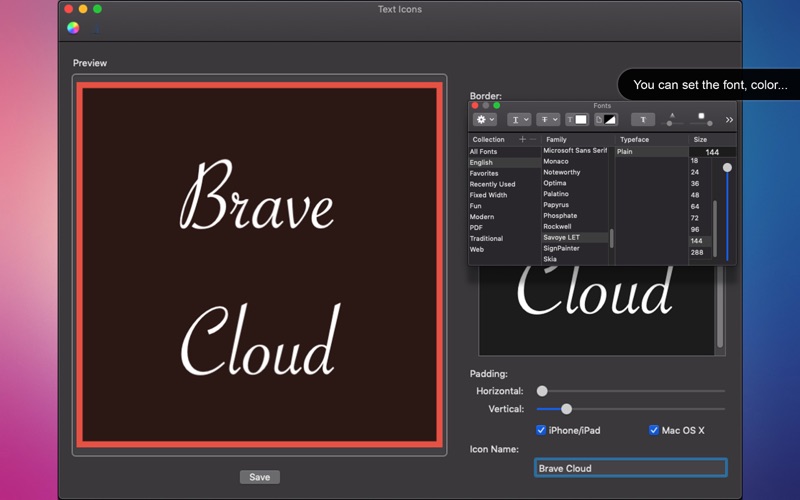
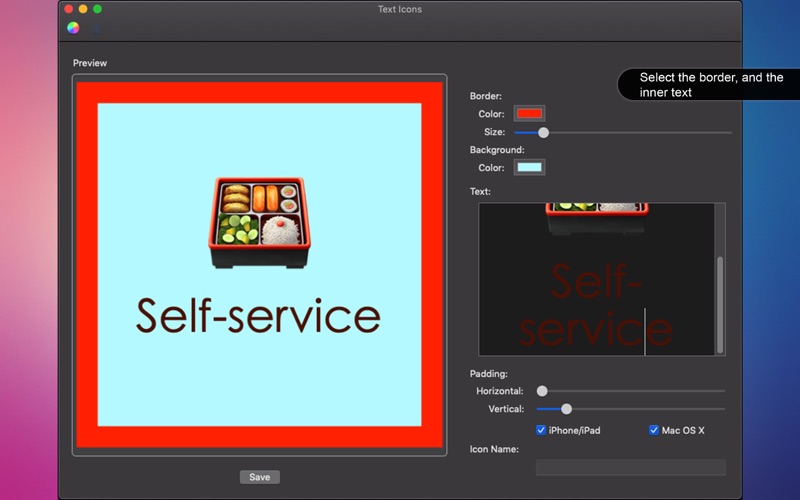
Do you want to create great icons in seconds? Text Icons is a great solution to create squared text (or Emoji & Symbols) icons. Select the border color (and size), the background color and text.

Your text can be:
• A Rich Text, where you can format it as you wish using the text and color icons.
• Emoji, where you can go to Edit > Emoji & Symbols. The Emoji size follows the font size.
• Symbol, where you can go to Edit > Emoji & Symbols.

Or any combination of the above.

You can also use the padding sliders and Format > Text to align as you want.

Rich Text Editing Capabilities means that you can select font and color for every piece of your text, which you allow you to create great combinations. Select the portion of your text and use the font and color icon on toolbar to change it.

When you save you save your icon, you can choose to save it for iPhone/iPad and/or Mac OS X. When you do, all required icons will be created with the correct size so you can drag then directly to your project. No need for a resize app.

Just few clicks and done!

•••••••••••••••••••••••••••••••
If you need help?
•••••••••••••••••••••••••••••••

Do you need any help? If you have any doubt or trouble with our products and company, like to make a suggestion or submit a request for a new feature, you can use the following tools:

Go to our website: ••• bravecl.com

There you can find:
• Frequently Asked Questions
• List of applications
• Tutorials
and more…

You can also send an email to: ••• help@bravecl.com
We’ll respond as soon as we can. Your contact is very important and with it we can constantly improve our apps.

En voir plus...

Quoi de neuf dans la dernière version ?

• New interface.
• Corrected the final icons sizes.
• Other bug fixes.

  • Screenshot #1 pour Text Icons
  • Screenshot #2 pour Text Icons
  • Screenshot #3 pour Text Icons

D'autres applications du développeur

Convert All Images
Convert All Images
/ macOS
Animals Pack
Animals Pack
/ iOS Universel
Happy Birthday Pack
Happy Birthday Pack
/ iOS Universel
Christmas Card Message - Text
/ macOS
Easter Frames - Cute Stickers
/ macOS

Note

(0 note)

Détails sur l'application

Version
2.0
Taille
3.5 Mo
Version minimum de macOS
10.10
Dernière mise à jour
29/08/2019
Publié par
Clovis Michel Pedroso Picanco

Newsletter App Store

Recevez chaque jour les meilleures promos

Actualité Apple

Image Les MacBook Pro M5 Pro/Max annoncés à la fin janvier ?
Les MacBook Pro M5 Pro/Max annoncés à la fin janvier ?
Image Hijack saison 2 démarre aujourd’hui sur Apple TV (1 épisode disponible)
Hijack saison 2 démarre aujourd’hui sur Apple TV (1 épisode disponible)
Image Apple Arcade va ajouter ces 4 jeux en février, dont Civilization VII
Apple Arcade va ajouter ces 4 jeux en février, dont Civilization VII
Image iPhone 18 (Pro) : des détails sur les tailles, Face ID sous l’écran et la Dynamic Island
iPhone 18 (Pro) : des détails sur les tailles, Face ID sous l’écran et la Dynamic Island
Partenaires : Actualité iPhone - Culture Geek
©2009-2026 i2CMedia | A propos |