Easy Access App for Dropbox
macOS / Economie et entreprise
The most complete way to use your Dropbox on a Mac. More than documents — browse, search, share, organize, and do far more with every file, all in one fast, beautiful, native app.
Easy Access r for Dropbox is built for people who live in Dropbox. Preview files instantly, share secure links and QR codes, keep important files offline, and even summarize and organize documents with private on-device AI — without the wait, the clutter, or the bloat of heavy sync clients.
Whether you're a freelancer juggling client folders, a student syncing assignments, or a team member sharing files across devices, this turns your Mac into a true Dropbox command center.
BROWSE & FIND
- Secure sign-in with your existing Dropbox account
- Finder-like browsing in a clean list or thumbnail grid
- Sort by name, size, date, or kind
- One-click filters: Folders, Images, Documents, Audio & Video, Archives
- Places shortcuts for Photos, Videos, Documents, PDFs, and Archives
- Search your entire Dropbox by name or content — find anything in seconds
CREATE & ORGANIZE
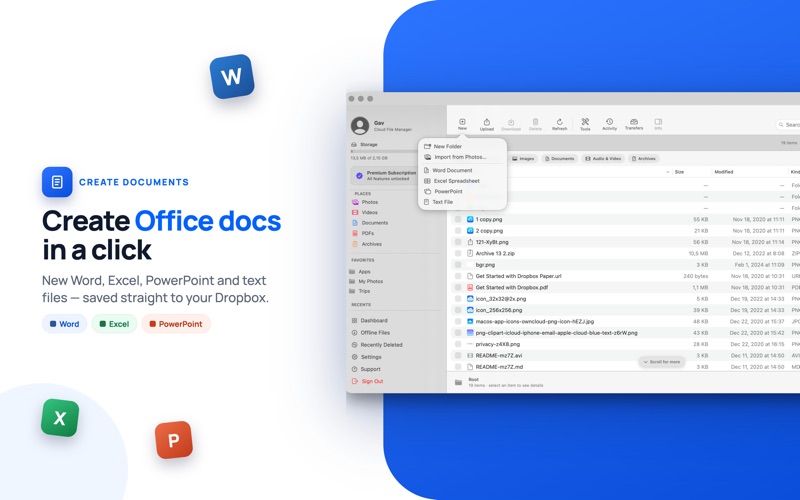
- Create Word, Excel, PowerPoint, and text documents right inside Dropbox
- Rename, copy, move, and make new folders — like Finder, with no re-uploading
- Star files and folders to Favorites for one-click access
- Colour-code folders and add coloured tags to stay organized
- Smart Folders that re-run your saved searches automatically
- Recently Deleted recovery and full version history, so nothing is ever lost
UPLOAD, DOWNLOAD & SHARE
- Drag & drop from Finder, or import straight from your Photos library
- Download single files or entire folders in one action (as a zip)
- A Transfers panel to watch, retry, and cancel transfers anytime
- Create share links and QR codes, copied and ready to send in one step
- Password-protect links and set link options for full control
- Invite people to shared folders and manage who has access
- A dashboard of every shared link, with instant one-click revoke
- Send via the native macOS share sheet — Mail, Messages, AirDrop, and more
OFFLINE, AI & POWER TOOLS
- Make any file available offline so it opens instantly, even without internet
- Watch Folder: drop files into a Mac folder and they upload automatically
- Private on-device AI (Apple Intelligence): summarize and chat with documents, Smart Rename, Auto-Organize, and a cleanup assistant — your
files never leave your Mac
- Extract text from images and scans (OCR)
- Merge & split PDFs, convert & resize images, and compress files to zip
- Storage analyzer for your largest files, plus a duplicate finder
- A home Dashboard and a live activity feed
WHY EASY ACCESS
- More than a documents app — manage every file type, with sharing, offline, and AI built in
- Native macOS interface that follows Light & Dark mode
- Fast and responsive, built to feel right at home on your Mac
- Lightweight — no heavy background syncing draining your battery or storage
- Works alongside or instead of the standard Dropbox app
- A detailed, built-in Help Manual covering every feature
Download Easy Access for Dropbox today and rediscover what fast cloud file management feels like on Mac
PLANS & PRICING
Browsing, search, sort, and view are free. Unlock everything with Lifetime ($19.99, one-time), Yearly ($14.99, 3-day free trial), or Monthly ($4.99). Prices may vary by region.
Subscriptions auto-renew unless cancelled 24h before renewal; manage or cancel anytime in your Apple Account settings.
Privacy Policy and Terms of Use
https://gavcris.app/privacy.html
https://gavcris.app/terms.html
I am Cristian Gav, developer on the Dropbox API and maker of Easy Access for Dropbox. Cristian Gav and Easy Access for Dropbox
are not affiliated with, developed, produced, or endorsed by Dropbox Inc. All trademarks, logos, and trade names used to identify Dropbox or
its products are the property of Dropbox Inc, registered in the U.S. and other countries. The Dropbox logo and name are trademarks of Dropbox
Inc.
Quoi de neuf dans la dernière version ?
Small UI fix