• KultureGeek
  • Comparateur de prix
       
iPhoneAddict
 iAddictv5Notre Application iPhone/iPad
  • Accueil Apps
  • Actualité Apple
  • Keynote Apple
  • Firmwares & iTunes
  • Contactez-nous
Accueil » Liste des Apps » Apps Mac » Economie et entreprise » MergePDF : Combine PDF files
5.0 macOS €Gratuit RootRise Technologies Pvt. Ltd. 0 0 MergePDF is an ultimate tool to merge two or more pdf files into single PDF document. MergePDF can also allows to set metadata and encrypt your merged document. MergePDF do perform merging operations by preserving exact PDF contents (means structure...
MergePDF : Combine PDF files

MergePDF : Combine PDF files

macOS / Economie et entreprise

Gratuit au lieu de 2,49€
Obtenir sur l'App Store

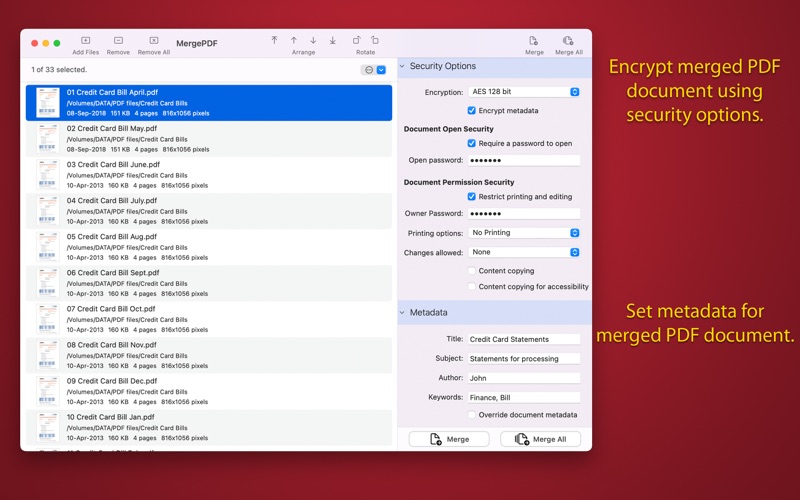
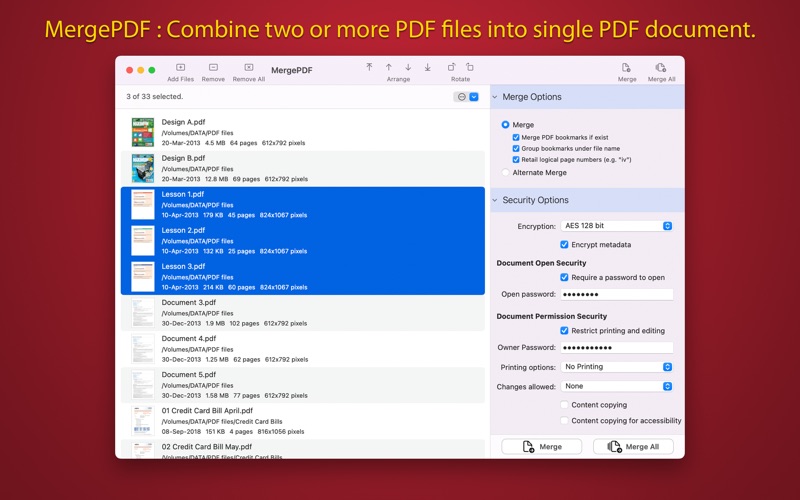
MergePDF is an ultimate tool to merge two or more pdf files into single PDF document. MergePDF can also allows to set metadata and encrypt your merged document. MergePDF do perform merging operations by preserving exact PDF contents (means structure of the file, color profiles, fonts, links, bookmarks) without losing document’s integrity and does it very fast.

FEATURES:

• Combine multiple pdf files into single PDF document.

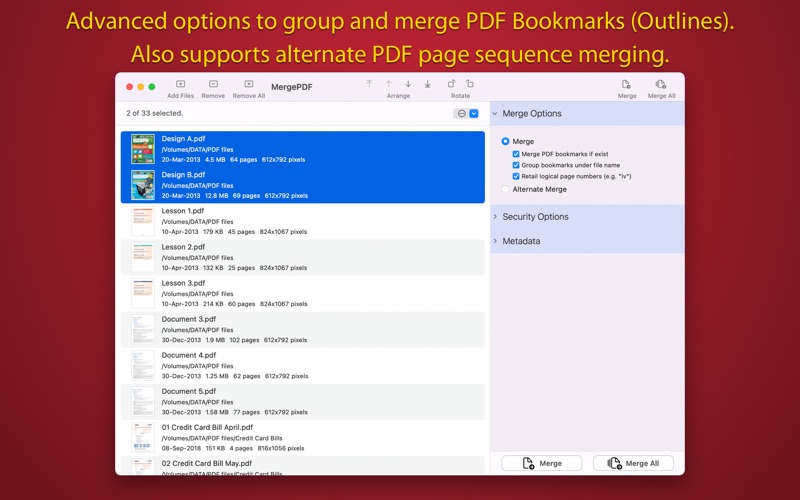
• Advanced options to to group and merge PDF outlines (Bookmarks).

• Alternate page merging option to merge files by switching document after reading single page and merge them together.

• You can arrange and shuffle files into conversion list and get same sequential pages in merged PDF.

• Assign metadata description of PDF document. Set Title, Author, Subject, and Keywords properties.

• Set security options to encrypt output PDF. Set option to require Open Password to open and view PDF and even restrict created PDF documents from printing and copying contents without owner password.

• Very flexible options to add files. Simply Drag & Drop into list or Right click Open With in Finder or Drop on "MergePDF" application to add files for export beside direct Add File/Folder buttons.

• Rotate all pages of PDF files.

Note: MergePDF is a standalone application running natively to merge PDF files securely on your computer.

*The free version has limitation to merge PDF files once per week. Get Premium to remove all restrictions and start merging PDF files an unlimited number times.

Privacy Policy: http://rootrisetech.com/app-privacy-policy
Terms of Use(EULA): https://www.apple.com/legal/internet-services/itunes/dev/stdeula/

En voir plus...

Quoi de neuf dans la dernière version ?

- Minor bug fixes and UI improvements to streamline with latest macOS.

If MergePDF is useful to you, we would appreciate an App Store review. It will help other people find the app and make them delighted.
  • Screenshot #1 pour MergePDF : Combine PDF files
  • Screenshot #2 pour MergePDF : Combine PDF files
  • Screenshot #3 pour MergePDF : Combine PDF files

D'autres applications du développeur

PhotoConvert
PhotoConvert
/ macOS
PhotoResize
PhotoResize
/ macOS
JPG to PDF
JPG to PDF
/ macOS
PDF to JPG Pro
PDF to JPG Pro
/ macOS
PDFGenius 4
PDFGenius 4
/ macOS
PhotoResize Pro
PhotoResize Pro
/ macOS
Voir toutes les apps

Note

(0 note)

Détails sur l'application

Version
5.0
Taille
3.5 Mo
Version minimum de macOS
12.0
Dernière mise à jour
13/01/2026
Publié par
RootRise Technologies Pvt. Ltd.

Newsletter App Store

Recevez chaque jour les meilleures promos

Actualité Apple

Image L’App Store génère un plus gros chiffre d’affaires pour les jeux que le Google Play Store et Steam réunis
L’App Store génère un plus gros chiffre d’affaires pour les jeux que le Google Play Store et Steam réunis
Image MacBook low-cost : Apple se bat pour limiter les coûts des composants
MacBook low-cost : Apple se bat pour limiter les coûts des composants
Image Brésil : Apple de nouveau sanctionnée pour la vente d’iPhone sans chargeur
Brésil : Apple de nouveau sanctionnée pour la vente d’iPhone sans chargeur
Image Apple et Amazon encore épinglés en Espagne pour avoir traîner à supprimer leurs clauses illégales
Apple et Amazon encore épinglés en Espagne pour avoir traîner à supprimer leurs clauses illégales
Partenaires : Actualité iPhone - Culture Geek
©2009-2026 i2CMedia | A propos |