iPhoneAddict Apps
  • Actualités
  • Accueil Apps
  • iPhone
  • iPad
  • Universelles
  • Mac
  • Apple TV
KG KultureGeek
App
iPhone / iPad Télécharger iAddict v5 Mac Télécharger iAddict Mac
  • Actualités
  • Accueil Apps
  • iPhone
  • iPad
  • Universelles
  • Mac
  • Apple TV
  • Archives keynotes
  • Firmwares & iTunes
  • Contactez-nous
  • Comparateur de prix
  • KultureGeek
Accueil » Liste des Apps » Apps Mac » Economie et entreprise » PDF pages Extractor & Splitter
7.1 macOS €3,99€ Ruchira Ramesh 0 0 Extract pages of choice from a PDF and save as separate PDF file. Pages could be selected by page range or explicit page numbers separated by comma. The application supports batch processing as well. This means that the application could extract...
PDF pages Extractor & Splitter

PDF pages Extractor & Splitter

macOS / Economie et entreprise

3,99€ au lieu de 9,99€
Acheter sur l'App Store
Facebook X E-mail

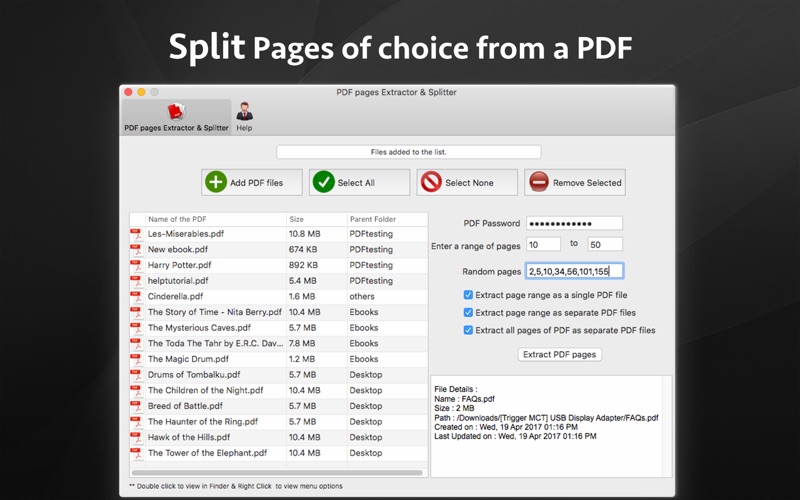
Extract pages of choice from a PDF and save as separate PDF file. Pages could be selected by page range or explicit page numbers separated by comma. The application supports batch processing as well. This means that the application could extract pages from even hundreds of PDF files at the same time.

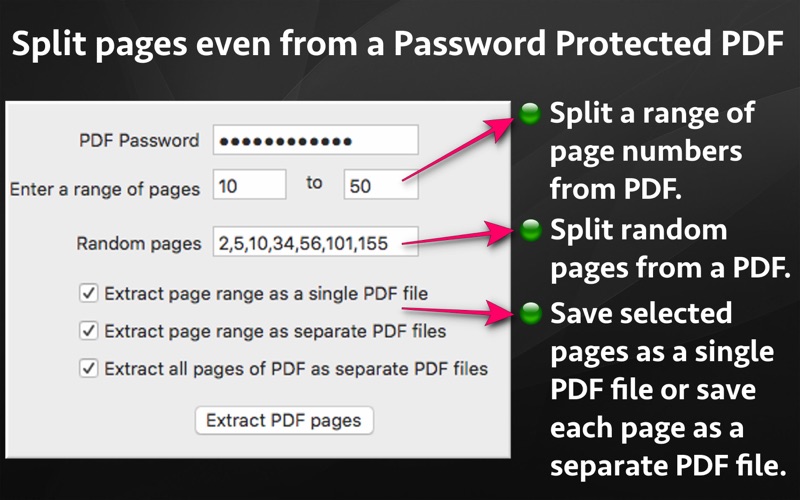
The application also supports Password Protected PDF files. This means that the application could easily extract pages even from PDF files that are protected by a password. Also, the application removes the password from the extracted pages.
(Note: You will have to enter the password in application.)

Using the application, you could specify a range of the pages to be extracted and saved.For example, if you want to extract from page 10 to page 20 of a PDF file, you could specify this range of 10 to 20 in the application. The application will extract these pages and save them either as a single PDF file or each page as a separate PDF file as per your choice.

Sometimes, we want to extract random pages from PDF. For example, if you want to extract only pages numbered 2,6,8,25, and 50 from PDF, this could be done as well. Inside the application just specify all page numbers separated by comma. The application will extract these random pages and save them either as a single PDF file or as a separate pdf file as per your choice.

If you want to extract all pages of PDF and save each of these pages as separate PDF, you could do this as well.

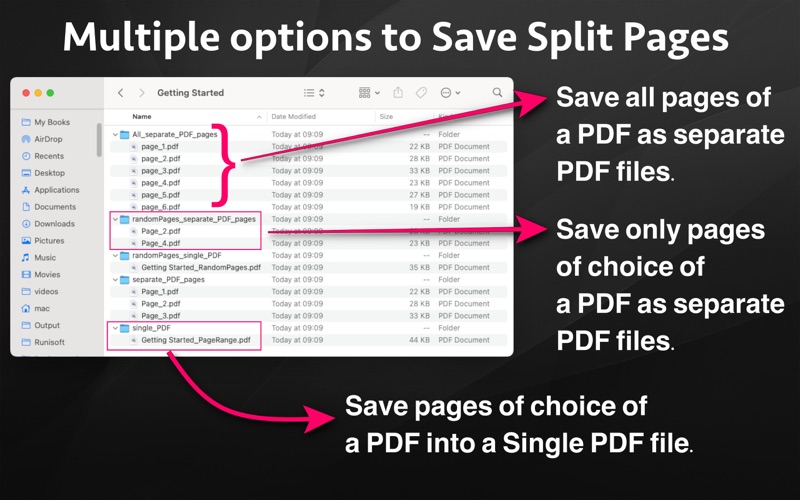
The extracted pages could be saved in following three ways :
a) All pages of choice could be extracted and saved as a single PDF file.
b) Each extracted page could be saved as a separate PDF file.
c) All pages of the PDF could be saved as a separate PDF file.

Benefits :
-- Reduce the file size by only taking the pages that are needed.
-- Share only the PDF containing the required pages.
-- Save PDF files without password
-- Remove unwanted pages from a PDF
-- Maintain documentation easily by extracting and keeping only important pages from a PDF.
-- Extracted pages could be easily used inside a document or a presentation.This makes documentation and presentation easy to prepare.

En voir plus...

Quoi de neuf dans la dernière version ?

- Now the application is a Universal application with support for both Apple Silicon and intel based Macs.
In case of any issue or questions, please write to us on support@runisoft.com. We will be happy to assist.
  • Screenshot #1 pour PDF pages Extractor & Splitter
  • Screenshot #2 pour PDF pages Extractor & Splitter
  • Screenshot #3 pour PDF pages Extractor & Splitter

D'autres applications du développeur

insta Ringtone Generatorinsta Ringtone GeneratormacOSPrivacy Suite Pro - Hide FilesPrivacy Suite Pro - Hide FilesmacOSPhoto CompressorPhoto CompressormacOSPhoto Pixel ResizerPhoto Pixel ResizermacOSVideo Clipper and CutterVideo Clipper and CuttermacOSVideo to Audio ExtractorVideo to Audio ExtractormacOSVoir toutes les apps

Note

(0 note)

Détails sur l'application

Version
7.1
Taille
15.5 Mo
Version minimum de macOS
10.11
Dernière mise à jour
21/03/2021
Publié par
Ruchira Ramesh

Newsletter App Store

Recevez chaque jour les meilleures promos

Actualité Apple

Image Apple limite les signalements de failles face au déluge de l’IA
Apple limite les signalements de failles face au déluge de l’IA
Image iPad Air 2027 : écran OLED, puce M5 et possible nouveau design
iPad Air 2027 : écran OLED, puce M5 et possible nouveau design
Image iPhone : Apple a capté 49 % des revenus de smartphones au 2e trimestre, un record
iPhone : Apple a capté 49 % des revenus de smartphones au 2e trimestre, un record
Image L’iPhone Air 2 aurait une Dynamic Island plus petite et d’autres nouveautés
L’iPhone Air 2 aurait une Dynamic Island plus petite et d’autres nouveautés
iPhoneAddict Apps

Le catalogue iPhoneAddict pour suivre les nouveautés, mises à jour et baisses de prix de l’App Store.

Apps

Toutes les apps iOS iPhone iPad Universelles Mac Apple TV

iPhoneAddict

Actualité Apple Archives keynotes Contact À propos KultureGeek

Suivez-nous

©2009-2026 i2CMedia. Tous droits réservés.