SQL Server Manager Pro
macOS / Economie et entreprise
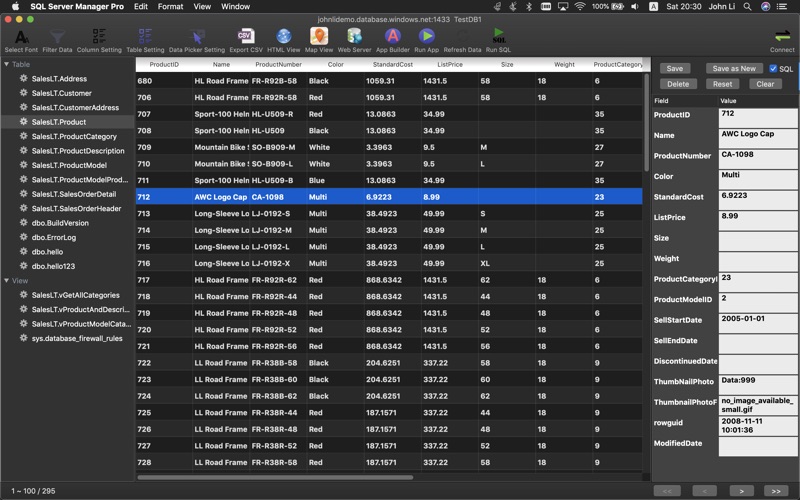
Connect to Microsoft SQL Server/Azure SQL Server/Sybase ASE on your Mac with SQL Server Manager, you can view data easily with Filter, Sort, Paging , and edit data directly on your Mac.
(This version have all features without in-app purchase product)
* Connect directly to Microsoft SQL Server , Windows Azure SQL Server and Sybase ASE, no middleware needed.
* Browser database tables and views
* View table data with paging table list, column resizable
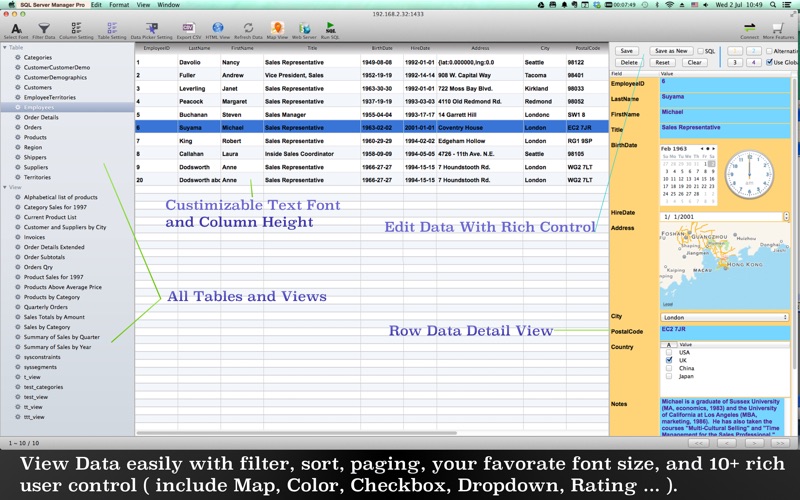
* 10+ data view UI control (include Map, Date Time, Checkbox, Rating, Color,Dropdown, Multi-select ...)
* Sort table by click on the column
* Show cross table data value by ID ( use the Data Picker Setting )
* Filter/Search table data on column
* Sort table data by click on the column header
* Choose tables to show and columns to show
* Drag drop rearrange column order and change column width in main table
* Zoom data via change data font size
* CSV View and export
* Html View with customisable template
* Works great with companion mobile app 'SQLServer Database Manager' for iPhone and iPad
(Windows Authentication is not supported.)
'Edit Data' Features:
* 10+ data edit UI control (include Map, Date Time, Checkbox, Rating, Color Picker,Dropdown, Multi-select...)
* Update table row data
* Delete table row data
* Add table row data
* Cross table ID,Value single or multi-select using the Data Picker
'Map View' Features:
* View Geolocation on map
Support two format:
1. Latitude and Longitude column data;
2. any column contain this format geolocation: {lat:11.123,lng:34.56}
* Auto update Geolocation by search address
Select address column to search, and select save to column to save the found geolocation.
Please select the column which have enough length to save Latitude and Longitude.
'Instant Web Server' Features:
* Publish data on local network with one single click, view and add data on any web browser from mobile devices or computers
* Easy setup template for list page and detail page
* Build-in form to add data
* Config URL Path, template and server port
* Build-in 10+ Html Table Template
'App Builder' Features:
* Build customized User Interface for your database
* Bind database table row data to user control
* Support Rows Table List, Row detail data controls, search field
Microsoft SQL Server Connection Config Example:
Server: 192.168.2.1
(IP address of the server, or domain name)
Port: 1433
(Default is 1433, or change to your customised configuration)
User: sa
Password: password
Schema:
(This can be empty, will list all database when connect)
Sybase ASE Connections Conifg Example:
Server: 192.168.2.1
(IP address of the server, or domain name)
Port: 5000
(Default is 5000, or change to your customised configuration)
User: sa
Password: password
Schema:
(This can be empty, will list all database when connect)
Sybase ASE: checked
Windows Azure Config Example:
Server: myazureserver.database.windows.net
(server address)
Port: 1433
(Default is 1433, or change to your customised configuration)
User: user@myazureserver
Password: password
DB.Schema: DBName
(This can not be empty for Windows Azure SQL Server)
Quoi de neuf dans la dernière version ?
Update App to support MS SQL Server 2022.