• KultureGeek
  • Comparateur de prix
       
iPhoneAddict
 iAddictv5Notre Application iPhone/iPad
  • Accueil Apps
  • Actualité Apple
  • Keynote Apple
  • Firmwares & iTunes
  • Contactez-nous
Accueil » Liste des Apps » Apps Mac » Economie et entreprise » Virtual Teleprompter Pro
1.0.32 macOS €7,99€ matthew sheedy 0 0 Online meetings can be challenging for presenters who are trying to juggle speaking notes, their appearance, talking speed and all the other challenges that comes with hybrid working. The Virtual Teleprompter is ideal to help with online meetings,...
Virtual Teleprompter Pro

Virtual Teleprompter Pro

macOS / Economie et entreprise

7,99€
Acheter sur l'App Store

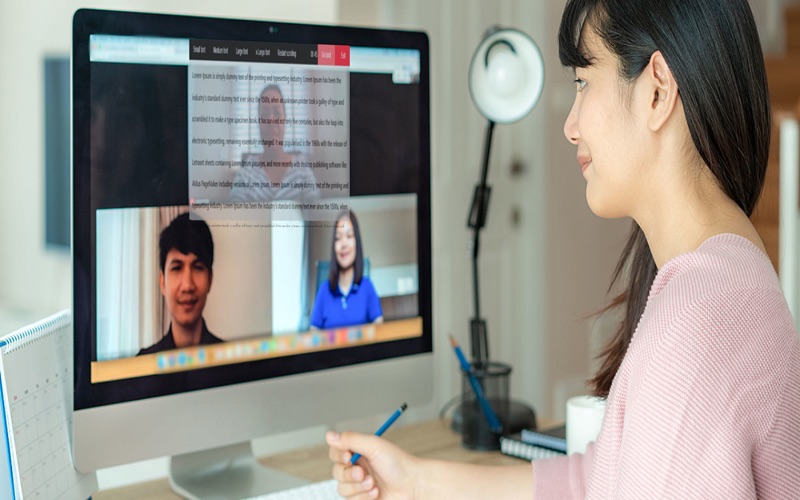
Online meetings can be challenging for presenters who are trying to juggle speaking notes, their appearance, talking speed and all the other challenges that comes with hybrid working. The Virtual Teleprompter is ideal to help with online meetings, interviews, presentations and speeches.

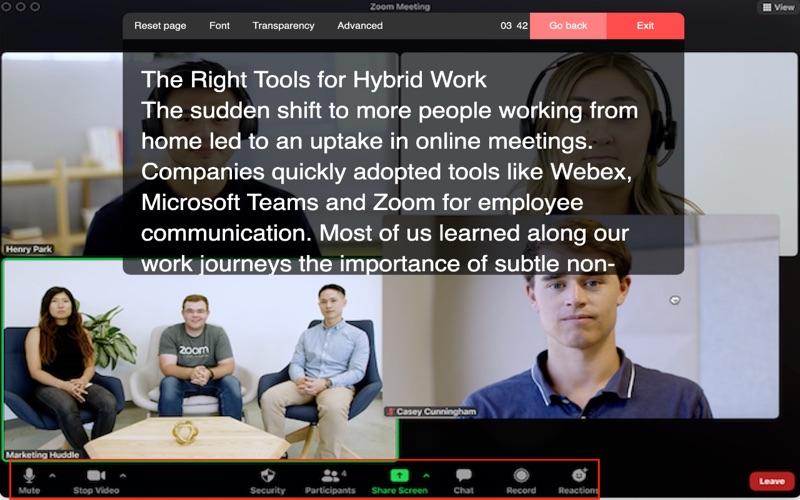
The Virtual Teleprompter app is an elegant teleprompter that runs on your laptop. The Virtual Teleprompter app is an ideal companion for online meetings, interviews, presentation, live streaming, content creators or making pre-recorded content. You can adjust the transparency of the overlay, speed, font size, and colors. Fine-tune everything and look natural and professional even while reading or referencing your notes.

Compatible with all meeting platforms such as Webex, Zoom, Microsoft Teams, Google Meet, GoTo Meeting, BlueJeans, Webinars and Live Streaming.

***Virtual Teleprompter App - Benefits and FAQ***
- Does the Virtual Teleprompter app work on all versions of Windows?
Yes, our teleprompter software has been developed for Windows 7, 8, 10, 11.

- Does the Virtual Teleprompter app work on Webex, Zoom, Teams, Google Meet, GoToMeeting?
Yes, our teleprompter app is fully agnostic meaning that it work on any PC and any platform. Whether you are using Webex, Zoom, Teams, Google Meet, GoTo Meeting, BlueJeans or YouTube Live Streaming, our application will integrate seamlessly. You should avoid putting the teleprompter window over the critical meeting control so you can easily access the mute button, webcam on/off button, screenshare etc. For more details on this please refer to our instructions page.

- You Can Speak Naturally
You can speak more naturally with a laptop teleprompter compared to physical notes because your notes are right in front of you instead of looking down at pieces of paper. Your head will gradually move from left to right as you read from the screen, allowing you to speak evenly to everyone in the room. When you read from a screen, you are able to stay on track with your speech while still connecting with your audience.

- Teleprompters allow for more precise wording
You can keep better precision than if you read from notes or try to remember what to say off the top of your head since you can read your script without losing your position. This advantage could be crucial in situations when the precision of your statements is critical. Legal and budget presentations, for example, frequently necessitate precision.

- You can concentrate on your nonverbal communication.
Nonverbal clues are frequently just as essential as what you say out loud. You may focus more of your attention on exhibiting the correct non-verbal clues to make your speech as impactful as possible when you know what you’re going to say and don’t have to worry about forgetting it. Furthermore, without notes, your hands are free to emphasise key points in your presentation.

- Your Professionalism Will Grow
It is critical to appear professional when speaking persuasively. Without scribbled notes or awkward pauses to distract your audience, you can exude professionalism and confidence, emphasising your expertise. Your audience will trust you more if you appear well-dressed and confident in yourself.

- Teleprompters Help You Save Time
You can spend less time memorising your speech if you use this technology. That time could be better spent improving other aspects of your performance.

- Is the Virtual Teleprompter online?
No, we created a dedicated laptop teleprompter application so we can optimise the use of computer resources. Online teleprompters that run in your internet browser use significant amounts of computer CPU and RAM that impact the performance of your computer.

En voir plus...

Quoi de neuf dans la dernière version ?

- Reduced the size of the menu bar to provide a better line of sight while using a webcam,
- Reduced the tips popup message from 8 seconds to 3 seconds to be less obtrusive,
- Minor adjustments to the help page,
- Minor tweaks and improvements.

  • Screenshot #1 pour Virtual Teleprompter Pro
  • Screenshot #2 pour Virtual Teleprompter Pro
  • Screenshot #3 pour Virtual Teleprompter Pro

D'autres applications du développeur

ABC Data
ABC Data
/ iOS Universel

Note

(0 note)

Détails sur l'application

Version
1.0.32
Taille
162.5 Mo
Version minimum de macOS
10.11.0
Dernière mise à jour
23/04/2022
Publié par
matthew sheedy

Newsletter App Store

Recevez chaque jour les meilleures promos

Actualité Apple

Image TSMC : Apple n’échappera pas à l’augmentation du prix des puces
TSMC : Apple n’échappera pas à l’augmentation du prix des puces
Image Studio Display 2 ou Pro Display XDR 2 : un nouvel écran Apple apparaît
Studio Display 2 ou Pro Display XDR 2 : un nouvel écran Apple apparaît
Image Apple TV est maintenant disponible dans les vols d’Air France
Apple TV est maintenant disponible dans les vols d’Air France
Image Siri IA avec Gemini : Apple va verser des milliards de dollars à Google
Siri IA avec Gemini : Apple va verser des milliards de dollars à Google
Partenaires : Actualité iPhone - Culture Geek
©2009-2026 i2CMedia | A propos |