InerziaIcon
macOS / Graphisme et design
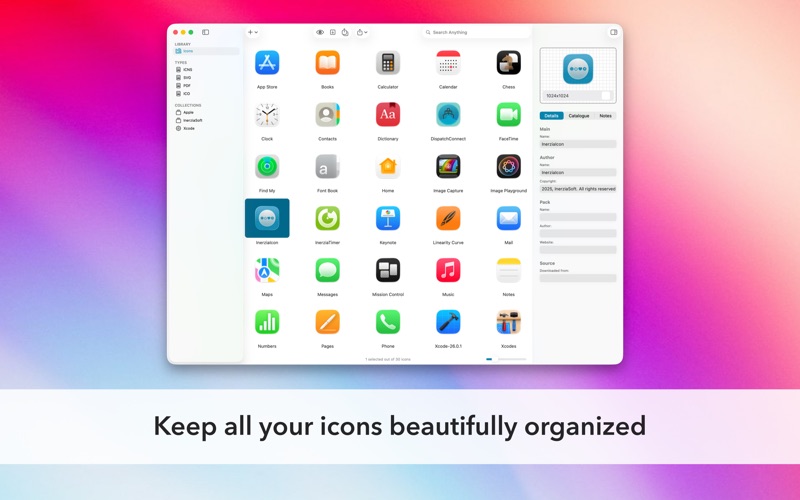
Bring personality to your Mac with InerziaIcon, the easy, all-in-one way to organize, customize, and enjoy your favorite icons.
Make your desktop yours! InerziaIcon lets you discover, collect, and manage all kinds of icon files. No experience needed!
What You Can Do
• Instantly organize ICNS, ICO, SVG, and PDF icon files
• Import icons from anywhere: apps, folders, or your Mac’s volumes
• Add tags and search to find the perfect icon in seconds
• Group your icons in neat Collections to keep things fun and tidy
• Sort automatically with Smart Collections for effortless browsing
• Export your icons in lots of formats (PNG, JPEG, and more) and sizes—perfect for sharing or using in apps
• Use quick presets to get icons ready for Xcode and other projects
• Personalize folders and files on your Mac with your favorite icons
• Bring in iContainer files, keep all your icon details and tags
• Print your icons with a click: see them come to life!
And there’s always more coming to help you customize your Mac even further.
Simple, One-Time Upgrades (Feature Sets)
InerziaIcon is free to use and enjoy. Want more power? Upgrade with optional, one-time Feature Sets: no subscriptions, ever. Every Feature Set adds cool new abilities for life, and older purchases always stay unlocked. You’ll get future upgrades, fixes, and improvements with no extra fees.
Bought InerziaIcon before version 4? The first Feature Set is free! Thanks for your support!
Batch Export and SVG/PDF support are part of the “Unleash the Power” Feature Set, free for version-3-and-older users or available to purchase for everyone else.
Note: On some Macs, system security limits icon changes for certain files or folders.
Please print with care: think of the environment!
Quoi de neuf dans la dernière version ?
Thank you for using InerziaIcon! This update includes several bug fixes to improve stability and reliability.
Continue reading for the full list of changes.
Note
• This version performs a lightweight migration of some internal attributes of the InerziaIcon library on launch. If you encounter any issues, please contact the InerziaSoft Support Center.
Bugs Fixed
• Fixed a crash when searching icons in libraries that use specific formatting in the Notes field.
• Fixed an issue where all icons became unusable after moving the library to a different drive or computer.
• Fixed an issue preventing export of 1024×1024 icons.
• Fixed an issue where toolbar configuration changes were not saved after restarting the app.