iPhoneAddict Apps
  • Actualités
  • Accueil Apps
  • iPhone
  • iPad
  • Universelles
  • Mac
  • Apple TV
KG KultureGeek
App
iPhone / iPad Télécharger iAddict v5 Mac Télécharger iAddict Mac
  • Actualités
  • Accueil Apps
  • iPhone
  • iPad
  • Universelles
  • Mac
  • Apple TV
  • Archives keynotes
  • Firmwares & iTunes
  • Contactez-nous
  • Comparateur de prix
  • KultureGeek
Accueil » Liste des Apps » Apps Mac » Graphisme et design » PhotosBlender - Image Blending
2.0.4 macOS €22,99€ Limit Point Software 0 0 PhotosBlender is an app for combining photos horizontally, vertically or square using gradient blending at the seams where they are joined. PhotosBlender has an iOS companion, Photo Blender: https://apps.apple.com/us/app/photo-blender/id561886395 ...
PhotosBlender - Image Blending

PhotosBlender - Image Blending

macOS / Graphisme et design

22,99€ au lieu de 23,99€
Acheter sur l'App Store
Facebook X E-mail

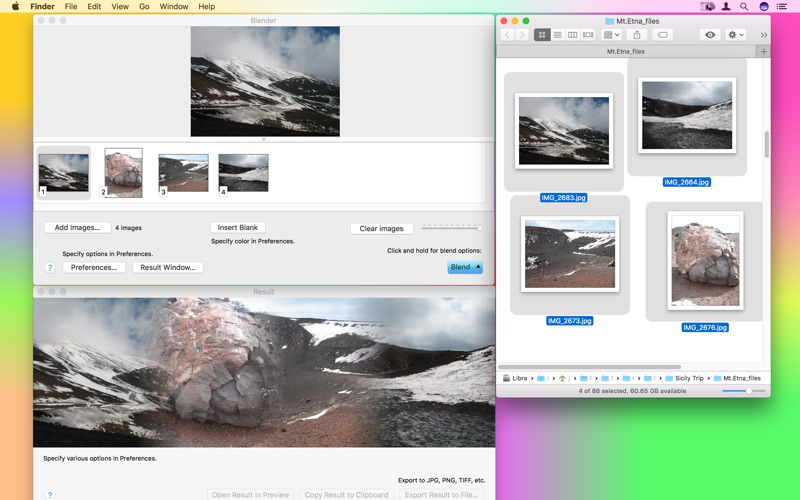
PhotosBlender is an app for combining photos horizontally, vertically or square using gradient blending at the seams where they are joined.

PhotosBlender has an iOS companion, Photo Blender:

https://apps.apple.com/us/app/photo-blender/id561886395

What can PhotosBlender do for me?

• Blends photos to create photomontages.

• Blends vertically (up or down), horizontally (left or right) or perfect squares.

• Blend your blends to create arrays of blended photos.

• Variable blending gradient or overlap.

It's easy to use:

1) Locate the files you want to blend in the Finder, Photos, or your web browser.

2) Drag the files you want to blend into the Blender window's "photo browser" at the bottom.

Drag and Drop the files in the browser to reorder - drag in between each other, or swap them - drag one on top of the other.

3) Photos are blended using a blending gradient. You can choose the width of this gradient in the Preferences window. Set it to 0 to simply abut them.

4) Use the "Blend" button in the lower right corner of the window to blend the photos.

If you quickly click the blend button the photos in the photo browser will be blended horizontally.

To obtain the menu for selection of the vertical or square blend option simply click down on the Blend button until it appears.

Square blends are for 4, 9 or 16 images, as 2x2, 3x3 or 4x4 arrays respectively.

5) When the blending is completed it will appear in the "Result" window.

If the result is not what you expected, double check that the size and resolution of the images are similar. PhotosBlender will "trim" the result to match the width and or height of the smallest photo.

If you want to create "arrays" of blended photos simply blend your photos horizontally first, saving each result, and then blend these results vertically.

Visit website to try a fully functional demo.

En voir plus...

Quoi de neuf dans la dernière version ?

New option to blend only selected images when more than one image is selected.

Also:
Fixed the appearance of image index labels for better visibility in dark appearance.
Fixed an issue where the displayed blend did not fit the result window properly.
Fixed an issue where saving vertical blends could be saved with the wrong orientation.

  • Screenshot #1 pour PhotosBlender - Image Blending
  • Screenshot #2 pour PhotosBlender - Image Blending
  • Screenshot #3 pour PhotosBlender - Image Blending

D'autres applications du développeur

Glow Draw.Glow Draw.iOS UniverselPhoto CropPhoto CropiOS UniverselNoSleepNoSleepmacOSFTPortalFTPortalmacOSnViewnViewmacOSGlow Paint.Glow Paint.iOS UniverselVoir toutes les apps

Note

(0 note)

Détails sur l'application

Version
2.0.4
Taille
5.2 Mo
Version minimum de macOS
10.14
Dernière mise à jour
27/06/2026
Publié par
Limit Point Software

Newsletter App Store

Recevez chaque jour les meilleures promos

Actualité Apple

Image Après le football et la F1, Apple TV veut diffuser du golf
Après le football et la F1, Apple TV veut diffuser du golf
Image iPhone pliable : « tout le monde » chez Apple l’appellent iPhone Ultra
iPhone pliable : « tout le monde » chez Apple l’appellent iPhone Ultra
Image iOS 27 : nouvelle bêta publique pour le firmware des AirPods
iOS 27 : nouvelle bêta publique pour le firmware des AirPods
Image Jennifer Bailey, responsable d’Apple Pay, va quitter Apple
Jennifer Bailey, responsable d’Apple Pay, va quitter Apple
iPhoneAddict Apps

Le catalogue iPhoneAddict pour suivre les nouveautés, mises à jour et baisses de prix de l’App Store.

Apps

Toutes les apps iOS iPhone iPad Universelles Mac Apple TV

iPhoneAddict

Actualité Apple Archives keynotes Contact À propos KultureGeek

Suivez-nous

©2009-2026 i2CMedia. Tous droits réservés.