iPhoneAddict Apps
  • Accueil Apps
  • iPhone
  • iPad
  • Universelles
  • Mac
  • Apple TV
KG KultureGeek
App
iPhone / iPad Télécharger iAddict v5 Mac Télécharger iAddict Mac
  • Accueil Apps
  • iPhone
  • iPad
  • Universelles
  • Mac
  • Apple TV
  • Actualité Apple
  • Archives keynotes
  • Firmwares & iTunes
  • Contactez-nous
  • Comparateur de prix
  • KultureGeek
Accueil » Liste des Apps » Apps Mac » Musique » NoSleep
1.1.8 macOS €9,99€ Limit Point Software 0 0 NoSleep is an application that you use to prevent your Mac from going to sleep. In 'no sleep' mode there is an option to also disable the screen saver. Note: 1) The purpose of NoSleep is to keep the Mac awake so you can read the screen while not...
NoSleep

NoSleep

macOS / Musique

9,99€ au lieu de 11,99€
Acheter sur l'App Store

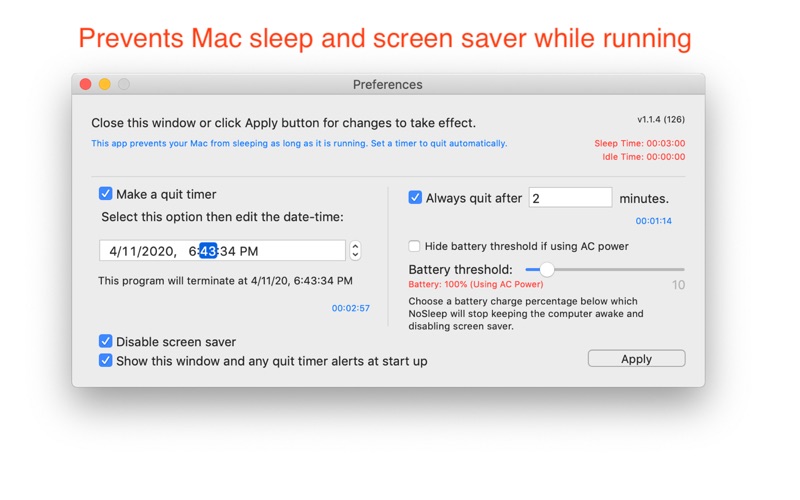
NoSleep is an application that you use to prevent your Mac from going to sleep.

In 'no sleep' mode there is an option to also disable the screen saver.

Note:

1) The purpose of NoSleep is to keep the Mac awake so you can read the screen while not otherwise actively using the Mac.

2) It is not a menubar app. It is a regular app that appears in the Dock.

3) Will not prevent a laptop from going to sleep if the cover is closed to prevent overheating issues.

Visit our website for other information and a demo.

This app was conceived for musicians who use their Macs to read music as they play their instrument and consequently do not want their Mac to go to sleep.

What can NoSleep do for me?

It keeps your Mac awake for a given period of time. NoSleep updates system activity periodically as soon as it launches, until it is quit, or, for laptops, the battery charge level drops below a specified amount (which defaults to 10%)

As soon as you launch NoSleep it prevents your Mac from sleeping until quit, or the battery charge level drops below a specified amount . You can schedule the time it quits so that you can leave it unattended. Do this in Preferences.

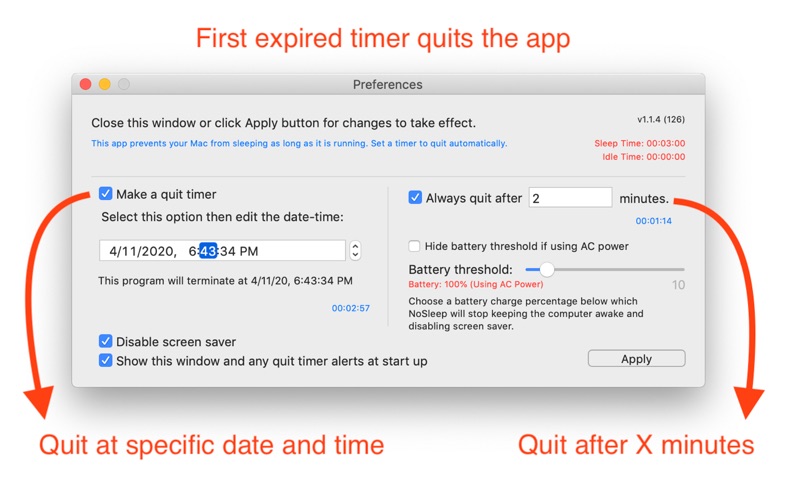
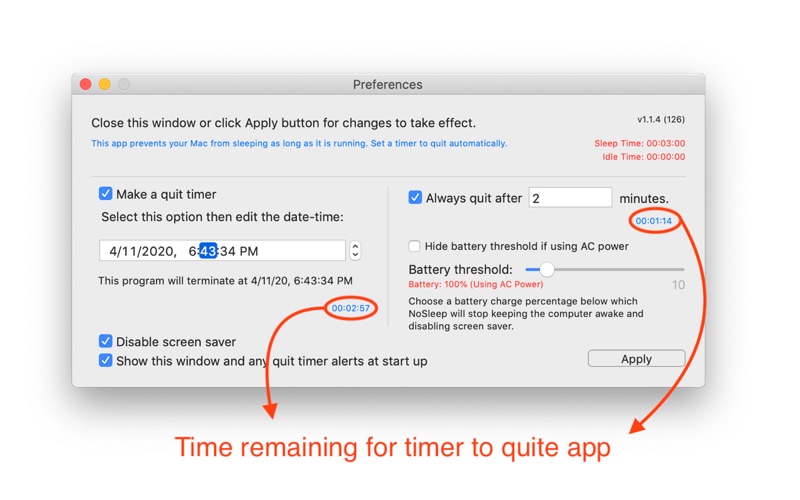
Preferences Window:

Use the Preference pane to specify quit time.

Also use the text field on the preferences window for creating a timer to quit the app at a time you can specify as a (fractional) number of minutes. The timer is created as soon as editing stops in the text field, say by tabbing out of it, and each edit resets the timer. If the value of the text field is zero no such timer is created, and any previous such timer will be removed.

Finally, in preferences you can specify a battery threshold so that NoSleep stops keeping the Mac awake at a certain level. This helps prevent the Mac from running out of energy when unplugged.

En voir plus...

Quoi de neuf dans la dernière version ?

Maintenance update.
  • Screenshot #1 pour NoSleep
  • Screenshot #2 pour NoSleep
  • Screenshot #3 pour NoSleep

D'autres applications du développeur

Glow Draw.
Glow Draw.
/ iOS Universel
Photo Crop
Photo Crop
/ iOS Universel
FTPortal
FTPortal
/ macOS
nView
nView
/ macOS
Glow Paint.
Glow Paint.
/ iOS Universel
Photo Cube - Animated Art
/ iOS Universel
Voir toutes les apps

Note

(0 note)

Détails sur l'application

Version
1.1.8
Taille
4.2 Mo
Version minimum de macOS
10.13
Dernière mise à jour
23/05/2023
Publié par
Limit Point Software

Newsletter App Store

Recevez chaque jour les meilleures promos

Actualité Apple

Image Résultats Apple T3 2026 : l’iPhone progresse, record du chiffre d’affaires
Résultats Apple T3 2026 : l’iPhone progresse, record du chiffre d’affaires
Image Séisme au Japon : Apple va faire un don aux secours
Séisme au Japon : Apple va faire un don aux secours
Image Les résultats financiers d’Apple aujourd’hui seront les derniers pour Tim Cook
Les résultats financiers d’Apple aujourd’hui seront les derniers pour Tim Cook
Image Ventes d’iPhone : Apple réalise son deuxième trimestre historique
Ventes d’iPhone : Apple réalise son deuxième trimestre historique
iPhoneAddict Apps

Le catalogue iPhoneAddict pour suivre les nouveautés, mises à jour et baisses de prix de l’App Store.

Apps

Toutes les apps iOS iPhone iPad Universelles Mac Apple TV

iPhoneAddict

Actualité Apple Archives keynotes Contact À propos KultureGeek

Suivez-nous

©2009-2026 i2CMedia. Tous droits réservés.