Netmo - The Netatmo Client
macOS / Météo
Keep your home climate and weather data in view – discreet, precise, and lightning-fast.
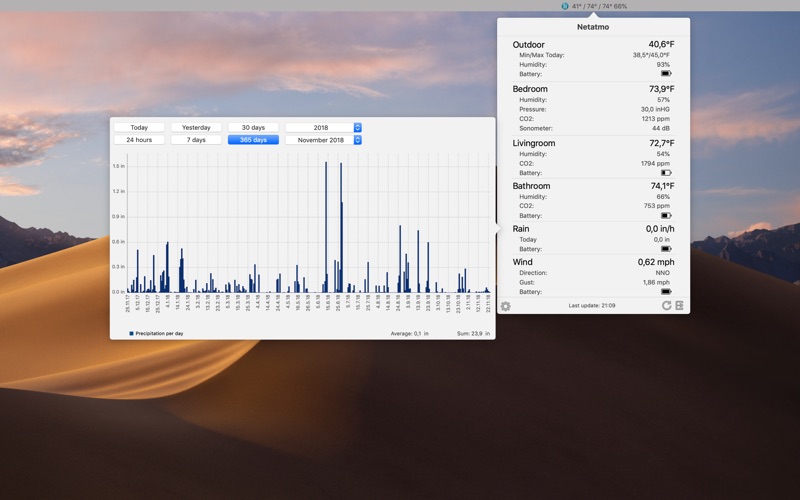
Netmo brings your Netatmo weather station data directly to your macOS Menu Bar. No need for browser tabs or checking your smartphone: a single click provides detailed insights into your home or garden.
Highlights:
- All-in-one View: Support for up to 6 stations, including all additional modules (Rain Gauge, Anemometer, and up to three extra Indoor Modules).
- Visualized Trends: Analyze temperature, air pressure, CO2, rainfall, or wind speed with elegant, interactive charts.
- Seamless Design: A minimalist interface that fits perfectly into the macOS look – including full Dark Mode support.
- Maximum Control: Conveniently export your data as a CSV file for further analysis.
Detailed Features:
- Display of temperature, humidity, air pressure, CO2, and noise levels.
- Precise data for rainfall, wind strength, and wind direction.
- Battery Status: Never miss a battery change for your modules again.
- Customizable: Choose exactly which values appear directly in your Menu Bar.
- Localized in English, German, and French.
IMPORTANT: Netmo is a Menu Bar app.
After launching, you won't see a standard window or dock symbol. Instead, look for the small Netmo icon in the top-right corner of your macOS Menu Bar (next to the clock and Wi-Fi). Click it to access your data!
Please note:
- A Netatmo account and weather station are required for this app to function.
Quoi de neuf dans la dernière version ?
- Streamlined Login: The authorization window now automatically appears on startup if you aren't already logged in, making the initial setup much smoother.
- Updated German Localization
- Improved Auth Workflow: Clicking the "Authorize" button now automatically closes the app panel as it redirects you to the Safari authentication window, reducing screen clutter.
- Stability improvements and bugfixes