AudioCraft - Convert & Cut
macOS / Musique
Convert any audio. Cut it like a pro. All in one beautifully simple Mac app.
AudioCraft brings together a lightning-fast batch audio converter and a precision waveform cutter — the two tools every music lover, podcaster, and audio tinkerer reaches for most. No clutter, no learning curve, just drag, drop, done.
FREE BATCH CONVERTER — NO LIMITS
The converter is completely free. Convert one file or a hundred in a single pass.
• Reads virtually everything: MP3, AAC, M4A, WAV, AIFF, FLAC, OGG, Opus, WMA, APE, AC3, DTS, AMR, and audio from MP4, QuickTime, and MKV videos
• Exports to 9 popular formats: MP3, M4A (AAC & Apple Lossless), WAV, AIFF, FLAC, MP2, OGG, Opus, and Matroska Audio
• Full control when you want it: codec, bitrate, CBR/VBR, sample rate up to 96 kHz, channel layout from mono to 7.1
• Smart defaults when you don't — pick a format and go
• Per-file overrides: give each file its own format and output name
• Import from Finder, drag & drop, or straight from your Music library
• Clear progress for every file, with one-click reveal in Finder when done
Whether you're freeing a FLAC collection for your car stereo, shrinking WAV recordings into podcast-ready MP3s, or pulling audio out of videos, AudioCraft handles it in seconds — powered by an industry-standard encoding engine trusted by professionals.
PRECISION AUDIO CUTTER
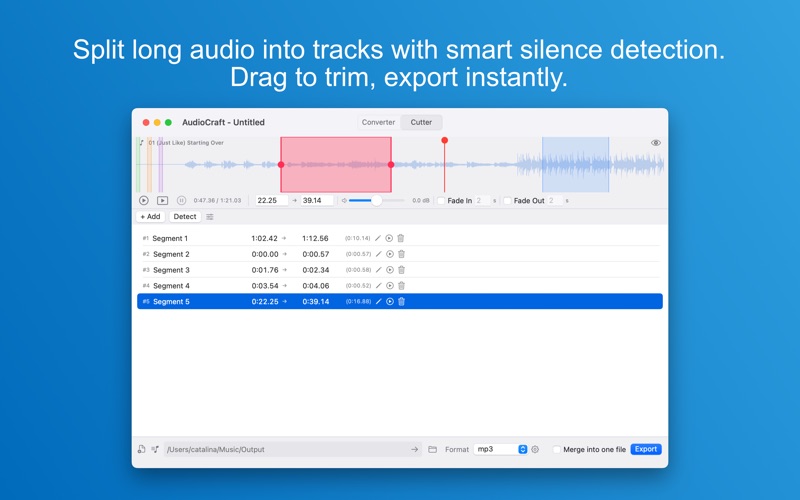
Load a track and see it. AudioCraft draws a crisp waveform so you can cut exactly where the sound is — not where you guess it is.
• Slice one long recording into perfectly trimmed segments
• Automatic silence detection finds the natural gaps for you — tune the threshold and minimum duration to match your material
• Drag segment edges directly on the waveform, or type exact times for frame-accurate cuts
• Per-segment volume (0–200%) with live dB readout
• Smooth fade-in and fade-out with adjustable duration
• Preview any segment with its effects applied before you commit
• Export each segment as its own file, or merge them all into one — in any order you choose
• Save your work as a project file and pick up right where you left off
Rip a live concert into individual songs. Trim the dead air from an interview. Cut voice memos into clean clips. What used to take an evening in a complex audio editor now takes minutes.
WHY AUDIOCRAFT?
• Native Mac app — fast, lightweight, and at home on macOS
• Drag & drop everything, including project files
• Non-destructive: your original files are never touched
• Batch-first design: set it up once, apply to all
• Built-in log viewer when you want to see exactly what happened
FREE VS. PREMIUM
The full batch converter is free forever — no watermarks, no file limits, no nags. The Cutter's editing tools are free to explore; exporting your cuts requires an AudioCraft Premium membership, available as a monthly or yearly subscription. Cancel anytime in your App Store settings.
Download AudioCraft today and take control of your audio — convert it, cut it, keep it exactly the way you want it.
--------------------------------------------------------
Terms & Conditions: https://getseasoft.com/legal/terms-of-service
Private: https://getseasoft.com/legal/privacy-policy
Subscriptions renew automatically unless canceled at least 24 hours before the end of the current period. Payment is charged to your Apple ID account. Manage or cancel anytime in App Store account settings.
Quoi de neuf dans la dernière version ?
-Fixed some bugs