• KultureGeek
  • Comparateur de prix
       
iPhoneAddict
 iAddictv5Notre Application iPhone/iPad
  • Accueil Apps
  • Actualité Apple
  • Keynote Apple
  • Firmwares & iTunes
  • Contactez-nous
Accueil » Liste des Apps » Apps Mac » Musique » PlayBacker
3.1.5 macOS €24,99€ INTEGRAL SOUND DESIGN 0 0 The advanced audio file player application equipped 4 decks & 16 pads sampler. Each individual 4 deck has basic functions such as ‘Auto Pause’ and ‘Repeat’ which are essential for play backing on stage performances, as well as advanced...
PlayBacker

PlayBacker

macOS / Musique

24,99€ au lieu de 25,99€
Acheter sur l'App Store

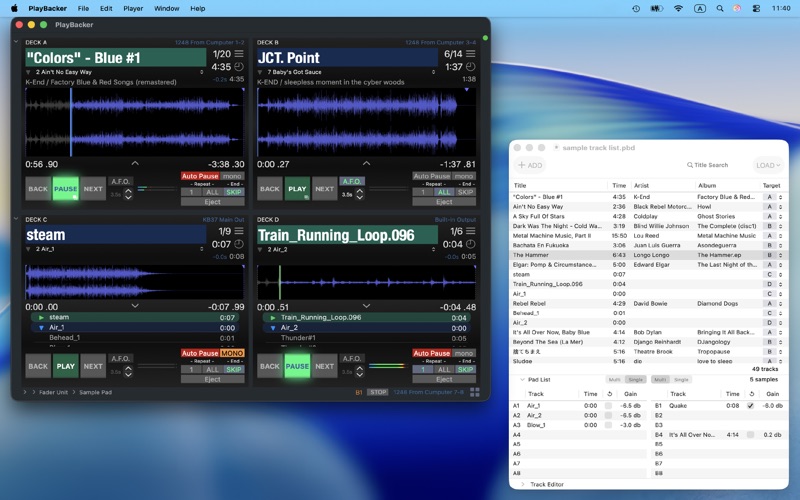
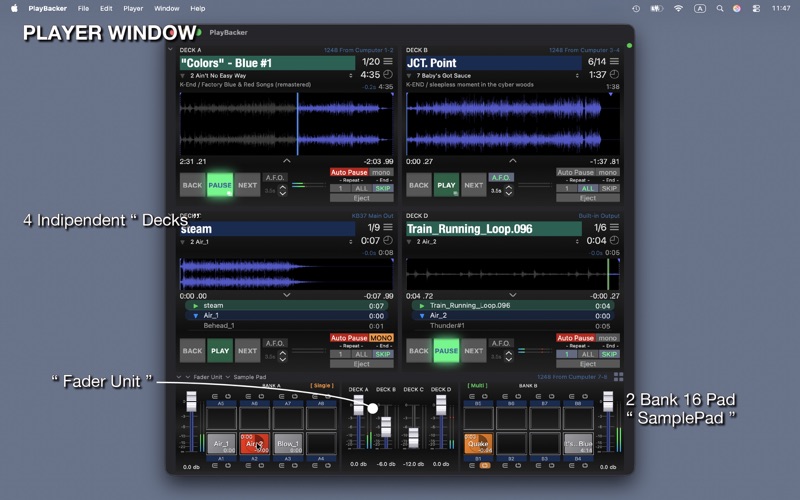
The advanced audio file player application equipped 4 decks & 16 pads sampler.

Each individual 4 deck has basic functions such as ‘Auto Pause’ and ‘Repeat’ which are essential for play backing on stage performances, as well as advanced features like ‘Auto Cue Search’, ‘Skip End’ and ‘Auto Fadeout’ those will help users to focusing their operations.
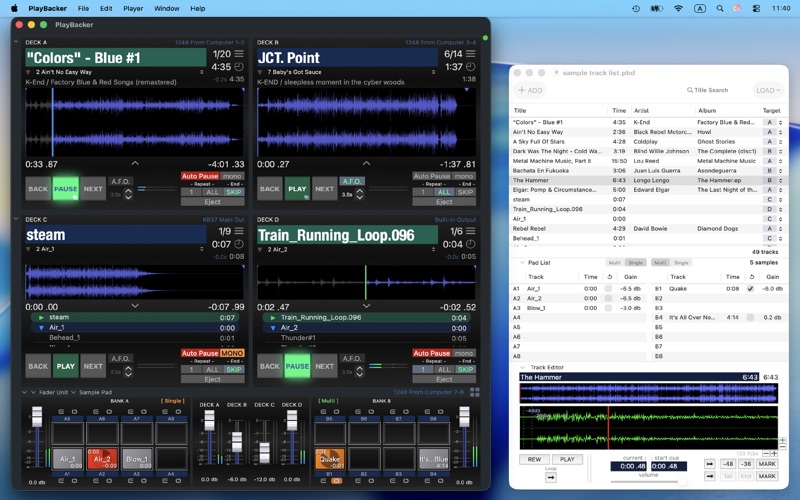
The SamplePad has total 16 pads for play ( 2 Bank / each 8 Pads ). Each pad has 2 play mode of ‘SHOT’ and ‘LOOP’, these can respond flexibly against on demanded operations.
Every playback equipments on PlayBacker can be assigned output route and channels independently, and can accept user customization of keyboard shortcut or MIDI message assigning against some main features.
‘TrackList Document’ holds all informations about a sequence, users can prepare operation quickly anytime by open stored document. In addition by built in ’Track Editor’, users can put detailed editing of custom cue points or gain etc on tracks.

PlayBacker will perfectly supports user’s audio playback works from preparation to production.

※) This application not support for playing DRM protected audio files.


# MAIN FEATURES

■ Each equipment can set output route and channels independently
■ Start Cue / End Cue customizable
■ Auto Cue Search feature
■ Keyboard shortcut customizable
■ MIDI controls available
■ Fader Unit

# DECK

■ 4 deck / 2 deck changeable
■ Auto Pause : pauses at the track’s head
■ Skip End : finish playing at the last audible frame
■ Repeat 1 ( manual / auto ) / All
■ Auto Fadeout
■ Cueing enabled waveform view
■ CueList Mode
■ Counter Mode

# SAMPLE PAD

■ 2 bank / each 8 pads ( total 16 pads )
■ Bank Play Mode ( Single / Multi )
■ Pad Play Mode ( Shot / Loop )
■ Snapshot store enabled
■ Volume Fader for each bank

# TRACK LIST DOCUMENT

■ Managing all tracks of a sequence
■ Editing track’s properties
■ Track Editor : modifies cues, gain and play mode

En voir plus...

Quoi de neuf dans la dernière version ?

Update for Optimizing to new macOS 26 Tahoe and Liquid Grass interface.

■ Deck :
‘Current Track Selector’ has moved to “Play / Pause Button” from Next button. The change has done for increasing consistency of playback operation.
To show ‘Current Track Selector’ : long press the Play/Pause button while ‘having selector mark’ appears. This feature will be enabled while deck’s cue list is not visible.
A user selected track will be loaded immediately.

■ Track Editor ( in trackList window ) :
‘move to start cue button’ and ‘move to end cue button’ have added at cue position setting buttons area ( right bottom part of view ).

■ MIDI features update :
- Bug Fix : An issue the app became not able to receive MIDI messages when Preferences window has closed by ‘Cancel’ operation was solved.

- Bug Fix : An issue when using some MIDI devices having multi Port - the app may receive repetition MIDI messages was solved.

- Change : related with bug fix mentioned above, the app will be connected only with a ‘Main Port’ of external device.
The ‘Main Port’ will be confirmed in ‘Audio MIDI Setting.app’. ‘Main Port’ will be shown at the top of the list of device’s port list.
There will be no effects from this change if you had been using any external devices with no problem.

- Added : MIDI Device Selector
User can choose specific device receiving MIDI messages only from it.

- Added : MIDI Trigger Bank Selector
User can store 3 MIDI trigger map and switch them depending on playback situation.

  • Screenshot #1 pour PlayBacker
  • Screenshot #2 pour PlayBacker
  • Screenshot #3 pour PlayBacker

D'autres applications du développeur

PlayBacker lite
PlayBacker lite
/ macOS
PlayBacker for iPad
PlayBacker for iPad
/ iPhone
PlayBacker for iPhone
/ iPhone

Note

(0 note)

Détails sur l'application

Version
3.1.5
Taille
15.4 Mo
Version minimum de macOS
10.13
Dernière mise à jour
20/01/2026
Publié par
INTEGRAL SOUND DESIGN

Newsletter App Store

Recevez chaque jour les meilleures promos

Actualité Apple

Image iOS 16.7.14 est disponible avec macOS 11.7.11, watchOS 10.6.2 et watchOS 9.6.4
iOS 16.7.14 est disponible avec macOS 11.7.11, watchOS 10.6.2 et watchOS 9.6.4
Image iPhone 18 plus cher ? Une incertitude avec le prix de la RAM en hausse
iPhone 18 plus cher ? Une incertitude avec le prix de la RAM en hausse
Image iPhone pliable : de nouveaux détails dévoilent le design général
iPhone pliable : de nouveaux détails dévoilent le design général
Image L’iPhone 17 Pro va détecter les hors-jeu dans le championnat brésilien de Foot
L’iPhone 17 Pro va détecter les hors-jeu dans le championnat brésilien de Foot
Partenaires : Actualité iPhone - Culture Geek
©2009-2026 i2CMedia | A propos |