To FLAC Converter
macOS / Musique
'To FLAC Converter' rips CDs easily and quickly. It also converts video and audio formats*, including AIFF, WAV, MP3, M4A, and AAC, to lossless FLAC format.
Download 'To FLAC Converter' to quickly get lossless copies of CD albums, iTunes playlists, high-quality audio, music videos, and others thanks to:
• Automatic music organizer;
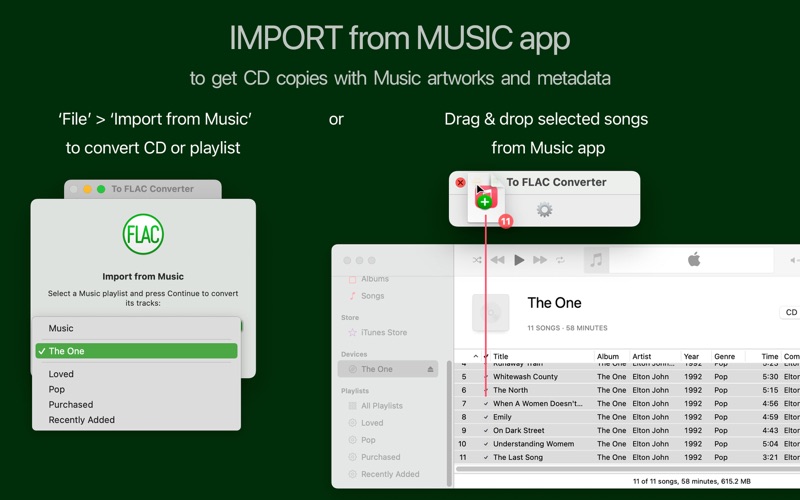
• Export from the Apple Music app or iTunes;
• Automatic volume adjusting and silence cutting;
• CUE splitter;
• Web parser and downloader;
• Fully customizable settings;
• True batch processing.
The trial version is available at amvidia.com/to-flac-converter.
INPUT FORMATS
'To FLAC Converter' imports and converts more than 200 audio and video formats, including, but not limited to, CD, DVD, AIFF, WAV, MP3, M4A, AAC, MP4, VID, FLV, WMA, AVI, MPG, ASF, MPEG, MPE, MOV, 3GP, M4V, MKV, MOD, OGM, and CAF. In addition, the converter can parse and download non-copyrighted audio and video files from the web.
LOSSLESS CD RIPPER
Get precise and organized FLAC copies of CD albums. 'To FLAC Converter' can import CDs with metadata from Apple's Music or iTunes and download corresponding Album Artworks.
Alternatively, to search and download album artwork and music metadata, enable the 'Load missing tags and artworks from network' option in Settings.
We recommend disabling volume adjustment and fade audio effects in Settings / Effects to avoid changing the original sound in lossless files.
BATCH CONVERSION
'To FLAC Converter' allows you to convert an unlimited number of files and folders in one click and supports multiple conversions simultaneously. Furthermore, it can rename and organize FLACs into folders and playlists according to the audio metadata.
EASY TO USE
Drop or paste files, folders, CUE sheets, or web page links into the app to start conversion. 'To FLAC Converter' will estimate conversion time and provide progress details for every source file.
AUTOMATIC OUTPUT SETTINGS
'To FLAC Converter' can estimate Bit Depth and Channels to apply optimal format settings to output FLACs automatically. As a result, it guarantees the best possible sound quality and saves your time and hard drive space.
Or you can set particular Bit Depth, Channels, and Compression level in Settings / Format.
SOUND QUALITY
You can customize audio effects to improve output sound quality:
• Adjust the volume of quiet tracks.
• Trim silence.
• Apply fade-in and fade-out effects for smooth playback.
TAGGING ON THE FLY
'To FLAC Converter' transfers all tags from source files by default. It also retrieves missing audio metadata from file and folder names and converts images from local folders into album artworks.
If you would like to organize converted music more sophisticatedly, or if you rip an album CD, we recommend enabling the option 'Load tags and artworks from network' in Settings / Tags. 'To FLAC Converter' will identify songs by their 'fingerprints' and search for missing album covers and song metadata in online databases, such as MusicBrainz, AcoustID, and CoverArt.
CUE SPLITTER
'To FLAC Converter' can split music albums and DJ sets into separate tracks and import tags from a CUE file. To split the audio, drop the whole folder or the CUE file into the app.
PERFORMANCE AND STABILITY
'To FLAC Converter' fully utilizes all CPU cores. Encoding in separate processes makes it reliable and 'crash-free.'
CUSTOMERS SUPPORT
Please email support@amvidia.com with any problems or feature requests.
*Note: DRM-protected audio files (M4P-protected AAC audio files) cannot be converted.
Quoi de neuf dans la dernière version ?
• Enhanced support and fixes for macOS Sequoia.
• Improved tag handling when loading from network services.
• Optimized artwork loading from local folders.
• Various minor bug fixes and overall improvements.