To M4A Converter
macOS / Musique
To M4A Converter converts audio and video to iTunes-friendly M4A or MP4 audio files. Customizable AAC or ALAC (Apple Lossless Audio) codec, together with export in iTunes, ensure quality and fast conversion of music to your iTunes playlists.
The trial version is available at amvidia.com/to-m4a-converter .
Advanced features, like sound enhancement, audio effects, music organizing, CUE splitter, and batch processing will allow converting your favorite media such as music, podcasts, video records to quality M4A or MP4 audio.
INPUT FORMATS
To M4A Converter accepts more than 200 audio and video formats, including but not limited to MP3, MP4, VID, FLAC, FLV, WMA, WAV, AVI, MPG, ASF, MPEG, MPE, MOV, 3GP, M4V, MKV, MOD, OGM, CAF. Please, note: the application does not facilitate downloads from media sharing services, such as YouTube or Vimeo.
BATCH CONVERSION
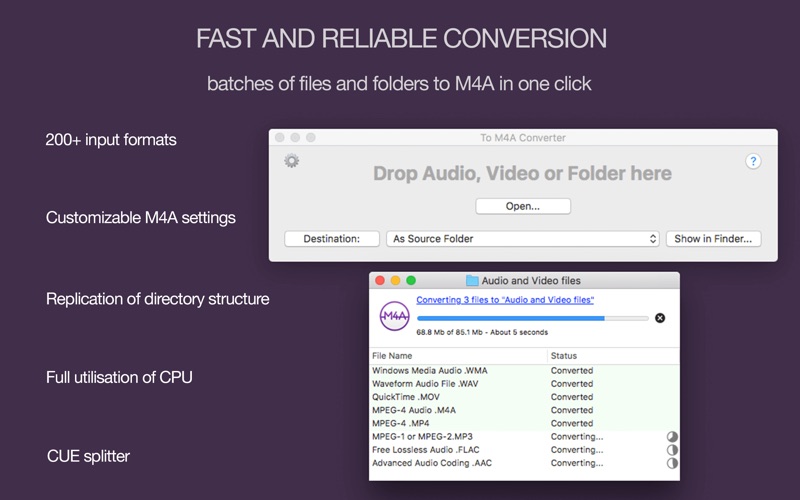
To M4A Converter allows to convert the unlimited number of files and folders in one click, and supports multiple conversions simultaneously. If you convert a batch of folders, To M4A Converter will replicate the structure of source folders. It is especially convenient if you need to encode the entire music collection to M4A.
EASY TO USE
To start the conversion, just drop files or folders to the app’s window or icon. To M4A Converter will estimate conversion time, and provide details of the conversion of every source file. You will be informed when the conversion of all files is finished.
AUTOMATIC OUTPUT SETTINGS
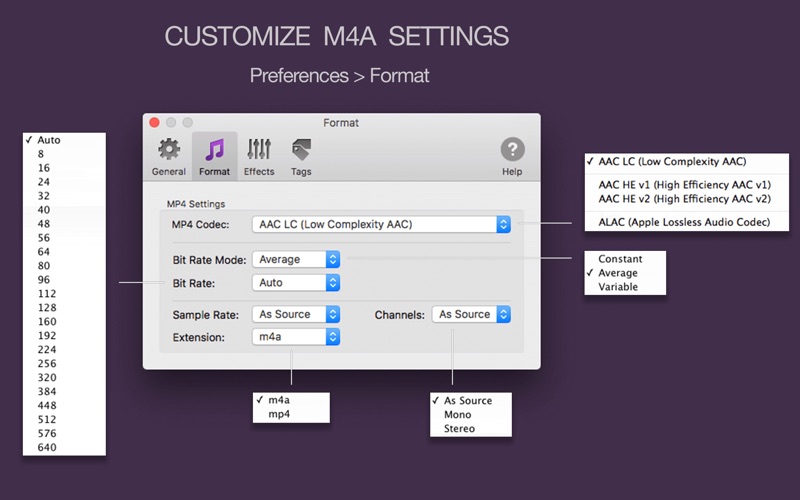
To M4A Converter estimates Bit Rate, Sample Rate, and Channels automatically, and applies optimal settings for AAC or ALAC codecs. It guarantees the best possible sound quality, saves your time and hard drive space.
If you would like to convert to a particular Bit Rate, Sample Rate, Channels, etc., just change Format settings in the Preferences.
SOUND QUALITY
You can customize audio effects to improve the quality of output sound: adjust the volume of quiet tracks, trim silence, and apply fade in and fade out effects for smooth playback.
TAGGING ON THE FLY
By default, To M4A Converter transfers all tags from source files and creates missing tags and artworks based on filenames, paths, and images in local folders.
If you would like to organize converted music in a more sophisticated way, or if you convert songs from a CD, we recommend enabling the option ‘Load tags and artworks from network’ in Preferences. To M4A Converter will identify songs by their “fingerprints”, and search correct tags for those songs in online databases, such as MusicBrainz, AcoustID, and CoverArt.
CUE SPLITTER
To M4A Converter can split music albums and DJ sets to separate tracks and import tags from the CUE file. To split audio with a CUE file, drop the whole folder or just the CUE file to the app.
INTEGRATION WITH ITUNES
To M4A Converter allows exporting converted tracks to new or existing iTunes playlists by the quick and easy way.
EXTRACT ALL AUDIO TRACKS FROM A VIDEO
Sometimes movies contain a few audio tracks - such as multi-language tracks, or soundtracks for different playback devices. To M4A Converter extracts all soundtracks from videos so that you can choose the most suitable one at the end of conversion.
PERFORMANCE AND STABILITY
To M4A Converter fully utilizes all CPU cores. Encoding in separate processes makes it reliable and “crash-free”.
CUSTOMERS SUPPORT
Please, email to support@amvidia.com about any problems or feature requests. We always glad to improve our applications for you. If you like “To M4A Converter”, a review at the App Store would be very appreciated.
Quoi de neuf dans la dernière version ?
Improvements
• Support of VOC/RCA source audio files.
• Better support for various input formats.
• More precise loading of tags from paths.
• Quicker and more precise loading of tags from network services.
• Fixes for the user interface and usability.
Compatibility with macOS 10.15 Catalina
• Support for macOS 10.15 Catalina.
• Improvements for the 'Grant Access' dialog.
• Fixes and improvements for export to iTunes and Apple Music.