
iPhoneAddict Apps
  • Actualités
  • Accueil Apps
  • iPhone
  • iPad
  • Universelles
  • Mac
  • Apple TV
KG KultureGeek
App
iPhone / iPad Télécharger iAddict v5 Mac Télécharger iAddict Mac
  • Actualités
  • Accueil Apps
  • iPhone
  • iPad
  • Universelles
  • Mac
  • Apple TV
  • Archives keynotes
  • Firmwares & iTunes
  • Contactez-nous
  • Comparateur de prix
  • KultureGeek
Accueil » Liste des Apps » Apps Mac » Photo et vidéo » MovieCaptioner
L'application n'est plus disponible sur l'App Store français
6.65 macOS €99,99€ Synchrimedia 0 0 MovieCaptioner is the easiest way to create captions and transcripts for your video. Once you load your movie and hit the Start button, it will loop through a few seconds of the movie while you type what you hear. When you hit the Return key, it...
MovieCaptioner

MovieCaptioner

macOS / Photo et vidéo

99,99€
Acheter sur l'App Store
Facebook X E-mail

MovieCaptioner is the easiest way to create captions and transcripts for your video. Once you load your movie and hit the Start button, it will loop through a few seconds of the movie while you type what you hear. When you hit the Return key, it records the caption and timecode and automatically moves on to the next few seconds, which helps you move through your captioning project quickly. It can also import text files if you already have transcripts, and can import many different formats of caption files. It can also export to many different formats such as SRT for YouTube, SCC (line 21) for broadcasting, iPods, iPhones, and iPads, JW Player, SUB, SAMI (for Windows Media), and can burn in open captions to a new movie so they will show up in all video players. It can also export transcripts in both text and HTML formats, and provides a means of converting SRT caption files to the newer MCC format for CEA-708 broadcast captions.

En voir plus...

Quoi de neuf dans la dernière version ?

• Preview window now includes the last caption that we set
• New 1-Minute Intervals transcript export option gives all captions in each minute of the video
• 59.94 and 60 frames per second export options available in Preferences window
• Bug fix: Larger/Smaller arrows that control screen space ratio between video and caption list were not visible with Catalina and newer OSX.
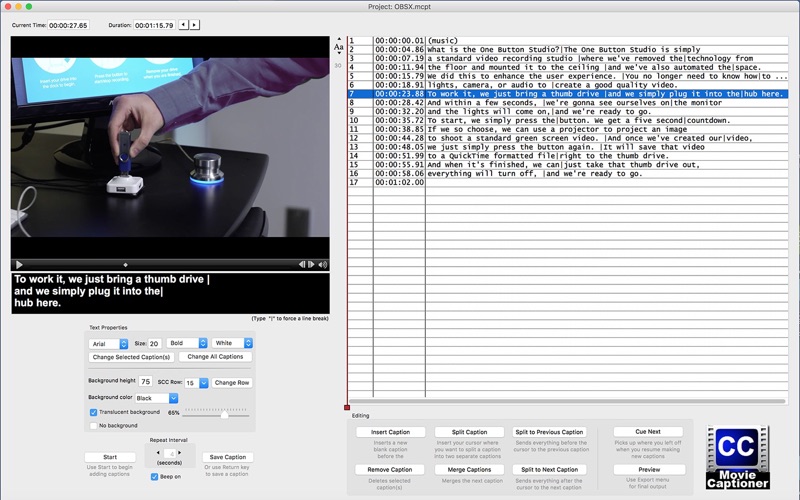
  • Screenshot #1 pour MovieCaptioner
  • Screenshot #2 pour MovieCaptioner

Note

(0 note)

Détails sur l'application

Version
6.65
Taille
21.8 Mo
Version minimum de macOS
10.9
Dernière mise à jour
12/12/2021
Publié par
Synchrimedia

Newsletter App Store

Recevez chaque jour les meilleures promos

Actualité Apple

Image Apple ouvre son Advanced Manufacturing Center à Houston
Apple ouvre son Advanced Manufacturing Center à Houston
Image Les Apple Watch continuent de largement dominer les ventes de montres connectées
Les Apple Watch continuent de largement dominer les ventes de montres connectées
Image App Store : Apple laisse passer des fraudes pour les applications
App Store : Apple laisse passer des fraudes pour les applications
Image iPhone 18 : 12 Go de RAM et Dynamic Island réduite ?
iPhone 18 : 12 Go de RAM et Dynamic Island réduite ?
iPhoneAddict Apps

Le catalogue iPhoneAddict pour suivre les nouveautés, mises à jour et baisses de prix de l’App Store.

Apps

Toutes les apps iOS iPhone iPad Universelles Mac Apple TV

iPhoneAddict

Actualité Apple Archives keynotes Contact À propos KultureGeek

Suivez-nous

©2009-2026 i2CMedia. Tous droits réservés.