inPixel Lite
macOS / Photo et vidéo
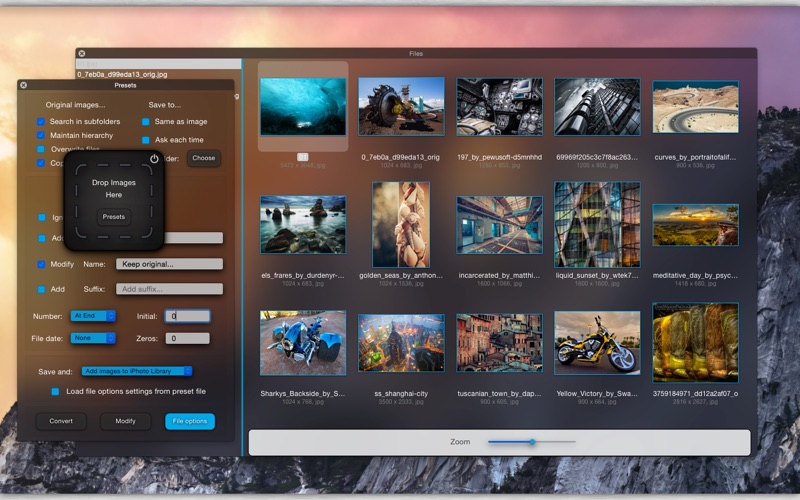
Convert, resize, transform, rename, add watermark, adjust, enhance, apply filters, effects, create icons and icon set, change color space... Batch process images, folders and multiple representations.
Create a preset and it's all done!. inPixel will always be next to your mouse, in background or in the menu bar ready to complete any kind of operation.
The Lite version has all the features of the paid version, except:
- You can save 1 preset.
- You can batch process up to 10 images.
Features:
-CONVERSION:
-Convert from dozens of image formats including RAW formats (CRW, CR2, CR3, NEF...), PDF, AI, PSD, EPS...
-Easily convert to JPG, PNG, HEIF, BMP, TIFF, GIF, PDF, ICNS, PSD.
-TIFF conversion and resize preserve all representations.
-GIF to GIF conversion and resize preserve all frames.
-Use the depth map with heif/heic images and apply filters to background and foreground separately.
-Adjust quality, compression and set depth (8/16/32 bits per channel).
-inPixel supports multiple resolutions and multiple representations.
-Simply select a Color Space and convert from/to Adobe RGB, RGB, sRGB, CMYK, CMYK with transparency, Gray, Gray Gamma 2.2... Preserve transparency in CMYKA Color Space with TIFF images.
-Create @2x Retina versions.
-Create a complete icon set for Xcode, 16x16, 32x32, 128x128, 256x256, 512x512 + @2x versions.
-Create a complete iOS icon set: iPhone, iPad, iPad Mini, Retina versions.
-Create icons with rounded corners and add shadow.
-Create high-resolution tiff files with multiple representations: one for low-resolution and one for high-resolution.
-Merge multiple files into one file that contains all representations.
-Easily convert to multilayered PSD: drag and drop multiple files and obtain layers ready for Photoshop.
-RESIZE AND TRANSFORM:
-Huge variety of resizing options:
-Scale, High-quality resampling, fit to width, fit to height, fit to rectangle, max size.
-Crop, stretch and crop.
-Rotate 90°, 180°, 270°, Free rotation, Specular, Flip.
-Set resolution and transparency.
-Add borders.
-Auto-Adjust images.
-Apply compositing filters: apply filters to images and select a composite operation, add a new image and adjust size and position.
-FILTERS AND FACE DETECTION:
-47 color filters that you can apply to images.
-Color controls, color correction, photo effects, color effects, HDR, blur, adjustments...
-Tiny planet filter.
-Adjust and customize filter parameters.
-Create a filter chain with three different filters.
-Search features in images: detect faces, pixelate, blur, vignette, enhance, red eyes.
-WATERMARK:
-Add text, add file date.
-Modify font, color, size, obliqueness, opacity.
-Set position and rotate.
-Add image.
-Control opacity, size, position and rotation.
-RENAME:
-Add prefix and/or add suffix.
-Change file name.
-Add date, rename with file date.
-Add numbers at start or at end.
-Add leading zeros.
-Import images, drag and drop to preview window and verify settings and filters.
-Browse images, select files that you want to process. You can use inPixel also as image viewer.
-Different sorting modes: by name, exif creation date, file creation date, file modification date, format, pixel size, file size.
-Batch processing with folders.
-Search in subfolders and maintain folder structure.
-You can hide inPixel and use "open with" to process images in background.
-Save to same folder, choose a folder and save settings to preset.
-Preserve image metadata, EXIF, IPTC...
-Share your images.
-Add images to Photos Library, open with Photoshop, Lightroom...
Please report bugs or send requests to quentin.apps14@gmail.com .
Quoi de neuf dans la dernière version ?
- Bug fixes.