• KultureGeek
  • Comparateur de prix
       
iPhoneAddict
 iAddictv5Notre Application iPhone/iPad
  • Accueil Apps
  • Actualité Apple
  • Keynote Apple
  • Firmwares & iTunes
  • Contactez-nous
Accueil » Liste des Apps » Apps Mac » Photo et vidéo » Photo Video - Photo Slideshow
L'application n'est plus disponible sur l'App Store français
3.2.7 macOS €Gratuit 桂平 彭 0 0 Add multiple music as background music . You can trim music and set fadein fadeout . Export slideshow to video, you can custom video format, frame rate , resolution and bit rate . If you want to adjust photos play order you can click “Photo...
Photo Video - Photo Slideshow

Photo Video - Photo Slideshow

macOS / Photo et vidéo

Gratuit
Obtenir sur l'App Store

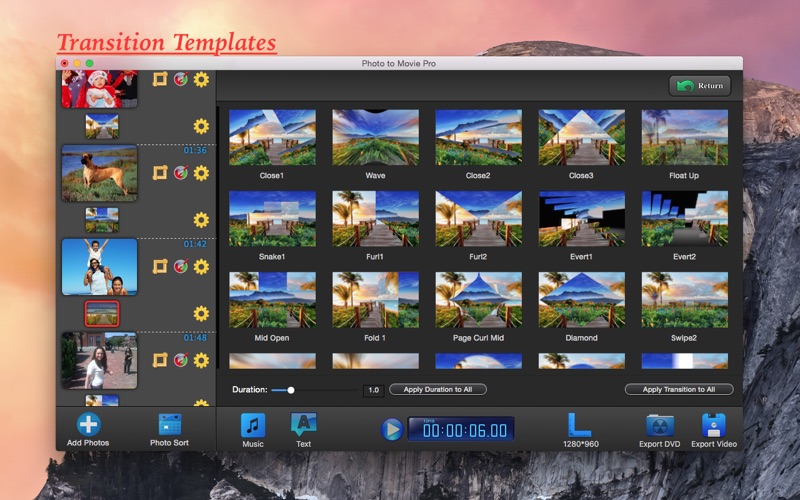
Add multiple music as background music . You can trim music and set fadein fadeout .

Export slideshow to video, you can custom video format, frame rate , resolution and bit rate .

If you want to adjust photos play order you can click “Photo Sort” button . It’s easy to adjust the play order here .

##### Main Function #####

1. Transformed photos to movie .
2. Can add multiple music as background music .
3. Use and save ken burns effect .
4. Photo edit ( Crop, Rotate, Effect ) .
5. Photo sort - adjust photos play order .
6. Custom photo show duration and transition duration .
7. Can apply your edit effect to all photos , save your time .
8. Export to video or DVD .
9. Add text on slideshow .

Note: If you have some problems,Please send an email to screenrecord@126.com I will solve these issues as quickly as possible.

En voir plus...

Quoi de neuf dans la dernière version ?

Resolved some bugs.

  • Screenshot #1 pour Photo Video - Photo Slideshow
  • Screenshot #2 pour Photo Video - Photo Slideshow
  • Screenshot #3 pour Photo Video - Photo Slideshow

Note

(0 note)

Détails sur l'application

Version
3.2.7
Taille
17.8 Mo
Version minimum de macOS
10.7
Dernière mise à jour
27/10/2017
Publié par
桂平 彭

Newsletter App Store

Recevez chaque jour les meilleures promos

Actualité Apple

Image iPhone 18, 18 Pro et Fold : 12 Go de RAM pour toute la gamme
iPhone 18, 18 Pro et Fold : 12 Go de RAM pour toute la gamme
Image iPhone 18 Pro : écran LTPO+ et Face ID sous l’écran au programme
iPhone 18 Pro : écran LTPO+ et Face ID sous l’écran au programme
Image Xenia, un émulateur de Xbox 360, débute sur Mac
Xenia, un émulateur de Xbox 360, débute sur Mac
Image Lisa : retour sur l’ordinateur qui a révolutionné l’informatique… avant d’être oublié
Lisa : retour sur l’ordinateur qui a révolutionné l’informatique… avant d’être oublié
Partenaires : Actualité iPhone - Culture Geek
©2009-2026 i2CMedia | A propos |