iPhoneAddict Apps
  • Actualités
  • Accueil Apps
  • iPhone
  • iPad
  • Universelles
  • Mac
  • Apple TV
KG KultureGeek
App
iPhone / iPad Télécharger iAddict v5 Mac Télécharger iAddict Mac
  • Actualités
  • Accueil Apps
  • iPhone
  • iPad
  • Universelles
  • Mac
  • Apple TV
  • Archives keynotes
  • Firmwares & iTunes
  • Contactez-nous
  • Comparateur de prix
  • KultureGeek
Accueil » Liste des Apps » Apps Mac » Photo et vidéo » Photo Perspective Editor
1.6.5 macOS €2,99€ 永亮 潘 0 0 Photo Perspective Editor is a professional correction software that automatically correct photos you’ve taken where the subject appears tilted or distorted. Simple operations can also get very professional effect. It straighten and adjust distorted...
Photo Perspective Editor

Photo Perspective Editor

macOS / Photo et vidéo

2,99€ au lieu de 3,99€
Acheter sur l'App Store
Facebook X E-mail

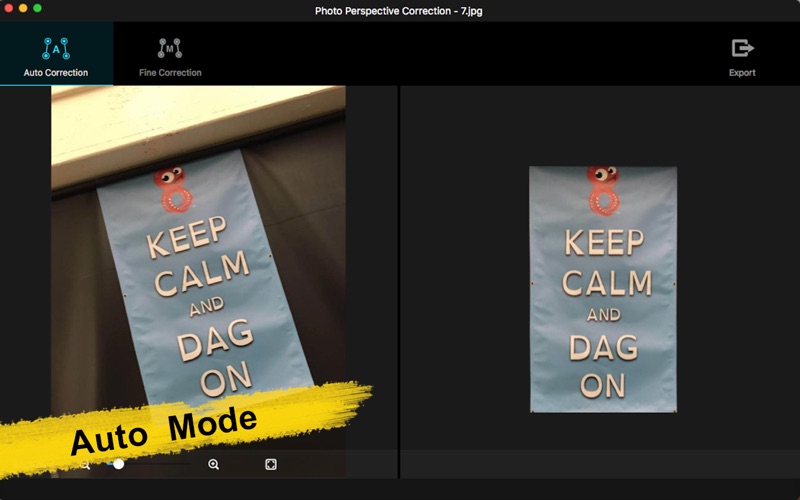
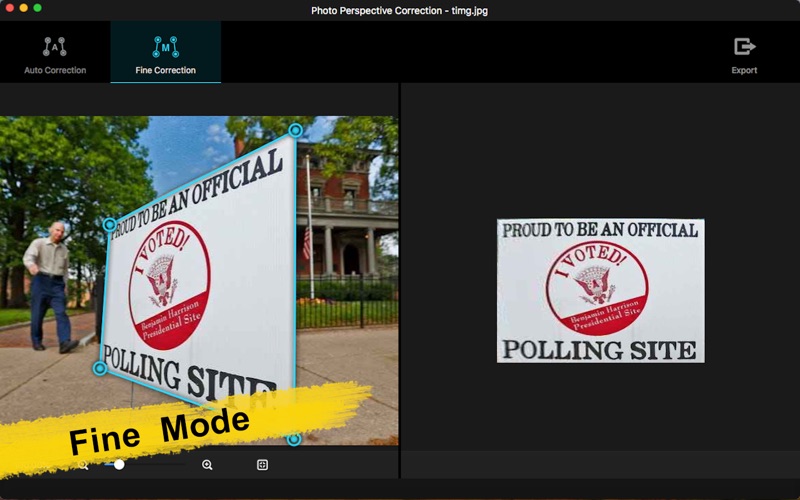
Photo Perspective Editor is a professional correction software that automatically correct photos you’ve taken where the subject appears tilted or distorted. Simple operations can also get very professional effect. It straighten and adjust distorted pictures; correct non-rectangular distorted pictures into rectangular images; it can also distort photos or graphics. There are two modes to fix distorted photos:Auto Correction mode and Fine Correction mode.

-Fix distorted problems in photos: such as distortion, imbalance, tilt,etc.
-Correct oblique objects in pictures;
-Straighten the horizon
-Straighten photos
-Correct images of 70+ formats

Photo Perspective Editor has two operating modes:Auto Correction mode and Fine Correction mode.

1.Auto Correction mode
The system automatically recognizes distorted pictures, automatically identifies and corrects the edges of pictures, and automatically corrects pictures. As long as you import the original picture, you can get professional repair results.
-Drag the picture directly into the software or onto the icon
-Automatically identify and correct complex perspective problems
-Automatic recognition and optimization to the maximum visible area
-Save the corrected pictures

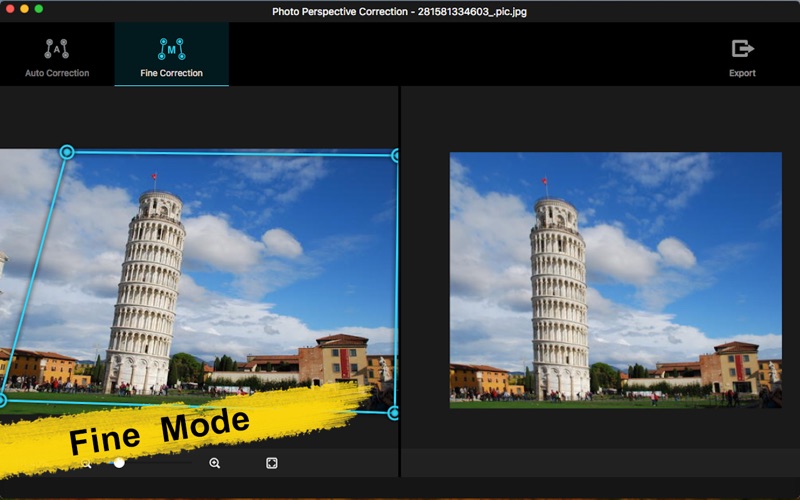
2. Fine Correction mode
In Fine Correction mode, you can adjust and repair the picture according to your tastes.
-Optimal control of double group adjustable quads
-Display correction results in real time
-Save the corrected pictures

Please send an email to ColorLemonStudio@yeah.net, if you have any problems.

En voir plus...

Quoi de neuf dans la dernière version ?

1 Fix a minor bug.
  • Screenshot #1 pour Photo Perspective Editor
  • Screenshot #2 pour Photo Perspective Editor
  • Screenshot #3 pour Photo Perspective Editor

D'autres applications du développeur

My Photo Collage -  MakerMy Photo Collage - MakermacOSPhoto Perspective Editor&MakerPhoto Perspective Editor&MakeriOS UniverselPhoto Perspective ProPhoto Perspective PromacOSPhoto Perspective ProPhoto Perspective ProiOS UniverselPhoto Sketch & Pencil SketcherPhoto Sketch & Pencil SketcheriOS UniverselPhoto Watercolorizer-editorPhoto Watercolorizer-editormacOSVoir toutes les apps

Note

(0 note)

Détails sur l'application

Version
1.6.5
Taille
37.1 Mo
Version minimum de macOS
10.13
Dernière mise à jour
14/10/2025
Publié par
永亮 潘

Newsletter App Store

Recevez chaque jour les meilleures promos

Actualité Apple

Image iOS 27 : un nouveau firmware bêta pour les AirPods
iOS 27 : un nouveau firmware bêta pour les AirPods
Image ChatGPT sur Mac peut répondre et analyser vos iMessages
ChatGPT sur Mac peut répondre et analyser vos iMessages
Image iOS 27 : des albums photos partagés en meilleure qualité qui occupent votre stockage iCloud
iOS 27 : des albums photos partagés en meilleure qualité qui occupent votre stockage iCloud
Image Des coques pour l’iPhone 18 Pro Max montrent plusieurs coloris
Des coques pour l’iPhone 18 Pro Max montrent plusieurs coloris
iPhoneAddict Apps

Le catalogue iPhoneAddict pour suivre les nouveautés, mises à jour et baisses de prix de l’App Store.

Apps

Toutes les apps iOS iPhone iPad Universelles Mac Apple TV

iPhoneAddict

Actualité Apple Archives keynotes Contact À propos KultureGeek

Suivez-nous

©2009-2026 i2CMedia. Tous droits réservés.